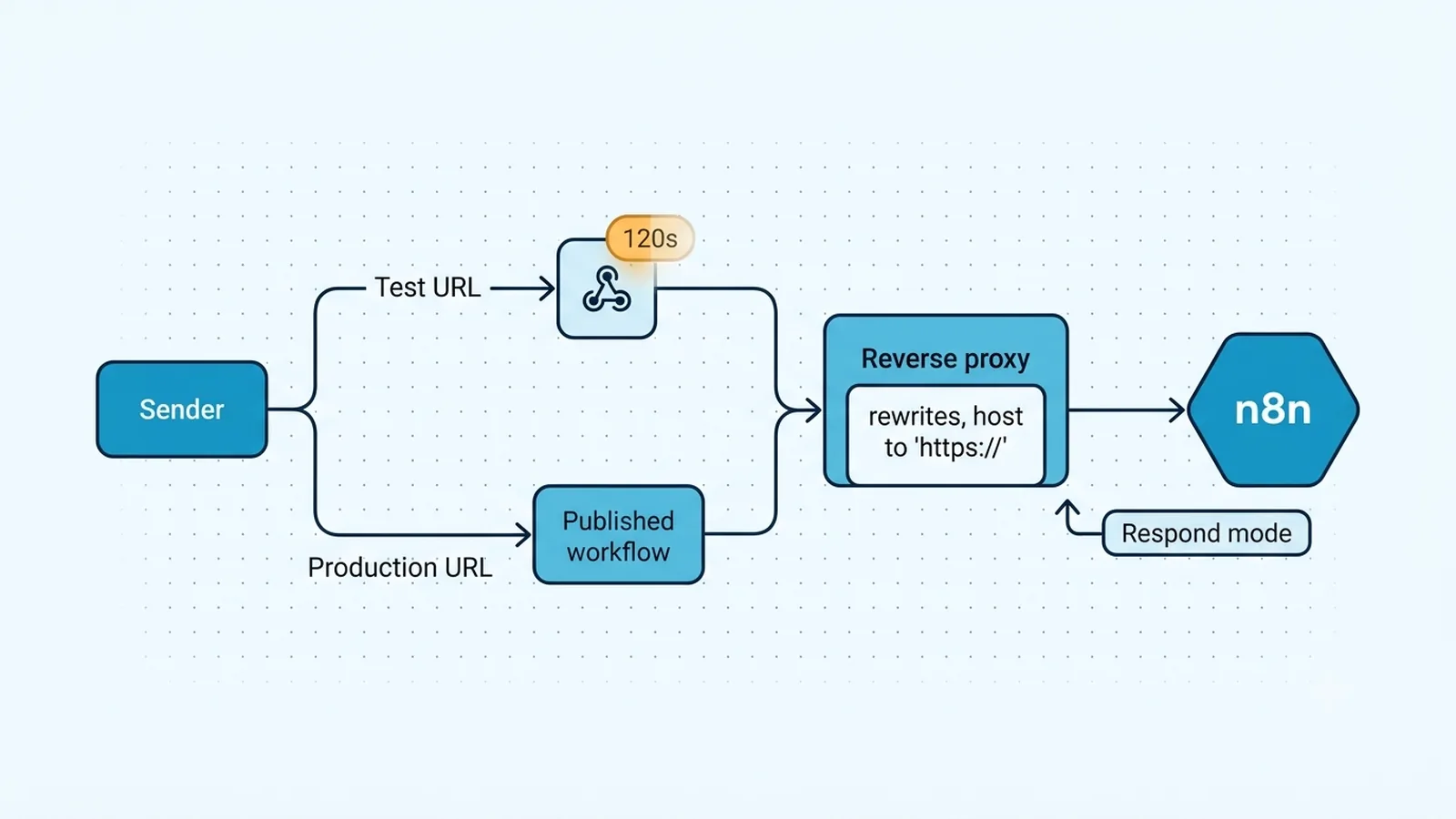
Separate a temporary listener from a registered production route
The first useful test is to copy both URLs from the Webhook node and compare them character for character. n8n deliberately exposes a test route and a production route. The test route is designed for development: after you click Listen for test event, n8n registers it for a limited window. Current n8n documentation states that the test webhook stays active for 120 seconds. If the sender calls that URL before you start listening, after the window expires, or after you close the test cycle, a 404 or an apparently dead workflow is expected. Do not use the test URL as a permanent callback in Stripe, a SaaS webhook screen, or your own application.
For production, use the Production URL and make sure the workflow version containing that Webhook node is saved and published. Older n8n interfaces describe this as making the workflow Active; newer releases use publishing language. The operational point is the same: the production webhook must be registered as a production workflow, not merely present on the canvas. Production requests also do not stream their data into the editor in the same way a test listener does, so inspect the Executions list before deciding that nothing ran.
Check method, path, and registration before touching credentials
A Webhook node registers a specific HTTP method and path. A GET request does not match a POST-only webhook, and a path copied with a missing prefix, extra slash, stale webhook ID, or URL-encoded character can hit a different route. Reproduce the request with curl or another client that shows the final method and URL after redirects. If the response says the requested webhook is not registered, that message is more useful than a generic 404: it means the request reached n8n but did not match a live registration.
Also search the instance for another workflow using the same custom webhook path and method. Duplicate or conflicting paths are especially easy to create when cloning workflows between projects or importing JSON. Give each production endpoint an intentional path, publish the workflow again, and re-copy the URL from the node instead of reusing a saved callback from an older workflow. If you changed the path while a third-party service still calls the old value, no downstream node change can fix it.
What each failure usually means
| Observed result | Most likely layer | Next check |
|---|
| 404 before any execution appears | Webhook registration or path | Test/production URL, publish state, method, path |
| Execution starts but sender times out | Response behavior | Webhook response mode and downstream duration |
| URL shows internal host or port | Reverse proxy/base URL | N8N_WEBHOOK_URL and forwarded headers |
| Only one environment fails | Deployment/config drift | Workflow version, host, protocol, proxy rules |
Fix the public webhook URL on self-hosted n8n
Self-hosted instances behind Nginx, Traefik, Cloudflare, an ingress controller, or another reverse proxy often run internally on port 5678 while the public service is HTTPS on port 443. If n8n builds callbacks from the internal host, protocol, or port, external systems receive a URL they cannot reach or a URL that bypasses the intended proxy path. Current n8n documentation recommends setting N8N_WEBHOOK_URL to the externally reachable base URL and N8N_PROXY_HOPS to the number of trusted proxy hops you actually use. The older WEBHOOK_URL variable is deprecated and logs a warning on current releases.
Make the proxy forward the original host and protocol information rather than rewriting them silently. n8n's reverse-proxy guidance calls out X-Forwarded-For, X-Forwarded-Host, and X-Forwarded-Proto on the final proxy. After changing environment variables, restart the instance, reopen the Webhook node, and verify that the displayed production URL is exactly the URL an internet client should call. If the UI still shows localhost, an internal container hostname, http instead of https, or the wrong subpath, fix deployment configuration before testing application logic.
N8N_WEBHOOK_URL=https://automation.example.com/
N8N_PROXY_HOPS=1
Separate receiving the request from replying to the caller
A webhook can trigger correctly and still look broken to the calling service because the HTTP response is delayed or shaped incorrectly. Review the Webhook node's Respond setting. If the workflow is configured to respond when the last node finishes, a slow API call, long retry, or blocked branch can keep the caller waiting. If you use a Respond to Webhook node, make sure every relevant execution path actually reaches it. A branch that exits early can leave the sender without the response it expects.
For a diagnostic run, reduce the workflow to Webhook → Edit Fields or Code → response, then add the real nodes back. This separates route registration from business logic. If the minimal route returns immediately but the full workflow times out, the webhook itself is healthy. The failure is downstream latency or response placement. If no execution appears at all, stay focused on registration, URL, method, proxy, and publishing; changing the response mode cannot repair a request that never reached the trigger.
Use execution evidence instead of repeatedly republishing
Once a request reaches a production webhook, use the execution record as the boundary between network and workflow debugging. Record the incoming timestamp, request method, request path, and any execution ID. If your third-party sender reports a successful 2xx but n8n has no execution, confirm that the sender is calling the same hostname and environment you are inspecting. Staging and production webhook URLs often differ by only one subdomain.
If n8n creates an execution, inspect the first node output before changing credentials or payload mapping. A webhook that receives an empty body may still be valid if the sender put data in query parameters or headers. Conversely, a reverse proxy can enforce body-size limits or strip a path prefix before n8n sees the request. Compare a direct request to n8n with the proxied request only in a controlled environment; the difference tells you whether the proxy or n8n configuration owns the failure.
Verification checklist
- The test callback succeeds only after Listen for test event is enabled and while the temporary listener is active.
- The production callback uses the Production URL from the currently published or active workflow, not a saved test URL.
- The sender's final HTTP method and path exactly match the Webhook node configuration.
- A production request creates an execution in n8n even when its data is not shown live on the editor canvas.
- The displayed self-hosted production URL uses the public HTTPS host and expected path after N8N_WEBHOOK_URL and proxy headers are applied.
- Every response path returns the intended status/body without waiting on unrelated slow nodes.
Documentation and community threads cited
These fixes follow current n8n documentation and community reports. Primary sources:
Frequently asked questions
Why does my n8n test webhook work once but the production URL returns 404?
The test route is a temporary development listener, while the production route must belong to a saved and published/active workflow. Re-copy the Production URL, verify the HTTP method and path, and confirm the workflow version with that Webhook node is published.
Why does n8n show the wrong webhook hostname on a self-hosted instance?
Behind a reverse proxy, n8n may otherwise construct URLs from its internal host and port. Set the public base with N8N_WEBHOOK_URL, configure the trusted proxy hop count, forward the original host/protocol headers, restart, and re-check the URL shown in the node.
Can a webhook trigger successfully even if the calling app reports a timeout?
Yes. If the workflow waits until the last node finishes or a Respond to Webhook node is not reached, n8n may start an execution while the caller waits too long. Confirm the execution exists, then debug response mode and downstream latency separately.