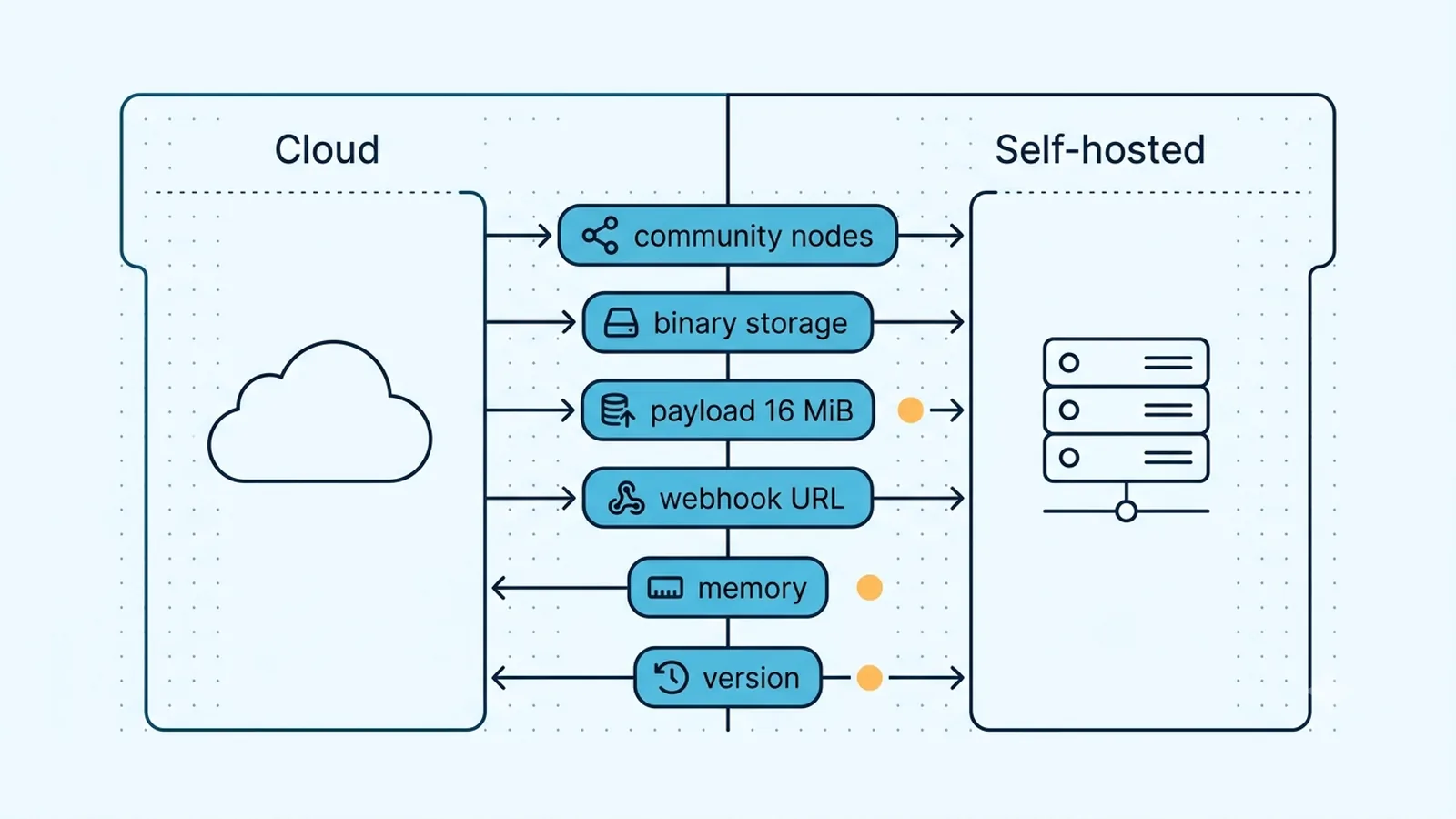
Build an environment diff before editing the workflow
Export the workflow JSON from both environments or compare the same commit, then record each instance's n8n version, node versions, credential type, execution mode, and hosting configuration. The same visual workflow can execute differently if one side has a newer node implementation or a changed default. If the failure started after migration, do not begin by rebuilding nodes; prove whether the two runtimes are equivalent.
Use one small input that reproduces the problem and capture the exact failing node plus its error body on both sides. Differences before that node are often more important than the failing node itself: a binary property name, field mapping, or credential scope may have changed upstream.
Compare credentials as part of the environment diff as well. A credential recreated during migration can have different OAuth scopes, callback URLs, token owners, or secret values even when the node label looks identical. Test one credential-backed call with the same minimal input on both environments and compare the provider's returned error body before changing workflow logic.
Compare binary-data and filesystem assumptions
n8n keeps binary data in memory by default. Self-hosted instances can choose other storage modes; current docs describe N8N_DEFAULT_BINARY_DATA_MODE values including default/memory, filesystem, database, and licensed external storage modes. For queue mode, filesystem binary mode is not supported because workers need shared access; use a compatible shared mode. A workflow that handles large files can pass on a generously sized Cloud worker but OOM a small self-hosted container, or the reverse depending on plan and deployment.
Do not design a portable workflow around arbitrary local filesystem paths. A self-hosted instance may have mounted volumes and host files that do not exist in Cloud. Conversely, Cloud manages infrastructure details you cannot reproduce by writing to a local disk path. Prefer explicit binary properties and external object storage when the file must survive across execution boundaries or environments.
Check payload size and memory separately
Current n8n endpoint environment-variable docs list N8N_PAYLOAD_SIZE_MAX with a default of 16 MiB for self-hosted instances. If a webhook or API request body is larger, self-hosted behavior can differ from Cloud depending on plan and platform limits. Measure the actual payload instead of guessing from record count; Base64-encoded files expand beyond raw file size.
Payload acceptance and execution memory are different limits. A 10 MiB request can be accepted and then explode into hundreds of megabytes when nodes duplicate item arrays or decode files. Watch container memory and worker OOM events on self-hosted deployments. If memory climbs with item count, split work into batches and avoid carrying large binary objects through nodes that do not need them.
Do not forget the reverse proxy's own body-size ceiling. A proxy or ingress can reject an oversized request before n8n creates an execution, even when N8N_PAYLOAD_SIZE_MAX would allow it. A 413 or missing execution at the proxy boundary should be diagnosed in Nginx, Traefik, Cloudflare, or ingress limits separately from an OOM that occurs after n8n has already accepted and parsed the payload.
Common environment differences to compare
| Layer | Cloud | Self-hosted check |
|---|
| Community nodes | Verified selection available | Verified plus unverified npm packages if enabled |
| Binary storage | Managed platform behavior | N8N_DEFAULT_BINARY_DATA_MODE and shared storage |
| Payload limit | Plan/platform managed | N8N_PAYLOAD_SIZE_MAX and proxy limits |
| Webhook base URL | Managed hostname | N8N_WEBHOOK_URL, proxy hops, TLS |
| Memory | Plan managed | Container/VM limits and worker OOM |
| Version | Cloud rollout | Your pinned image/package version |
Compare webhook URLs, credentials, and environment variables
Cloud supplies a public HTTPS hostname and manages the routing layer. Self-hosted n8n behind a reverse proxy must be told its correct external webhook base. Current docs recommend N8N_WEBHOOK_URL plus proxy-hop and forwarded-header configuration. A workflow that registers a callback successfully in Cloud can fail self-hosted because the third-party service receives localhost, an internal container name, http, or a private port.
Environment variables are another portability trap. Self-hosted deployments commonly inject values through Docker, Kubernetes, systemd, or .env files. Cloud uses its own variable/secret mechanisms and plan features. If expressions rely on $env or host-specific paths, enumerate those dependencies before migration rather than discovering them one failed node at a time.
Compare retention and version before debugging missing history
Self-hosted execution pruning is enabled by default in current n8n documentation. EXECUTIONS_DATA_MAX_AGE defaults to 336 hours, or 14 days, and EXECUTIONS_DATA_PRUNE_MAX_COUNT defaults to 10,000 finished executions. If one environment appears to “lose” old debugging data sooner, compare retention policy instead of assuming the workflow failed to save anything.
Finally, compare exact n8n versions. Node behavior and names change over time, especially around community nodes, credential APIs, UI labels, and binary handling. A migration test should either pin the same stable version or document the differences you accept. Re-test critical workflows after the destination version is chosen.
For a reproducible migration, record the exact n8n version, database type, execution mode, queue/worker topology, and relevant environment variables alongside the workflow export. That turns 'works on Cloud' into a concrete configuration comparison and prevents a later upgrade from reintroducing the same mismatch under a different symptom.
Verification checklist
- Both environments' n8n versions and the exact failing node versions have been recorded.
- Every community node used by the workflow is available in the destination under current verified/unverified rules.
- Binary-data mode, shared storage, filesystem assumptions, and worker memory have been compared.
- Payload size is below both n8n and reverse-proxy limits for the failing environment.
- Self-hosted webhook URLs display the correct public HTTPS base and proxy path.
- Environment variables, credentials, and execution-retention settings required by the workflow are explicitly mapped.
Documentation and community threads cited
These fixes follow current n8n documentation and community reports. Primary sources:
Frequently asked questions
Are community nodes unavailable on n8n Cloud?
Not all of them. Current n8n Cloud supports a selected set of verified community nodes. Unverified community packages installed from npm still require self-hosting, so check the exact node rather than applying the old blanket rule.
Why does a file-heavy workflow crash only on self-hosted n8n?
Check container/worker memory, binary-data storage mode, queue-mode compatibility, and payload size. A self-hosted instance can accept the request but still run out of memory later while duplicating or decoding binary data.
Why are my self-hosted webhook URLs wrong while n8n Cloud works automatically?
Cloud manages the public base URL. Self-hosted instances behind a reverse proxy usually need N8N_WEBHOOK_URL, the correct proxy-hop configuration, and forwarded host/protocol headers so n8n generates externally reachable callback URLs.