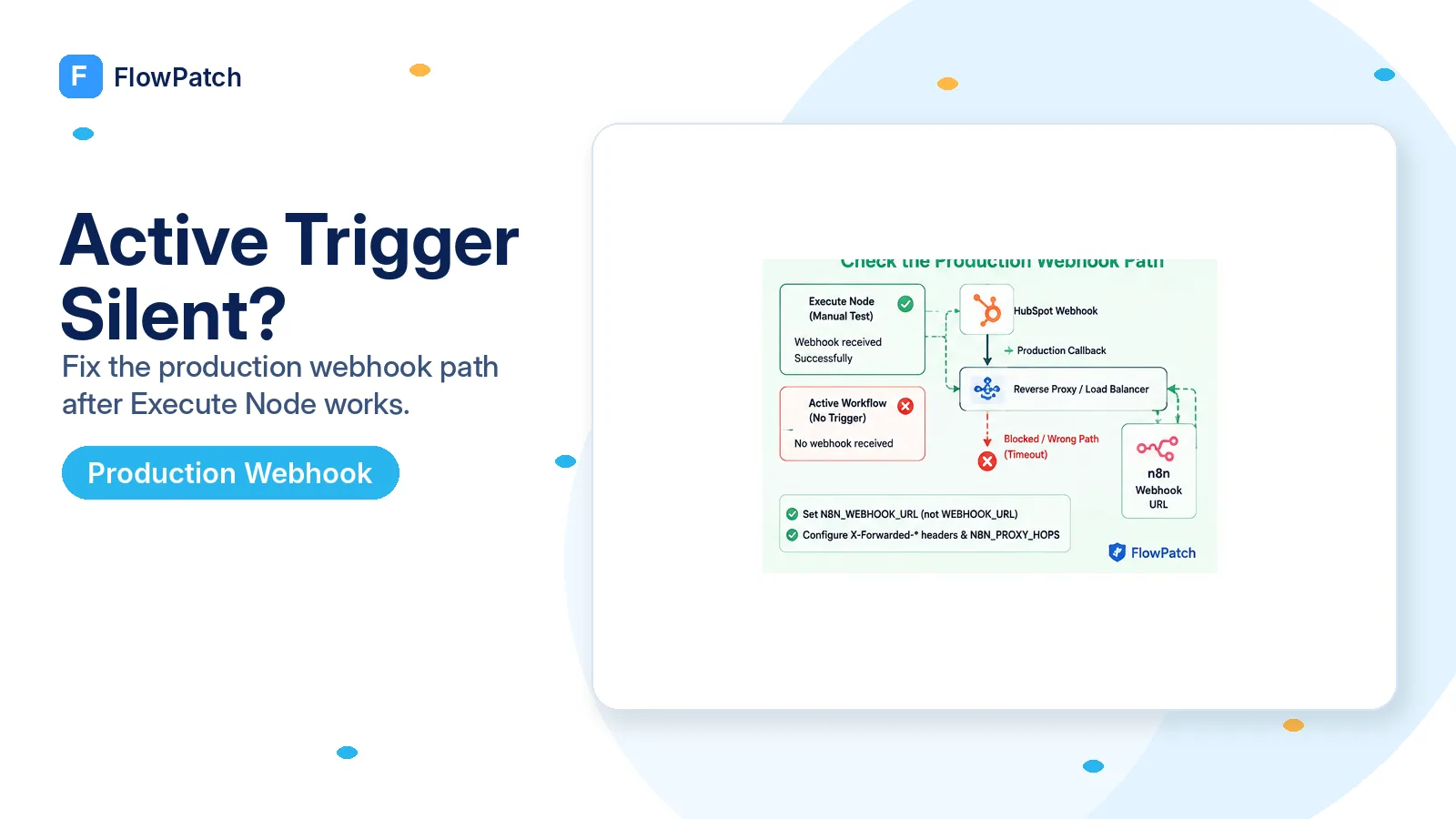
Manual success proves the event exists; it does not prove the production callback is reachable
A 2025 n8n Community thread describes a precise symptom: HubSpot events are received when the user clicks Execute Node and creates the event while the node is listening, but no executions appear when the workflow is simply left Active. There is no HubSpot error to read. That pattern should move network and subscription-state checks ahead of data mapping or downstream node debugging.
Manual listening and an active webhook are not interchangeable operational states. n8n has separate test and production webhook endpoints, and external services may register or call different URLs depending on how a trigger node implements its lifecycle. A test listener can be reachable from your browser-driven session while the production URL advertised to HubSpot is wrong, private, stale, or blocked by a proxy.
Make the first test embarrassingly simple. Activate a copy of the workflow with only the HubSpot Trigger and one Set/No Op-style step that records the incoming payload. If that copy is silent, you have isolated the failure before any database, filtering, AI, or CRM update can obscure it.
No production execution means debug delivery before payload logic. A filter node cannot discard an event that never reached n8n.
HubSpot’s webhook contract requires a public secure destination
HubSpot’s Webhooks v3 guide states that integrations using webhooks need a publicly available secure HTTPS endpoint to receive notifications. That requirement is easy to satisfy on n8n Cloud but easy to accidentally violate on a self-hosted installation where the editor is accessed through a reverse proxy, VPN, tunnel, or internal hostname.
Inspect the URL n8n considers its production webhook base. It must resolve publicly to the instance that owns the active workflow. localhost, 127.0.0.1, a Docker service name, a private 10.x/192.168.x address, an internal .local domain, or an old staging hostname cannot be called by HubSpot over the public Internet.
Do not test reachability only from a laptop on the same LAN or VPN. Resolve the hostname through public DNS and request the endpoint from outside your network boundary. A 404 or method-specific response can still prove the request reached the correct reverse proxy; a DNS failure, TLS failure, SSO login page, or connection timeout proves HubSpot will have trouble too.
On current self-hosted n8n, set the advertised webhook URL explicitly
n8n’s current reverse-proxy documentation says n8n normally builds webhook URLs from protocol, host, and port. Behind a proxy that can be wrong because n8n may listen internally on port 5678 while users reach it externally over HTTPS on 443. The docs now specify N8N_WEBHOOK_URL for the public webhook base and note that WEBHOOK_URL is a deprecated alias.
The same documentation instructs reverse-proxy installations to configure N8N_PROXY_HOPS and forward X-Forwarded-For, X-Forwarded-Host, and X-Forwarded-Proto from the last proxy. Without consistent forwarded host/protocol data, n8n can generate URLs that look correct in one screen but do not match how external services reach the instance.
After changing environment variables, restart or redeploy the n8n process and re-open the trigger node. More importantly, deactivate and reactivate the workflow if the integration registers subscriptions during activation. Updating the base URL without refreshing the remote subscription can leave HubSpot calling the old target.
N8N_WEBHOOK_URL=https://automation.example.com/
N8N_PROXY_HOPS=1

# Last reverse proxy should forward:
X-Forwarded-For
X-Forwarded-Host
X-Forwarded-Proto
Do not copy WEBHOOK_URL from an old tutorial without checking your n8n version. Current n8n docs identify N8N_WEBHOOK_URL as the replacement and keep WEBHOOK_URL only as a deprecated alias.
Check whether the production subscription was actually created and is active
A workflow toggle in n8n and an active subscription in HubSpot are related but not identical facts. If activation calls HubSpot to create or enable a subscription, a transient scope error, old app configuration, or stale credential can leave the workflow looking active locally while the remote subscription is missing or inactive.
Inspect the webhook settings/subscriptions in the HubSpot app where possible. For the legacy v3 model, HubSpot documents subscriptions with eventType and an active flag. Verify the exact event you expect — for example deal.propertyChange with the correct internal propertyName — instead of merely seeing that the app has “some webhooks.”
If you cannot inspect it comfortably in the UI, deactivate and reactivate a minimal trigger while watching n8n for activation errors. Do not create the business event until activation completes cleanly. A production trigger test is meaningful only after you know HubSpot accepted the subscription.
For property-change triggers, change the exact internal property after activation
The community case that motivated this guide used deal.propertyChange for a specific property. Property-change subscriptions are narrower than “the deal changed.” HubSpot’s webhook documentation says propertyName identifies the property being monitored. Changing deal name, owner, pipeline, or another field will not prove the subscription for solutions_engineer works.
Use a disposable record and make one clean before/after change to the exact property. Record the HubSpot record ID, property internal name, old value, new value, and timestamp. Avoid bulk imports or HubSpot workflows for the first diagnostic because they can create multiple changes and make timing hard to read.
If manual listening receives that exact change but Active mode does not, keep the focus on subscription target and activation lifecycle. If neither mode receives it, return to the event configuration, property internal name, and scopes instead. The divergence between the two modes is the signal that gives this troubleshooting path value.
Look for reverse-proxy, WAF, or login rules that allow the editor but block HubSpot
A production n8n domain is often protected by Cloudflare Access, basic auth, an identity-aware proxy, IP allowlists, or a web application firewall. Those controls can make the editor secure while also intercepting webhook POST requests. HubSpot cannot complete an interactive login challenge before delivering an event.
Review access logs at the outermost proxy. Search by the test-event timestamp and request path. If there is no request at all, DNS/subscription target is more likely. If the proxy logs a 301 to a login page, 401 from basic auth, 403 from WAF, or TLS handshake failure, fix the webhook route policy without exposing the entire n8n editor publicly.
Keep the webhook path narrow and verify request signatures where your integration supports it. The answer to a blocked callback is not to remove every security control from n8n. It is to let the intended machine-to-machine POST reach the webhook handler while protecting administrative routes separately.
- Public DNS points at the current production proxy.
- TLS certificate covers the hostname and chain validates publicly.
- Webhook POST path bypasses interactive login challenges.
- Proxy forwards host/protocol headers expected by n8n.
- Access logs show HubSpot requests reaching the correct service.
Make the downstream workflow safe for retries and duplicate webhook notifications
Once delivery works, do not assume every HubSpot event arrives exactly once. HubSpot’s webhook guide says notifications can be batched and that duplicate delivery is possible in rare cases. It also documents retry behavior for connection failures, timeouts, and HTTP error responses. A repaired production endpoint can therefore receive an event again after earlier failed delivery attempts.
Use stable event/object data to make side effects idempotent. If the trigger starts an expensive sync or sends a customer-facing message, store a processed key based on event identity or the object/property/timestamp combination appropriate to your workflow. Return a successful response quickly and move heavy work deeper into n8n rather than making the incoming request wait on slow external services.
This reliability step is part of the fix. A webhook that finally becomes reachable but then duplicates invoices, Slack alerts, or contact updates is not production-ready.
What this guide is based on
The Execute Node versus Active-mode symptom is taken from an n8n Community report. Public HTTPS, subscription behavior, retries and possible duplicates are grounded in HubSpot’s webhook documentation. Reverse-proxy settings use current n8n documentation, including the 2026 naming of N8N_WEBHOOK_URL and N8N_PROXY_HOPS.
Frequently asked questions
Why does the HubSpot Trigger work in "Execute Node" but never fire when the workflow is active?
Test mode and production mode are different delivery paths. Manual listening can succeed while the active subscription points to a URL that HubSpot cannot reach for your production instance.
What do I check on self-hosted n8n behind a proxy?
Current n8n documentation says to set N8N_WEBHOOK_URL and N8N_PROXY_HOPS and to pass the X-Forwarded-* headers. Confirm the active HubSpot subscription targets a publicly reachable HTTPS URL for the production instance.
Should I keep changing HubSpot scopes?
No. If subscription creation succeeds and only production delivery disappears, the problem is the production webhook path or a proxy/WAF, not scopes.