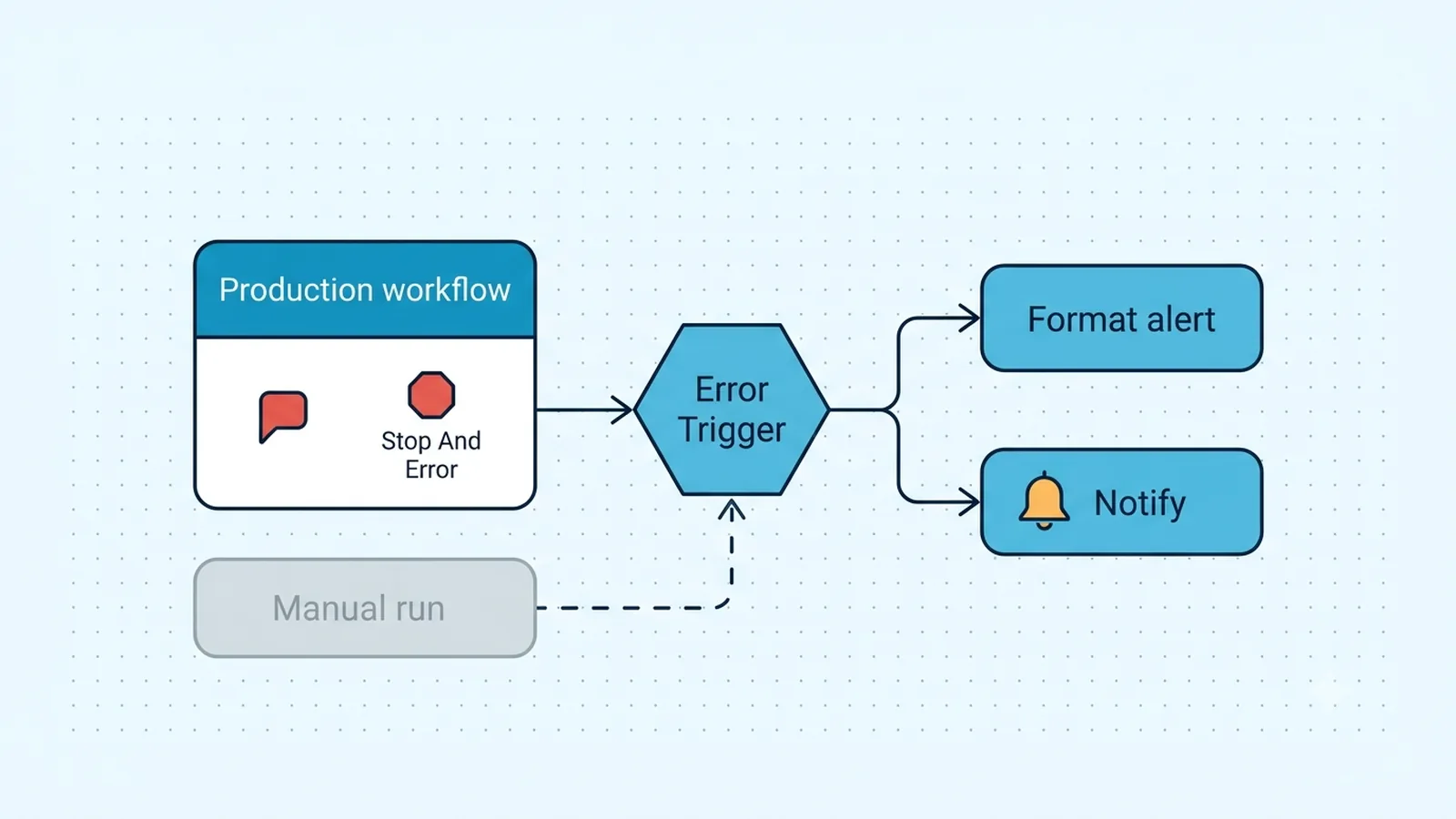
Prove the failure came from an automatic execution
Do not test the alert path by clicking Execute Workflow on the protected workflow. n8n documentation and its execution code explicitly state that manual executions do not trigger error workflows. Use a Schedule Trigger, production Webhook, or another automatic trigger, publish the protected workflow, and create a controlled failure. The failed execution should appear as a production execution in the Executions list.
This distinction explains many reports where the main workflow visibly turns red but the Error Trigger never runs. The manual editor run is useful for developing the main workflow, but it is not the event source the error-workflow mechanism listens for. Keep a tiny dedicated test workflow with a production trigger and a Stop And Error node if you need a repeatable health check.
Wire a dedicated Error Trigger workflow to the protected workflow
Create a separate workflow whose first node is Error Trigger. Save it, then open the protected workflow's settings and select that workflow in Error Workflow. n8n's current Error Trigger documentation says the error workflow itself does not need to be published. It also does not need a normal trigger: the Error Trigger is invoked by the linked workflow's automatic failure. The per-workflow Error Workflow setting is the configuration to verify when one workflow is silent.
Do not rely on the N8N_DEFAULT_ERROR_WORKFLOW environment variable named in older unofficial advice: it is not a documented n8n environment variable. Historically, n8n community maintainers explicitly said there was no such env setting. On current versions, use the UI/default-workflow features available in your instance or update workflow settings through supported APIs rather than inventing an env var.
Why an Error Workflow stays silent
| Condition | What n8n sees | Fix |
|---|
| Protected workflow run manually | Manual execution | Trigger a published production run |
| Node set to continue on error | Handled/continued path | Let the error bubble or raise intentionally |
| No Error Workflow selected | No handler association | Assign the Error Trigger workflow in settings |
| Handler fails itself | Secondary failure | Keep handler minimal and inspect its execution |
| Trigger-node activation failure | Different payload shape | Handle trigger.error as well as execution.error |
Do not swallow the error you expect the handler to catch
Node-level error handling changes whether the workflow is considered failed. If a node uses Continue, Continue using error output, or legacy Continue On Fail behavior, the workflow can keep running instead of entering a failed terminal state. That is correct when you intentionally handle the error locally, but the global Error Workflow then has nothing to catch.
Choose one pattern deliberately. For recoverable item-level errors, route the error output to logging and continue. For a condition that should page an operator, allow the node to fail or use Stop And Error after your IF/validation logic. Stop And Error is specifically designed to terminate an execution with a custom message or error object and pass that failure to the configured error workflow.
Parse Error Trigger data without assuming every field exists
For failures during an execution, the Error Trigger payload commonly includes workflow metadata plus an execution object containing the execution ID/URL when saved, the last node executed, and execution.error.message or stack. Alert expressions should use the nested execution path rather than assuming a top-level error object. Save one real payload from your own version and map from that evidence.
Trigger-node failures can produce a different shape with trigger.error instead of a full execution object. Use optional chaining or an IF branch so the error handler itself does not crash while formatting an alert. A robust message can derive the workflow name first, then choose execution.error.message when present and fall back to trigger.error.message.
const e = $json.execution?.error ?? $json.trigger?.error ?? {};
return [{ json: {
  workflow: $json.workflow?.name ?? 'unknown',
  executionId: $json.execution?.id ?? null,
  node: $json.execution?.lastNodeExecuted ?? 'trigger',
  message: e.message ?? 'Unknown workflow error'
} }];
Keep the error handler simpler than the workflow it protects
An Error Workflow that calls five external services with fragile credentials can fail in ways that hide the first incident. Keep the critical path short: normalize the payload, write to a durable log or data store if available, and send one primary notification. If you add enrichment such as fetching execution details, make that branch tolerant of failure and preserve the original error fields first.
Prevent alert storms as well. A production workflow that fails on every item can create many handler executions. Include workflow ID, execution ID, last node, and a compact message so downstream notification systems can deduplicate. Do not configure the handler to recursively point at itself.
Give the handler its own monitoring path as well. If its Slack, email, or incident API credential expires, the original workflow can fail correctly while the alerting workflow also fails. A lightweight secondary signal or periodic test keeps an error handler from becoming a silent single point of failure.
Test the complete alert path with a controlled production error
Use a small production-triggered workflow and intentionally raise a unique message such as flowpatch-error-handler-smoke-test with Stop And Error. Trigger it through the same mode your real workflows use. Confirm the protected execution is Failed, the Error Workflow has its own execution, and the alert contains the original workflow name and custom message.
Then test one failure at the trigger layer if that matters to your estate, because its payload can differ from a mid-workflow node failure. Finally remove or disable the smoke-test schedule/webhook so it cannot produce noise.
Run that test through the same production trigger path that normally starts the protected workflow. A manual editor execution is useful for checking node behavior, but it is specifically the wrong test for whether the Error Workflow fires. Record both the failed production execution ID and the handler execution so you can verify that the alert points back to the original workflow rather than merely proving the handler can run by itself.
Verification checklist
- The protected failure was generated by a published automatic execution, not by clicking Execute Workflow manually.
- The intended Error Trigger workflow is selected in the protected workflow's Error Workflow setting.
- The failing node is allowed to fail, or Stop And Error intentionally raises a workflow failure.
- Alert expressions handle both execution.error and trigger.error payload shapes without throwing.
- A controlled production failure creates a separate Error Workflow execution and includes the source workflow identity.
- The Error Workflow itself completes successfully and does not recursively use itself as its own external handler.
Documentation and community threads cited
These fixes follow current n8n documentation and community reports. Primary sources:
Frequently asked questions
Why does my n8n Error Workflow not run when I click Execute Workflow?
Manual executions do not trigger configured Error Workflows. Test with a published workflow started by a production Webhook, Schedule Trigger, or another automatic trigger and force a controlled failure.
Can Continue On Fail prevent the Error Trigger from running?
Yes. If the node is configured to continue and the workflow ultimately completes rather than failing, there is no terminal workflow failure for the Error Workflow to catch. Route the local error explicitly or let it bubble.
Is N8N_DEFAULT_ERROR_WORKFLOW a valid environment variable?
It is not a documented n8n environment variable. Use the Error Workflow setting on the workflow, any supported workflow-default feature available in your current instance, or supported API-based configuration instead of relying on that env name.