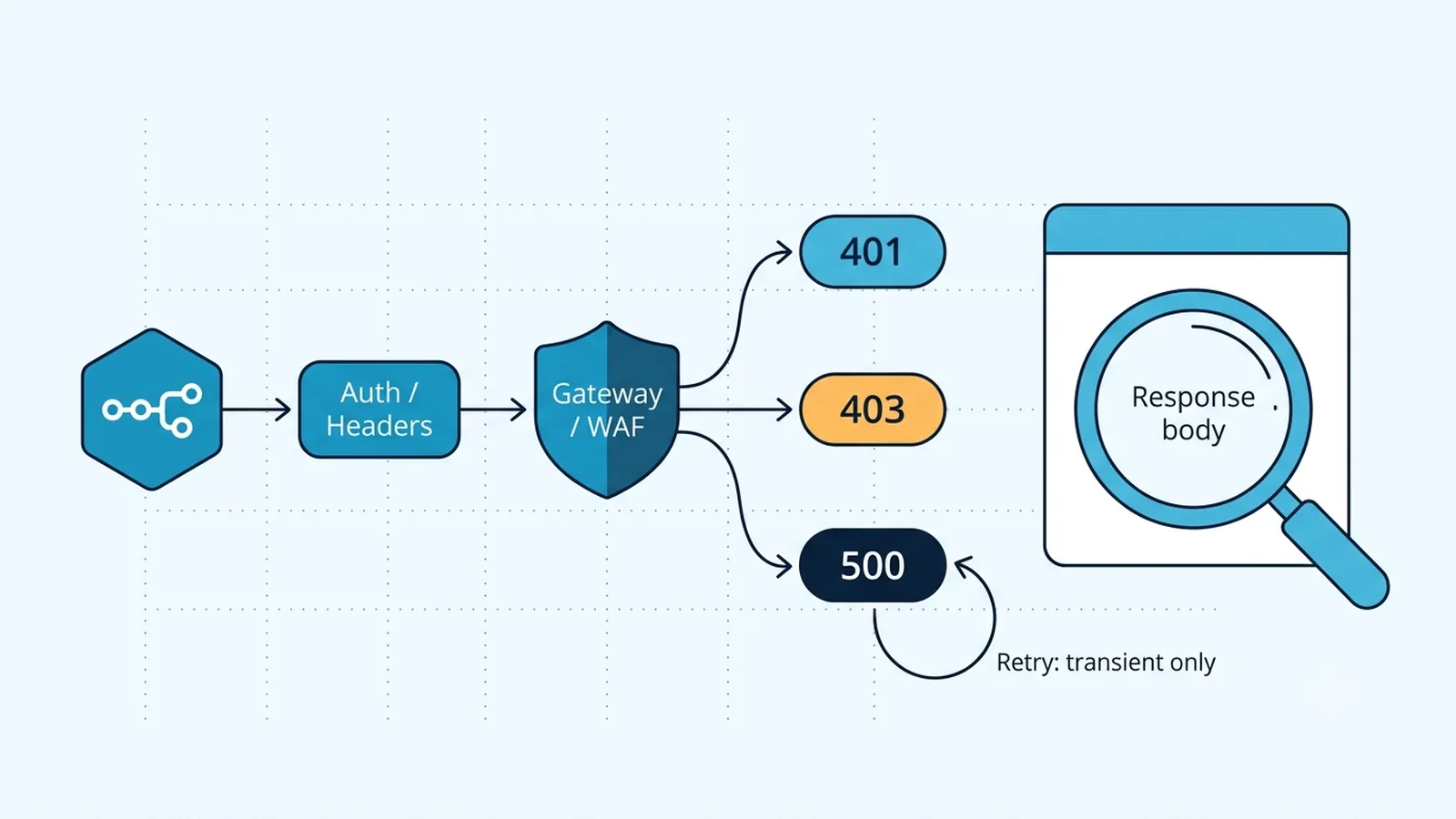
Capture the response the upstream actually sent
By default, the HTTP Request node emphasizes the response body on successful calls and raises on non-2xx responses. During diagnosis, add the Response option and enable Include Response Headers and Status. Current n8n documentation uses that label; older node versions and forum posts often call the same idea Full Response. If you need to branch on 4xx/5xx without the node stopping immediately, enable Never Error temporarily and inspect statusCode, headers, and body with an IF node.
Save one failing response before changing anything. Many APIs return a precise JSON error such as invalid_scope, token_expired, missing_signature, forbidden_ip, or validation_failed even though n8n's canvas initially surfaces only 401 or 403. If the body is HTML rather than the API's normal JSON, that is a strong clue that a CDN, WAF, proxy, or SSO gateway answered before the application.
For APIs that return structured JSON errors, keep that body in the execution even when the status is non-2xx. A 401 with `invalid_token`, a 403 with a WAF reference, and a 500 with an application validation message can share the same status family while requiring different fixes. Capture response headers too when they contain request IDs or vendor trace identifiers; those values make provider logs and support evidence much more useful.
// Diagnostic branch after HTTP Request with full response + Never Error
const s = $json.statusCode;
return [{ json: { status: s, headers: $json.headers, body: $json.body } }];
Separate credential configuration from manual headers
n8n can authenticate HTTP Request calls with a predefined credential type for supported services, a generic credential, OAuth2, or manually supplied headers/query parameters. Choose one source of truth. If a credential already injects Authorization, do not also add a second Authorization header unless the API explicitly requires it. Duplicate or differently cased auth headers can be normalized unpredictably by proxies.
For a 401, compare the request against the API's current authentication contract: Bearer token versus Basic auth, header versus query parameter, required scopes, token audience, and token expiry. Re-run the same call with curl from the n8n host when possible. If curl and n8n use the same token but only n8n fails, export the actual n8n headers minus secrets and compare method, URL, redirect behavior, and body.
Treat 403 as authorization or edge policy, not just token failure
A 403 means the server understood the request but refused it. The refusal can come from application permissions, a WAF rule, an IP allowlist, geofencing, a required User-Agent, missing CSRF-style header, or a proxy policy. The response headers often reveal the layer: CDN-specific headers and an HTML challenge page point away from the API application. A token with correct scopes can still be blocked because n8n Cloud or your self-hosted worker exits from a different IP than your laptop.
Test from the same network path as n8n. If the API offers an IP allowlist, confirm the worker's egress address rather than the browser's. If a vendor blocks automation-like user agents, use only a documented custom User-Agent rather than trying to evade access controls. A 403 that appears only after pagination may actually reflect rate protection triggered by burst traffic; inspect adjacent 429 responses and rate-limit headers.
Triage 500 by proving the request shape first
HTTP 500 is nominally a server error, but malformed inputs can expose bugs in upstream software and produce 500 instead of a clean 4xx. Compare a minimal known-good request with the failing one. Verify Content-Type, JSON versus form encoding, null handling, array shape, numeric versus string values, and whether you accidentally JSON.stringify data twice. With n8n's JSON body mode, pass an object unless the API explicitly expects a raw JSON string.
If the same request body fails outside n8n, the upstream owns the defect or cannot handle that payload. If curl succeeds while n8n fails, compare redirects and headers. Some APIs redirect a POST to another URL where authentication is dropped or method semantics change. Enable full response information so you can see the final status and headers before adding retries.
Retry only failures that are likely transient
Node Settings → Retry On Fail provides Max Tries and Wait Between Tries. Use it for transient 429, 502, 503, gateway timeout, or flaky network failures when the target operation is safe to repeat. Do not blindly retry a 401 caused by an expired credential or a deterministic 403 permission error. Those retries add load without changing the result.
For explicit rate limiting across many items, n8n documents two useful patterns: Retry On Fail with an adequate delay, or Loop Over Items plus Wait. The HTTP Request node also has batching controls that can reduce bursts. If you paginate until exhaustion, pace the pages according to the upstream API rather than letting dozens of workflow items fire concurrently.
Keep retry policy status-aware. A credential error should fail fast, while a genuine transient 5xx may justify another attempt after a delay. If the provider documents idempotency keys for write operations, use them before enabling retries so a timed-out first request cannot create duplicate side effects when the second request succeeds.
Use Ignore SSL Issues only as a diagnostic exception
Ignore SSL Issues disables certificate validation for the request. It can confirm that an internal CA, self-signed chain, or TLS interception layer is the reason a request fails, but it also removes an important authenticity check. For production self-hosted n8n, install the correct CA certificate or configure the runtime to trust your internal CA instead of leaving validation disabled.
TLS errors are distinct from 401/403/500 application responses. If you received an HTTP status code, the TLS handshake already completed. Do not toggle Ignore SSL Issues to fix a 403 from an API; it changes certificate validation, not authorization. Keep each diagnostic change tied to the layer it can affect.
Verification checklist
- The failing call records status code, response headers, and response body from the upstream service.
- Exactly one intended authentication mechanism produces the Authorization or query credential data.
- A 403 has been tested from the same egress network as n8n and checked for WAF/IP policy evidence.
- A 500 has been reproduced or disproved with the same method, headers, and body outside n8n.
- Retry On Fail is limited to transient and repeat-safe failures with a deliberate wait interval.
- SSL certificate validation is enabled in production unless a controlled diagnostic test specifically requires otherwise.
Documentation and community threads cited
These fixes follow current n8n documentation and community reports. Primary sources:
Frequently asked questions
How do I see the real 401 or 403 response body in n8n?
In the HTTP Request node, add Response and enable Include Response Headers and Status. During diagnosis, Never Error can let non-2xx responses continue to an IF or Code node so you can inspect statusCode, headers, and body together.
Why does curl work but the n8n HTTP Request node gets 403?
The calls may leave from different IP addresses or use different headers, redirects, or user agents. Reproduce curl from the n8n host/worker and compare the final URL, method, authentication, headers, and response body rather than testing only from your laptop.
Should I enable Retry On Fail for a 401 Unauthorized error?
Usually no. A deterministic 401 from an invalid, expired, or incorrectly scoped credential will not improve with retries. Fix the authentication source first; reserve retries for failures that can plausibly recover without changing configuration.