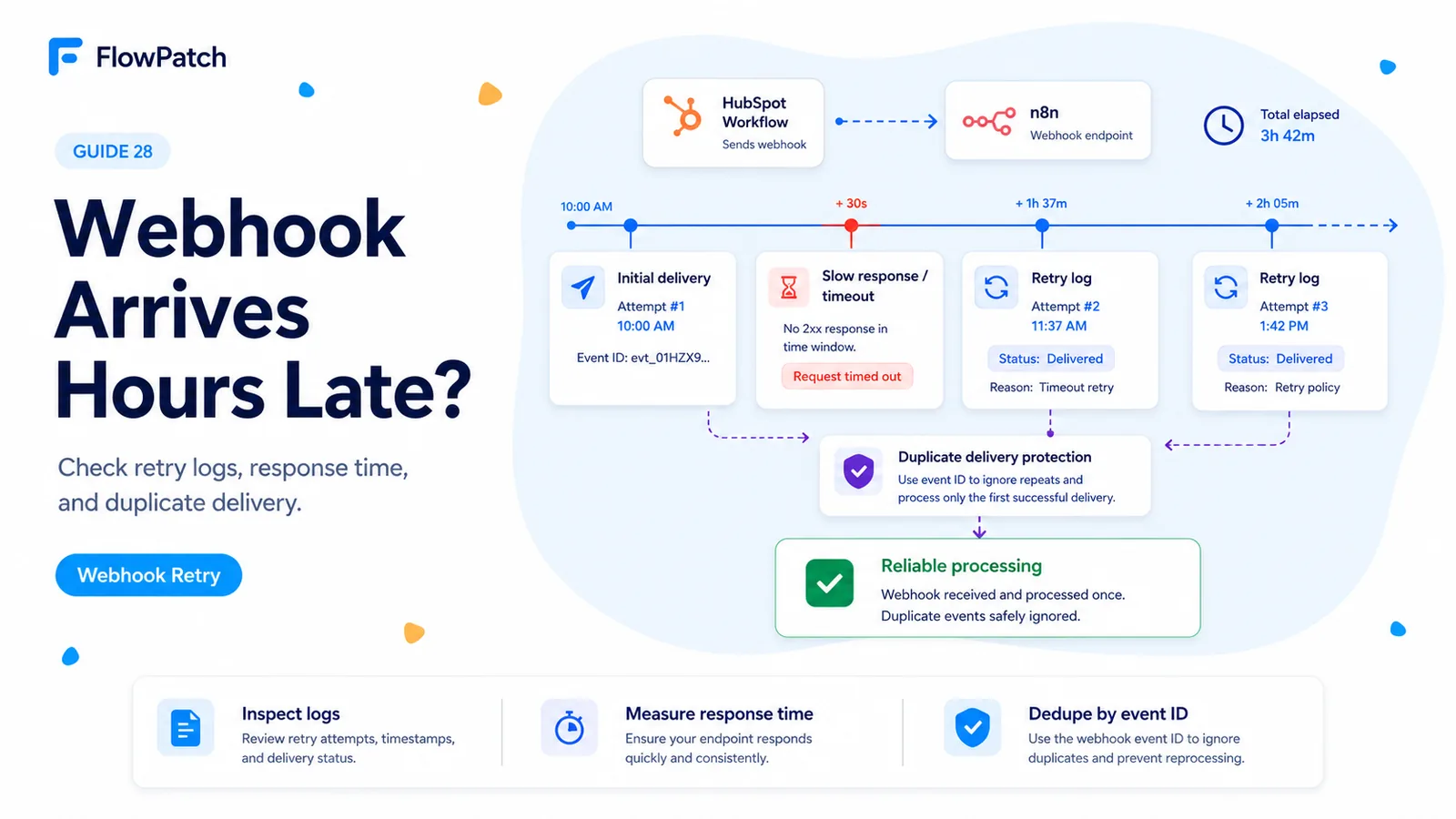
There are two very different delays that look identical in the n8n execution list
A community report described HubSpot workflow webhooks that appeared in n8n hours after the HubSpot step had run. That symptom can come from two layers. HubSpot may postpone or retry the outbound request, or n8n may receive the request promptly but delay execution because of its own queue, capacity, or downstream work.
If you only look at the n8n execution start time, both failures look like 'HubSpot was late.' The fix is timestamp correlation: compare when the HubSpot workflow action first attempted the request, when HubSpot retried it, when the HTTP request hit n8n, and when downstream work actually began.
Do this before rebuilding the webhook. A successful manual test only proves that the URL is reachable at test time; it does not prove that production requests are always acknowledged quickly.
Your first debugging goal is not to fix the delay. It is to identify which system owned the missing time.
HubSpot can intentionally deliver a failed workflow webhook later
HubSpot’s current workflow documentation says failed workflow webhooks are retried for up to three days, beginning about one minute after failure and then at increasing intervals with a maximum gap of eight hours. HubSpot also documents that a slow webhook can be logged as failed and retried later.
That means an n8n execution arriving hours later may be a retry, not the original request. If the first attempt reached your endpoint but did not return in HubSpot’s expected time window, downstream effects may already have happened before HubSpot decides to send the action again.
For app Webhooks API notifications, HubSpot separately documents retries when it cannot connect, when the service takes longer than five seconds, or when an error status is returned. Do not mix the exact retry schedule of app webhooks with workflow webhooks, but take the reliability lesson seriously in both cases: slow acknowledgment creates redelivery risk.
Start with the HubSpot workflow action log, not the n8n canvas
Open the affected record’s workflow history and inspect the Send a webhook action. HubSpot’s current troubleshooting documentation exposes information logs such as 'Webhook wasn’t able to execute, but will retry soon' and 'Webhook failed because of a server error, but will retry soon.'
Record the first attempt time, response code, timeout/server error message, and later retry time. If the HubSpot log itself shows a retry several hours later and n8n begins exactly then, the mystery is already solved: n8n was not sitting on the event for hours; HubSpot was retrying a failed delivery.
If HubSpot shows an immediate successful 2xx and the n8n execution only starts much later, shift the investigation toward n8n execution mode, workers, queue backlog, concurrency limits, or a proxy that buffers requests.
- First HubSpot attempt timestamp.
- HTTP response code or timeout result.
- Retry timestamp and retry reason.
- n8n webhook receive/execution timestamp.
- Correlation ID or event key carried in the body.
Make the webhook endpoint acknowledge quickly and move heavy work after receipt
Do not keep HubSpot’s HTTP request open while n8n performs enrichment, calls an LLM, waits on another SaaS, uploads files, and updates several CRM objects. Reliability improves when the endpoint validates the request, stores or queues the payload, and returns success promptly.
HubSpot’s developer guidance explicitly recommends fast acknowledgment and asynchronous processing for webhooks. In n8n, that may mean using the Webhook node’s response mode to return early, then continue the workflow, or using a thin ingress workflow that writes the event to a durable queue/table and starts a worker workflow.
Your exact response design depends on whether HubSpot needs output data from the webhook action for later workflow steps. If the HubSpot workflow consumes response fields, you cannot blindly return before producing them. In that case, minimize the synchronous work to only what is necessary for the response and move everything else out of the request path.
Treat retries as duplicate candidates, not brand-new business events
A retry can repeat a side effect. If the first request created a deal but timed out before the response reached HubSpot, a later retry can create another deal unless your workflow recognizes the same business event.
Choose a stable key from the payload: HubSpot record ID plus workflow/action context, a source event ID, or another value that uniquely identifies the operation. Store that key before executing non-idempotent actions, but use a state model that distinguishes 'started' from 'completed' so a crash does not permanently suppress unfinished work.
For CRM writes, prefer update/upsert behavior when the business object has a stable external key. For sends and notifications, persist a processed-event record. Retries are normal distributed-systems behavior; duplicate side effects are an application-design failure.
If HubSpot got 2xx immediately, inspect n8n’s receiving path
On self-hosted n8n, put timestamps at the edge of the system. Check reverse-proxy access logs, n8n webhook logs, and execution creation time. If the proxy received the POST at 10:02 but n8n did not create an execution until 11:30, the bottleneck is between those layers.
In queue mode, inspect worker availability and execution backlog. Also check whether a webhook ingress workflow waits for a synchronous child workflow. A long-running child can make the parent look stuck even though the incoming request arrived promptly.
On n8n Cloud, use execution history and request timestamps available to you, then compare them with HubSpot’s action log. The key is still the same: line up both systems on one timeline.
10:02:11 HubSpot first attempt
10:02:12 reverse proxy receives POST
10:02:12 n8n stores event
10:02:13 2xx returned to HubSpot
10:02:14 async worker starts heavy processing

Healthy pattern: acknowledgment happens before slow downstream work.
Check HubSpot’s webhook action rate-limit setting too
HubSpot’s workflow webhook action now includes an optional rate-limit control. If it is enabled, HubSpot can intentionally pause action execution to stay within the configured maximum. The action log will say that the action has been paused and will resume at a specific time.
This is a different condition from an HTTP retry. Do not tune n8n infrastructure to fix a deliberate HubSpot rate limit. Confirm whether the delay was configured by the workflow owner before escalating the network stack.
If you need to smooth bursts, a modest HubSpot rate limit can be useful, but document it. Invisible throttling creates confusing incident reports months later.
Run a controlled delivery test with timestamps and one deliberate failure
Send a normal test event and confirm HubSpot receives a quick successful response. Then, in a non-production endpoint, deliberately return a temporary server failure once. Record the first attempt and the retry. This proves what a retry looks like in both HubSpot and n8n logs.
Repeat with a slow test endpoint if you can do so safely. The goal is not to reproduce hours of delay; it is to teach your monitoring what failed acknowledgment looks like.
After the endpoint is fixed, keep an alert on non-2xx webhook responses and unusually long response times. A webhook that is 'usually fine' can still produce duplicates and late processing during traffic spikes.
Primary sources and reports
The symptom comes from an n8n Community report about HubSpot workflow webhooks arriving much later. Retry timing, slow-response behavior, action logs, rate limiting, and testing steps are verified against HubSpot’s current workflow-webhook and workflow-troubleshooting documentation.
Frequently asked questions
Why does a HubSpot workflow webhook show up in n8n hours after the step ran?
Two different delays look identical in the execution list: HubSpot can retry a failed or slow request on increasing intervals, or n8n can receive it promptly but process it late. Correlate timestamps before rebuilding anything.
How long does HubSpot retry a failed workflow webhook?
HubSpot’s workflow documentation says failed workflow webhooks are retried for up to three days, starting about a minute after failure and then at increasing intervals up to an eight-hour gap. A slow webhook can be logged as failed and retried.
How do I stop retries from duplicating work?
Make the endpoint acknowledge quickly and move heavy processing after receipt, then make downstream actions idempotent using a stable key such as the HubSpot record ID plus action context, so a retry does not create a second deal or send.