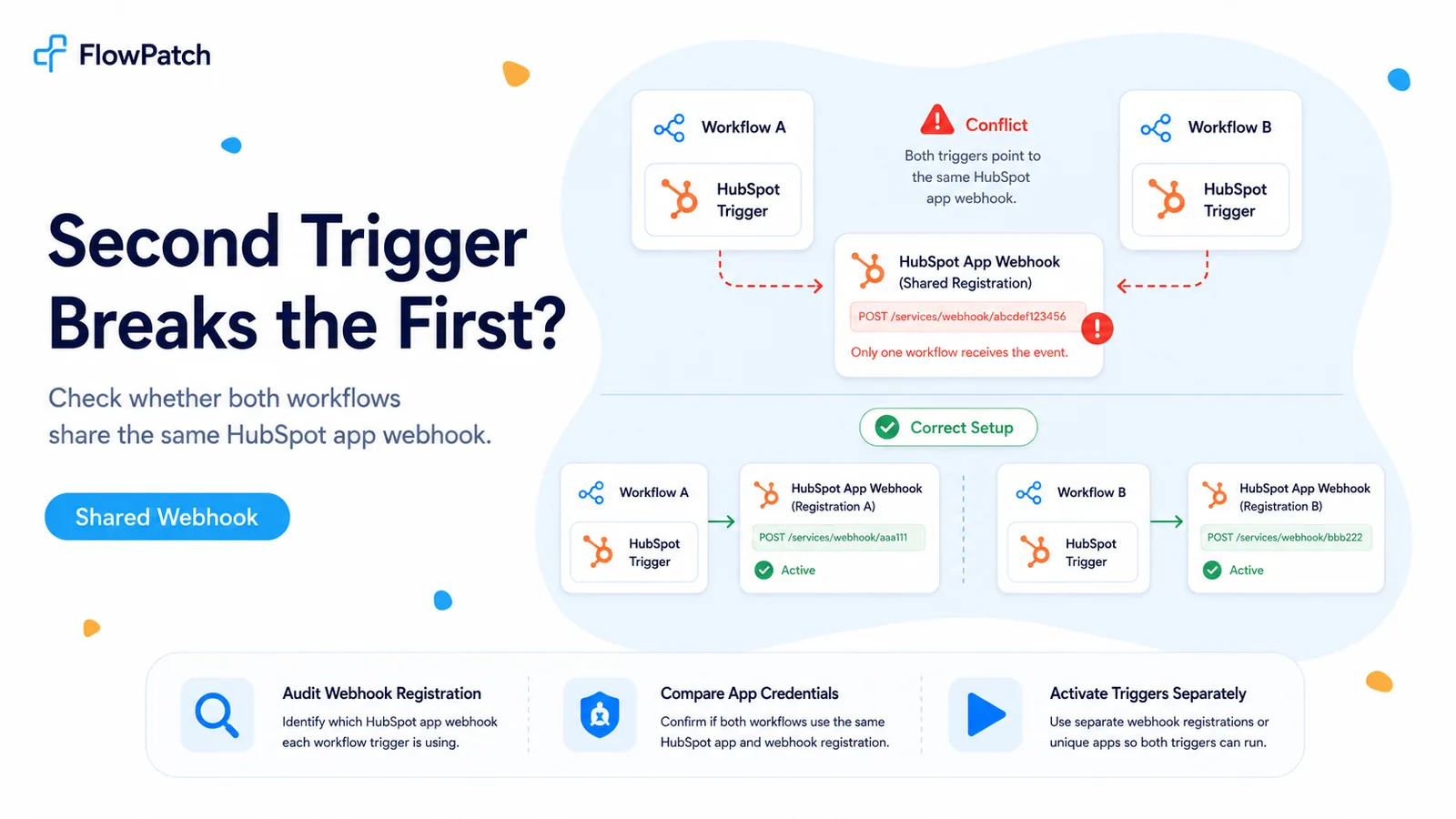
Recognize the pattern before recreating credentials
A long-standing n8n HubSpot Trigger warning says that activating a second trigger can make the previous trigger stop working because activation registers a webhook with HubSpot. A community question revisited this in the 2025–2026 period: the user wanted to know whether the limitation applied when the two workflows shared the same HubSpot app while other action-only workflows used a different private-app credential.
The useful distinction is between action nodes and webhook-registration nodes. A Get Deal, Update Contact, or Create Task node only needs API authentication. A Trigger must also own a route that HubSpot can call. Problems appear when two trigger workflows think they own the same app-level callback arrangement.
So when one trigger dies exactly after another is activated, do not start with scopes, event names, or expressions. Start by mapping app → credential → webhook target → workflow.
The timing is the clue: if Workflow A stops immediately after Workflow B is activated, inspect webhook registration state first.
Separate action-node credentials from trigger credentials in your mental model
An existing workflow that only calls HubSpot APIs can keep working even if a different trigger app is introduced. The community follow-up reported exactly that: a newly created public app used for a trigger did not interfere with workflows using HubSpot action nodes through a separate private app.
That means 'we already use HubSpot credentials elsewhere' is not enough information. Write down which credential each trigger uses and which HubSpot application owns the webhook configuration. Action credentials can be shared broadly; trigger registrations deserve more deliberate isolation.
HubSpot’s platform supports webhook target URLs on app configurations. In newer project-based patterns, webhook definitions are part of the app project. In legacy/private-app patterns, the target URL is configured on the app. The operational point is the same: webhook delivery belongs to an app configuration, not to a generic API token in the abstract.
Audit both workflows without deactivating production blindly
Open Workflow A and Workflow B and record the HubSpot credential names. Then open those credentials and identify the HubSpot app or developer configuration behind each one. Do not rely on names like `HubSpot Prod`; compare the actual app identifiers and callback configuration.
Next, check HubSpot’s webhook logs or app webhook settings. Look for the target URL and recent deliveries. If activating Workflow B changes the target URL or subscription configuration associated with the same app, you have direct evidence that the triggers are competing for registration.
Take screenshots or export configuration before testing. Repeatedly toggling two production triggers can make the failure look random when you are actually alternating which workflow owns the active registration.
- Record workflow name and n8n credential name.
- Record HubSpot app ID / app configuration behind each credential.
- Compare webhook target URL before and after activating the second trigger.
- Check HubSpot webhook logs for deliveries to the expected endpoint.
Option A: give independent triggers independent HubSpot app registrations
If both trigger workflows truly need separate webhook endpoints, the cleanest architecture is to avoid making them fight for the same app-level target. Use a separate compatible app/credential path for the second trigger when the HubSpot/n8n integration model you run supports it.
Be careful in 2026: HubSpot has sunset creation of new legacy public apps in the old Developer Platform UI. Existing legacy public apps continue to work, while new app development is moving to the Projects-based platform. Do not delete a functioning legacy app expecting to recreate it later.
If your current n8n HubSpot Trigger only supports a legacy credential model that you can no longer provision, a separate-app design may not be immediately available. In that case, consolidation or polling can be safer than forcing an unsupported auth path.
Option B: use one HubSpot ingress and route multiple event types inside n8n
A single ingress removes app-level callback competition. Receive HubSpot events in one workflow, normalize the payload, then branch by subscription type, object type, property name, or other event metadata. Call sub-workflows for the actual business logic.
This design also improves observability. You can log every incoming HubSpot event in one place and prove whether an event failed at delivery, routing, or business processing. With separate hidden registrations, a missed event often turns into a long argument about which workflow was supposed to receive it.
Do not turn one ingress into one giant canvas. Keep the ingress thin: verify, normalize, log, route. The child workflows should own contact, deal, ticket, or downstream actions.
HubSpot webhook / trigger
  ↓
Normalize event envelope
  ↓
Switch on object + event type
  ├─ contact.propertyChange → Contact sub-workflow
  ├─ deal.propertyChange    → Deal sub-workflow
  └─ ticket.creation        → Ticket sub-workflow
What does not fix an app-level webhook collision
Adding more CRM scopes does not create a second callback target. Regenerating a client secret does not isolate two registrations. Duplicating the n8n workflow can actually make the situation harder to diagnose if the duplicate carries the same trigger configuration.
Likewise, a manual Execute Node test can mislead you. Manual listening can temporarily prove that an event format is valid while the production registration still points somewhere else.
Only change credentials after you have mapped the registration conflict. Authentication and webhook ownership are separate layers.
Verification sequence after changing the architecture
Activate only Workflow A and send Event A twice. Confirm both deliveries appear in HubSpot logs and both executions appear in n8n. Then activate Workflow B. Without touching Workflow A, send Event A again and Event B twice.
If you chose separate apps, HubSpot should show the expected target for each app and both workflows should continue receiving their own events. If you chose a single ingress, every event should land in the ingress and route to the right child workflow.
Leave the system active for a normal business cycle before declaring it fixed. Trigger collisions often surface only after a restart, reactivation, or workflow edit causes n8n to re-register the webhook.
Where these facts come from
The two-trigger behavior and a real separation test come from n8n Community. HubSpot’s current developer material confirms that webhook subscriptions are delivered to target URLs configured as part of app webhook functionality, while the 2026 platform changes move new public-app development to Projects.
Frequently asked questions
Why does activating a second n8n HubSpot Trigger stop the first one?
If both workflows register through the same legacy app or credential path, activating one can replace or conflict with the webhook target the other expects. It is a webhook-ownership problem, not a broken trigger.
How do I run two HubSpot trigger workflows at once?
Separate the trigger app or credential where required so each workflow owns its own webhook, or consolidate the events into one inbound trigger and route internally to the right logic.
What should I not do?
Do not keep recreating credentials or toggling scopes. If subscription registration succeeds but one workflow goes silent when the other activates, look at shared webhook ownership first.