This is narrower than “custom properties are missing”
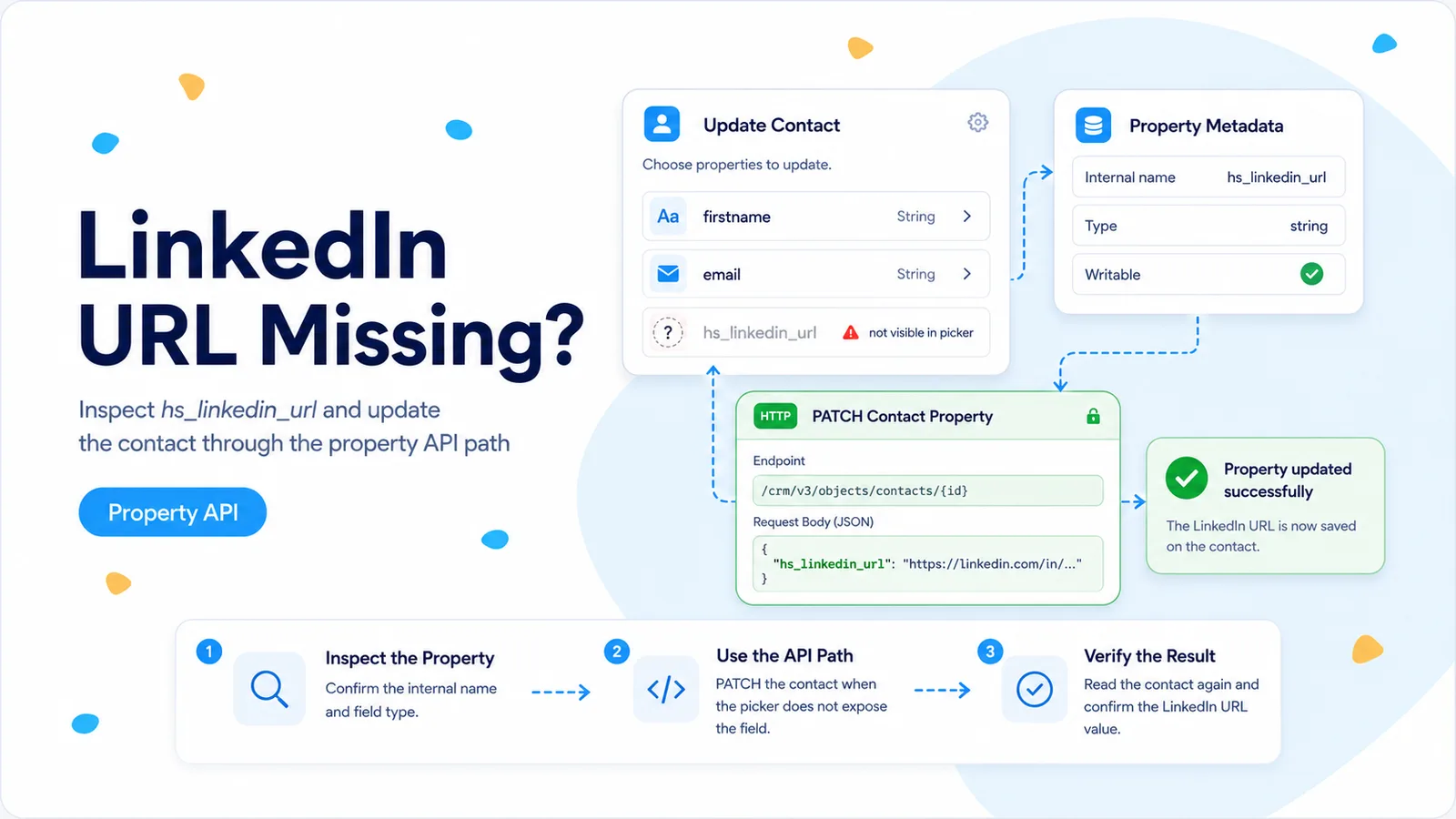
An n8n Community report describes a HubSpot contact property internally named hs_linkedin_url. The user could use the property when filtering/searching contacts, but could not select it in the Create or Update Contact action. Their credential already had contact read and write access, and other properties were available. That pattern is different from a portal where no custom fields load at all.
The useful diagnosis is capability asymmetry: the integration can reference the property in one operation but does not expose it in another operation’s field selector. Do not immediately conclude HubSpot has made the property read-only. The connector UI and the underlying API have separate capabilities.
Your first job is to verify the property in the same HubSpot account connected to n8n. HubSpot’s Properties API is the source of truth for the internal name, data type, field type, options, and other metadata that the connector may not display.
Verify the property by internal name before writing anything
Call the current contact Properties API and search the results for hs_linkedin_url, or for whichever internal property name is missing in your own case. Do not rely only on the visible label. Labels can be renamed, localized, or duplicated; API writes use the internal property name.
If the property is absent from the API response, stop. You may be in the wrong HubSpot account, looking at a different object type, or relying on an old property name. If it is present, record its type and whether the metadata suggests a value format you need to normalize before writing.
This check also prevents a bad workaround: creating a second custom field called LinkedIn URL. A duplicate field may make the n8n dropdown look easier today but fragments reporting and leaves the original field populated by other HubSpot processes.
GET https://api.hubapi.com/crm/properties/2026-03/contacts
Authorization: Bearer <token>

Find the result whose name is:
hs_linkedin_url
Prove the API write with one known contact
Retrieve a disposable or test contact and capture its HubSpot Record ID. Then use an HTTP Request node to PATCH only the missing property. Keep the payload to one field so a failure cannot be confused with another mapping problem.
HubSpot’s current contact API accepts property updates in a properties object. The Record ID is the safest target for this test because you have already resolved the exact contact. If your workflow starts from email, search or retrieve by email first, then carry the returned Record ID into the PATCH.
Use a realistic value format. For a URL-like property, send a complete URL rather than a display label or an HTML anchor. If HubSpot rejects the value, inspect the property metadata and the raw validation response before assuming the field itself is unwritable.
PATCH https://api.hubapi.com/crm/objects/2026-03/contacts/{{ $json.hubspotRecordId }}

{
  "properties": {
    "hs_linkedin_url": "https://www.linkedin.com/in/example"
  }
}
Keep the native HubSpot node for the fields it handles well
You do not have to replace the entire contact update with a raw API request because one property is missing from the selector. A practical pattern is to let the native HubSpot node upsert standard fields, capture the returned contact ID, then PATCH the missing property in a second HTTP Request node.
That split keeps common mappings readable for non-developers while making the exceptional field explicit. It also reduces the surface area you must maintain when HubSpot or n8n changes its API version. The second request should be labeled clearly — for example, “Patch hs_linkedin_url by API” — so future maintainers understand why it exists.
If several properties are missing from the native node, group them into one PATCH after you have verified each internal name. Do not send every available HubSpot property. Smaller payloads are easier to audit and less likely to overwrite fields that belong to another system.
HubSpot: Create or Update Contact
  ↓ returns contact Record ID
HTTP Request: PATCH missing connector fields
  ↓
HubSpot: Get Contact / verify selected properties
Do not infer “read-only” from a missing dropdown
A field can be omitted from a connector’s write selector for several reasons: the connector may maintain a curated list, the property metadata may not be loaded for that operation, or the node version may simply not expose the field. None of those reasons proves the HubSpot API forbids writes.
Conversely, a property being present in the Properties API does not guarantee you can change it. HubSpot contains system-managed properties whose values are controlled by HubSpot. The decisive test is a small authenticated PATCH and the response from the API, not the presence or absence of a dropdown entry.
If HubSpot returns a property-specific read-only or validation error, document that exact response and stop trying to force the write. Your integration should not fight fields owned by the platform. Use a custom property that your workflow legitimately owns instead.
Scope checks are secondary when other contact writes already succeed
If the same credential can update firstname, lastname, or another contact property, then the token already demonstrates useful contact-write capability. Expanding scopes blindly is unlikely to make one selector option appear. Keep permission debugging tied to actual 401/403 responses from the Properties or Contacts API.
Use the same credential for your verification GET and PATCH so you do not accidentally prove property visibility with one app and write capability with another. This matters in portals where multiple Service Keys, private apps, and OAuth connections have nearly identical names in n8n.
Round-trip verification
Patch one test contact, then retrieve that contact requesting hs_linkedin_url explicitly. Confirm the response contains the value you sent and that the HubSpot UI shows the same logical value. Then run the full workflow twice to make sure the second execution updates rather than duplicates the contact.
Finally, annotate the workflow with the reason for the HTTP Request fallback and the date you verified it. Connector support can improve; a future n8n version may expose the property natively, at which point you can simplify the workflow deliberately rather than leaving redundant writes in place.
- Property internal name verified through HubSpot.
- One-field PATCH succeeds on a known contact.
- Read-back returns the expected value.
- No duplicate custom property was created as a workaround.
- Workflow records why the HTTP Request node exists.
How this was verified
The hs_linkedin_url selector mismatch comes from n8n Community. The verification and PATCH strategy uses HubSpot’s current Properties and Contacts API contracts.
Frequently asked questions
The property exists in HubSpot but n8n will not write hs_linkedin_url — why?
Treat it as a connector-surface limitation until proven otherwise. The Create or Update Contact operation does not expose every writable property as a field, even when the property is valid in the portal and the Properties API.
How do I write a property n8n does not expose?
Verify the internal name and metadata through HubSpot, then write it with an authenticated HTTP Request using the contact Record ID. You can keep the native node for everything it does support and use HTTP only for the missing field.
Should I create a duplicate property to force it into the dropdown?
No. A duplicate property makes later reporting and integrations harder. Confirm the property is not read-only, confirm the credential scope, then write by internal name.