How HubSpot actually stores a multi-checkbox value
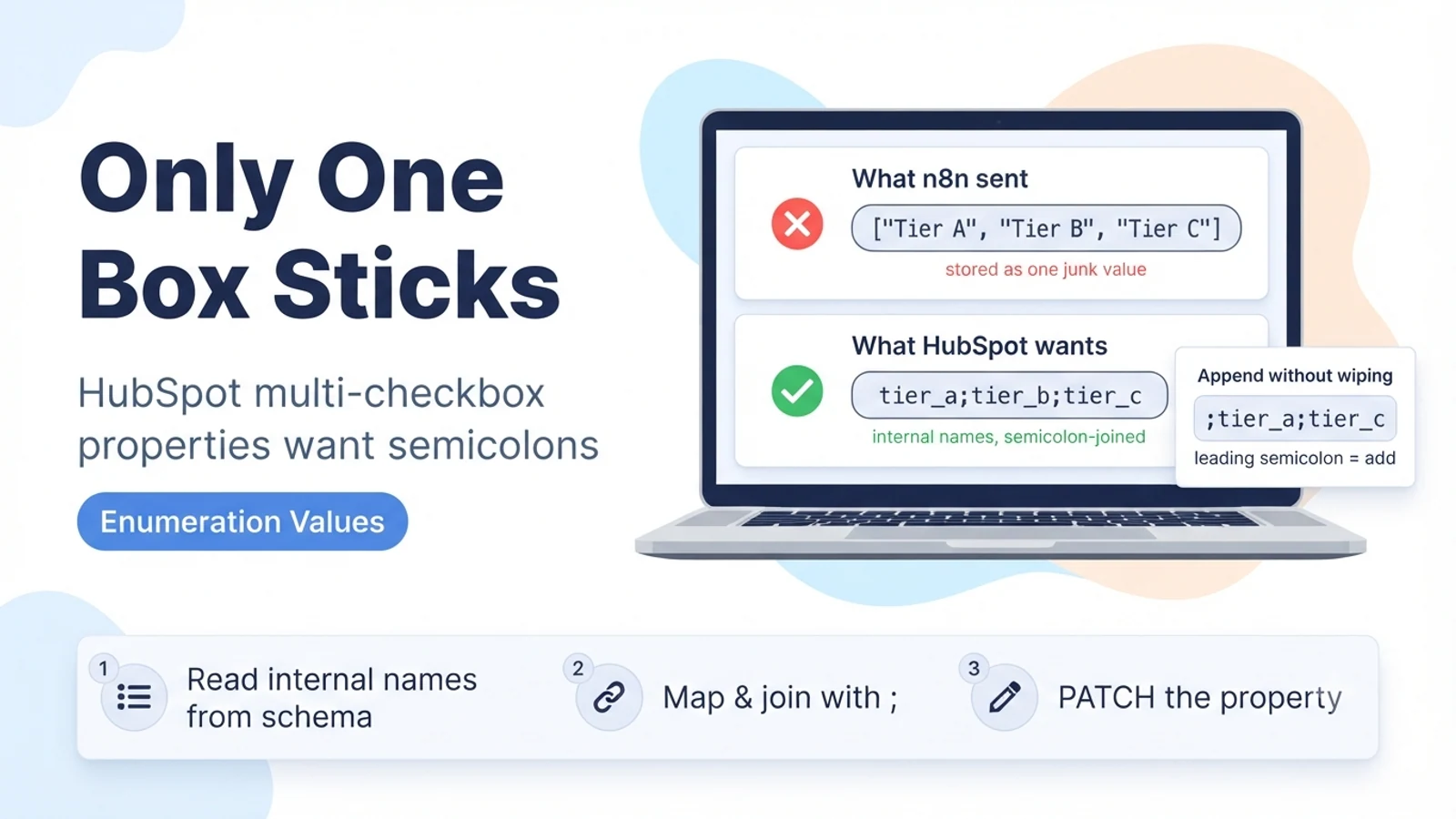
A multiple-checkboxes property is an enumeration type. On the wire it is not an array — it is a single string field whose value is the selected options' internal names concatenated with semicolons. If a contact has three interests checked, the property value is literally interest_a;interest_b;interest_c.
Two details matter. First, HubSpot matches on the option's internal name (the value defined in the property settings), not its display label. 'Tier A' shown in the UI might have the internal name tier_a or a1 or something set years ago; sending the label will not match. Second, since a 2024 change, HubSpot only splits an incoming value on semicolons when the target property is genuinely a multi-value or enumeration type. For those properties the semicolon is the delimiter; for a plain text property a semicolon is just a character.
So the write you need to send is one property, one string value, options separated by semicolons, using internal names.
Why it looks broken when you send it from n8n
If you map an n8n array directly into the property, the HTTP layer serialises it to something HubSpot does not expect, and you get one unrecognised value or a validation error. If you send a comma-separated list ('Tier A, Tier B'), HubSpot treats the entire string as a single option value, so the record ends up with one checkbox that reads 'Tier A, Tier B' — which is not a defined option, so it may be dropped or shown as invalid.
If you send the correct delimiter but the wrong names — labels instead of internal names, or a typo, or an option that was renamed — HubSpot keeps only the parts it recognises and silently discards the rest. That is the 'only one value stuck' symptom: two of your three names were valid and one was not, or the case did not match.
A full overwrite is also easy to cause by accident. Sending tier_b as the value replaces the whole property, so a contact who already had tier_a checked now has only tier_b.
- Array mapped straight in → serialisation error or single junk value.
- Comma list → stored as one undefined option.
- Correct semicolons, wrong (label or renamed) names → only the recognised names survive.
- Sending a subset as the value → the property is overwritten, previous checks lost.
What not to do
Do not switch the property to a plain text field to 'make it accept anything'. That destroys reporting, list segmentation, and workflow filters that depend on the enumeration, and it hides the real problem, which is name mapping.
Do not send one API call per option hoping they accumulate. Each call sets the property's whole value, so the last call wins and you end up with a single option. There is no per-option add endpoint for standard properties.
Do not paste the labels from the property settings screen. The labels are for humans; the API wants the internal names, which you have to read from the same screen's value column or from the property definition via the API.
The fix: build a semicolon-joined string of internal names
First, get the exact internal names. Read the property definition once (GET the property schema for that object and property) and keep a lookup from your source system's values to HubSpot's internal option names. Do not hardcode guesses.
In n8n, map your source values through that lookup, drop any that do not resolve, and join the survivors with a semicolon. Send the result as a single string on the property. If you want to replace the field entirely with this set, send the joined string as-is. If you want to add these options while keeping whatever the record already has, send the string with a leading semicolon, which HubSpot treats as 'append these' rather than 'replace with these'.
Trim whitespace around each name before joining. A stray space (tier_a; tier_b) can make the second name fail to match.
// n8n Code / Set node building the value:
const map = { 'Tier A': 'tier_a', 'Tier B': 'tier_b', 'Tier C': 'tier_c' }; // from the property schema
const wanted = ($json.sourceTiers || [])          // e.g. ['Tier A','Tier C']
  .map(v => map[v])
  .filter(Boolean)
  .map(s => s.trim());

const replaceValue = wanted.join(';');            // "tier_a;tier_c"  -> overwrites the property
const appendValue  = ';' + wanted.join(';');      // ";tier_a;tier_c" -> adds without clearing existing

return [{ json: { properties: { my_multi_checkbox: replaceValue } } }];

// PATCH https://api.hubapi.com/crm/v3/objects/contacts/{id}
// { "properties": { "my_multi_checkbox": "tier_a;tier_c" } }
Verification
Write two options to a test record and open it in HubSpot. Both checkboxes should be ticked, and the property history should show the value as the two internal names joined by a semicolon. If only one is ticked, one name did not match — recheck it against the property schema.
Test the append path: on a record that already has one option checked, send a leading-semicolon string with a different option and confirm the record now has both, not just the new one.
Test a bad name on purpose: include one option that does not exist in the joined string and confirm HubSpot keeps the valid ones and drops the invalid one, so your n8n mapping's filter step is what should be catching these rather than relying on HubSpot to error.
- Two valid names → both boxes ticked, history shows name;name.
- Leading-semicolon string → options added, existing ones kept.
- Unknown name in the string → silently dropped by HubSpot; your mapping should have filtered it.
Sources checked for this guide
HubSpot's developer changelog on semicolon-delimited property values documents that, since February 2024, incoming values are split on semicolons only for multi-value or enumeration properties. HubSpot Community threads document assigning multiple values to a multiple-checkboxes property via the create/update API using semicolons and internal names, and the leading-semicolon trick for adding without overwriting.