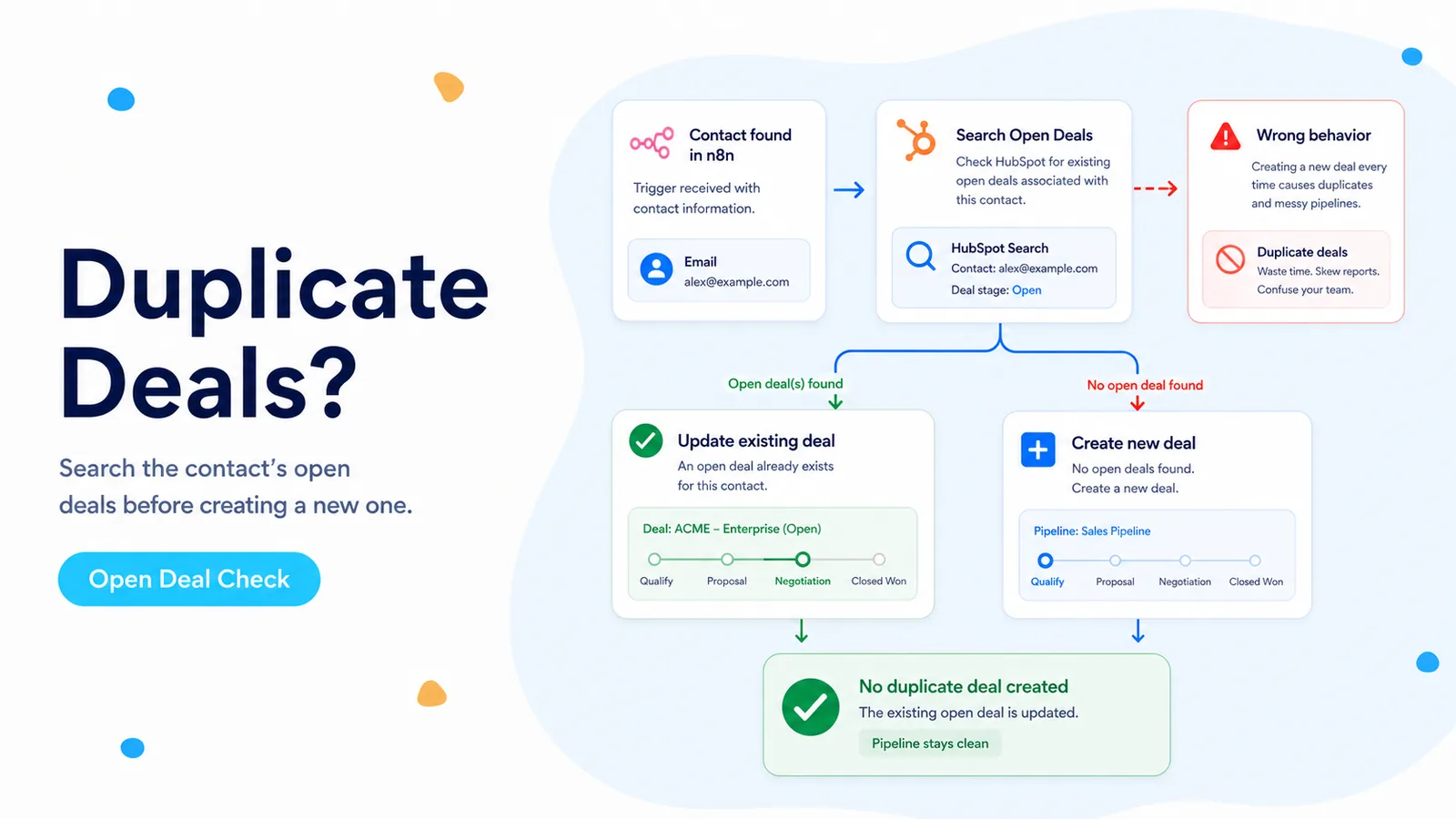
Why this workflow creates duplicates even though HubSpot itself is working
A June 2026 n8n Community case describes a common revenue-ops failure: Respond.io sends an event whenever a contact interacts, and the n8n workflow creates a HubSpot deal every time. Aircall logs, support conversations, returning customers, and genuine new leads all travel through the same Create Deal path. HubSpot is doing exactly what the workflow asks; the missing piece is qualification and existence checking before the write.
This is different from HubSpot’s contact upsert behavior. Deals do not become unique just because they share a contact, pipeline, or deal name. A contact can legitimately have several deals. If your automation wants 'at most one open sales deal per contact for this motion,' that is a rule your workflow must enforce.
The safest mental model is therefore not 'deduplicate after create.' It is 'identify the sales entity, inspect its current state, then decide whether create is allowed.' That shifts the destructive operation to the end of the branch rather than the beginning.
The Create Deal node should be the last branch of a decision, not the first reaction to an inbound event.
Step 1: remove events that are not sales opportunities
Start by saving one raw payload from a true new-lead event and one from the event that should never create a deal, such as an Aircall log or support message. Compare the payloads instead of guessing field names. In the community case, suggestions referred to fields such as `channel` or `source`, but the correct expression depends on the sender’s actual JSON.
Put this filter immediately after the webhook. It should answer a business question: 'Is this event allowed to enter deal logic?' Do not wait until after a HubSpot lookup because unnecessary lookups waste API calls and make debugging harder.
A Switch node is useful when you have several explicit categories. A Filter or IF node is better when the rule is simply 'continue only if source is a qualified lead channel.' Keep rejected events observable by sending them to a lightweight log path rather than deleting them silently.
- Capture raw payloads from at least two event types before writing the rule.
- Use the exact source/channel value emitted by the upstream system.
- Keep internal calls, support messages, and system updates away from Create Deal.
- Log rejected events with a reason so you can audit false exclusions.
Step 3: search that contact’s deals and define “open” with internal stage IDs
HubSpot’s date-versioned CRM Search endpoint for deals is `POST /crm/objects/2026-03/deals/search`. Search can filter by properties and by associations. The important part is to use internal pipeline and deal-stage values, not the labels sales reps see in the UI.
Define which stages count as open for the exact pipeline this automation owns. Do not use a vague test such as 'dealstage is not closedwon' unless your portal has only one closed state. Many pipelines have both won and lost terminal stages, plus custom terminal stages.
An association filter and pipeline filter can live in the same AND group. If you have several acceptable open stages, you can use an `IN` filter when appropriate or retrieve the contact’s deals and test against an explicit allowed-stage set inside n8n. Keep the stage list in one configuration node so a pipeline change does not require editing five branches.
POST https://api.hubapi.com/crm/objects/2026-03/deals/search

{
  "filterGroups": [{
    "filters": [
      {"propertyName":"associations.contact","operator":"EQ","value":"123456"},
      {"propertyName":"pipeline","operator":"EQ","value":"default"},
      {"propertyName":"dealstage","operator":"IN","values":["appointmentscheduled","qualifiedtobuy"]}
    ]
  }],
  "properties": ["dealname","pipeline","dealstage","hs_lastmodifieddate"],
  "limit": 10
}
Step 4: branch on the record you actually found
If the search returns one open deal for this sales motion, send its record ID to Update Deal or skip creation, depending on what the inbound event represents. If it returns zero, the workflow may create a new deal. If it returns more than one, do not arbitrarily update the first result—route that case to an exception path because the account is already in a duplicate state.
This three-way branch is safer than a boolean 'total > 0' check. It prevents the automation from hiding data-quality problems by silently choosing one of several matches.
When updating, only write fields that the event is allowed to change. A support interaction should not overwrite sales stage or amount merely because it happened to pass a broad source filter.
- 0 matches → Create Deal.
- 1 match → Update or Skip using that deal ID.
- >1 matches → Exception / review path.
- Never use the first search result as a substitute for a uniqueness rule.
Why search-before-create can still duplicate under concurrency
Two events can arrive milliseconds apart. Execution A searches and finds zero deals. Execution B searches before A’s create becomes visible and also finds zero. Both then create. HubSpot’s search documentation notes that newly created or updated objects may take a few moments to appear in search results, so a pure search-before-create pattern is not a transaction lock.
For high-value workflows, add an idempotency key that you control. In the Respond.io example, a conversation ID or lead-event ID can be stored in a custom deal property such as `external_opportunity_key`. Search that unique business key before create and persist it on the deal.
If the upstream platform can redeliver the same event, also store processed event IDs in n8n Data Tables or another durable store. Mark completion after the HubSpot write succeeds, not before. This gives you protection against both concurrent events and webhook retries.
Search reduces duplicates; a stable idempotency key is what protects you when two executions race.
Verification test: prove the workflow does not inflate the pipeline
Use one test contact and trigger the same qualified event twice. The first run should create exactly one deal. The second should resolve the same contact and route to Update/Skip. Then trigger a non-sales event such as the support or Aircall event you filtered earlier; it should stop before any deal search or create.
Next, close the existing test deal using a terminal stage and send a new legitimate lead event. If your business rule permits a new opportunity after closure, the workflow should now create a second deal. This proves your open-stage definition, not merely your contact lookup, is controlling the branch.
Finally, inspect HubSpot after several repeated tests. Count deals associated with the contact and compare against n8n execution logs. A workflow that says 'skipped' while HubSpot still gains records has a hidden create path elsewhere.
What this guide is based on
The duplicate-deal scenario comes from a June 2026 n8n Community thread. The association-search pattern, date-versioned search endpoint, filter semantics, and note about search-index delay come from HubSpot’s current CRM Search documentation.
Frequently asked questions
Why does the workflow keep creating duplicate HubSpot deals?
Create Deal runs directly after the inbound webhook without checking for an existing open deal, so repeated or near-simultaneous events each create a record.
What is the correct order of steps?
Reject non-sales events, resolve the HubSpot contact, search deals associated with that exact contact, keep only stages your pipeline treats as open, then branch to Update or Skip when a match exists.
How do I handle two events that arrive at the same time?
Add a stable source-event key so the second event recognizes the first as the same business event instead of racing it into a duplicate.