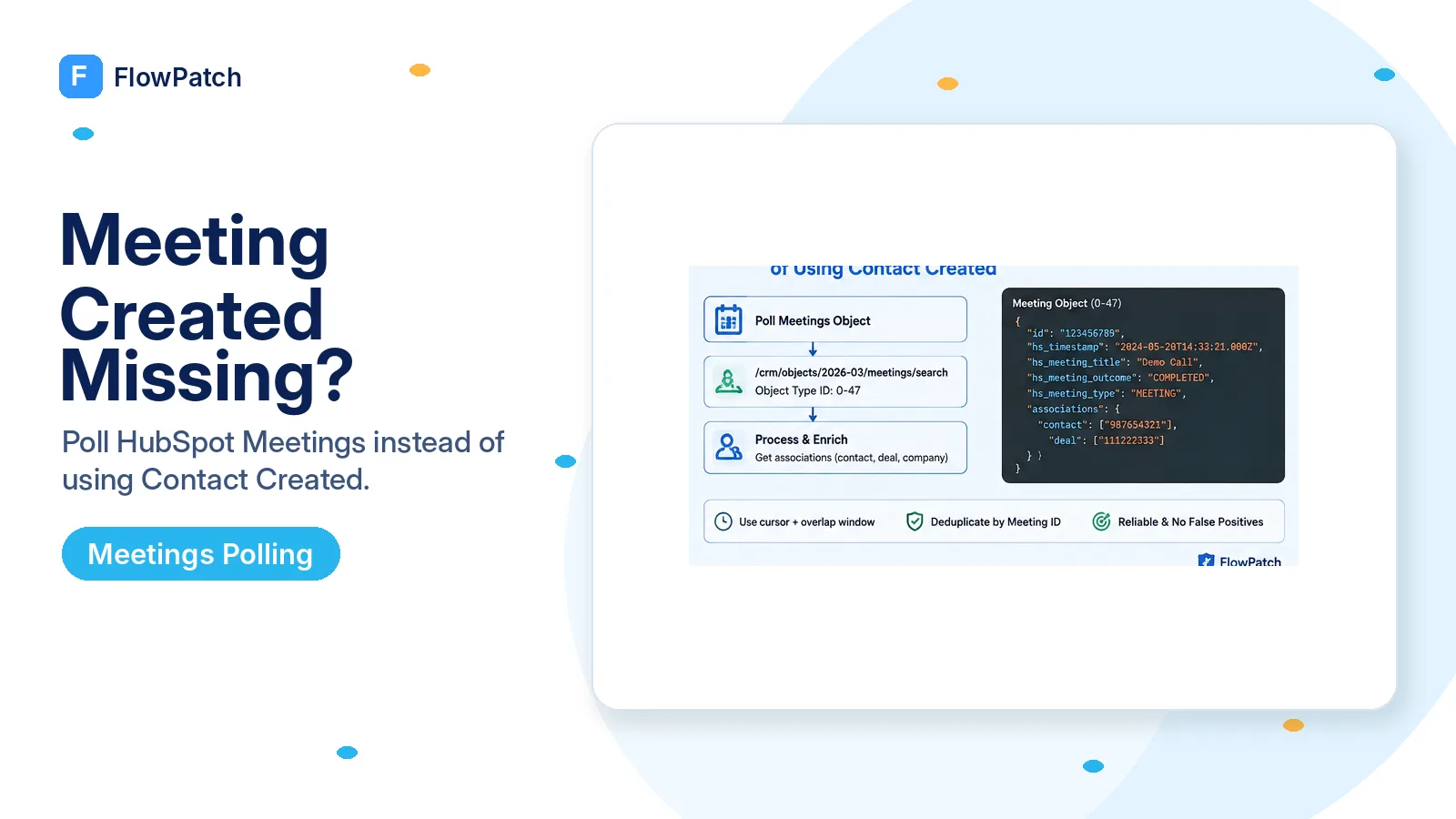
Contact Created answers a different question
An n8n Community user wanted to react when a customer creates a meeting in HubSpot and then retrieve the related contact/deal. They tried to reason from contact creation, which creates an immediate semantic problem: existing contacts can book or log meetings, and new contacts can be created for reasons that have nothing to do with a meeting. The trigger therefore produces both missed meetings and false positives.
A community reply suggested a New Engagement or Meeting Created-style trigger, but another user on n8n 1.119.2 reported that no such event appeared among the HubSpot Trigger options. That is the situation this guide addresses. The correct response is not to force a different CRM object event to impersonate meeting creation.
HubSpot’s current CRM documentation explicitly models Meetings as an activity object. Its object type ID table lists Meetings as 0-47, separate from Contacts 0-1, Deals 0-3, and Tickets 0-5. Once you accept that object model, the fallback becomes straightforward: observe the meeting records themselves.
A contact event is not a meeting event. If the trigger you need is absent, fall back to the object that actually represents the business event.
Use HubSpot’s date-versioned Meetings API as the source of truth
HubSpot’s current Meetings guide documents GET /crm/objects/2026-03/meetings for a paged list and GET /crm/objects/2026-03/meetings/{meetingId} for one record. HubSpot’s CRM Search reference also lists /crm/objects/2026-03/meetings/search and shows hs_createdate, hs_lastmodifieddate, and hs_object_id as default searchable meeting fields. That search surface is a better polling primitive because you can constrain work to a recent creation window instead of scanning an arbitrary first page.
For a trigger fallback, you normally care about hs_createdate, the meeting timestamp/title/outcome fields needed downstream, and then associations to contacts or deals. Request only the routing fields in the search pass. After a meeting ID has been identified as new, retrieve that individual meeting with the associations query parameter or use the Associations API; this avoids assuming that the search response itself carries every relationship you need.
Do not confuse the CRM activity Meetings API with HubSpot’s Scheduler API for meeting links and booking-page availability. The scheduler endpoints answer questions about scheduling pages and bookings; the CRM Meetings object is the record that appears as an engagement/activity on CRM timelines.
POST https://api.hubapi.com/crm/objects/2026-03/meetings/search
Authorization: Bearer {{ $credentials.hubspotToken }}
Content-Type: application/json

{
  "filterGroups": [{
    "filters": [{
      "propertyName": "hs_createdate",
      "operator": "GTE",
      "value": "{{ $json.cursorMillis }}"
    }]
  }],
  "sorts": ["hs_createdate"],
  "properties": ["hs_createdate", "hs_timestamp", "hs_meeting_title", "hs_meeting_outcome"],
  "limit": 100
}
Build a cursor that cannot skip a meeting when two records share a timestamp
A naive poll says “fetch meetings created after the last run time.” That works until multiple meetings land at the same boundary or one execution fails after advancing the timestamp. Use a cursor you advance only after successful processing, and include a small overlap so records near the boundary are seen again rather than skipped.
Deduplicate by HubSpot meeting ID. Record IDs are stable object identifiers, so seeing the same meeting in two overlapping polls should be harmless. Store a compact processed set for the overlap window or write the last-seen IDs alongside the cursor. If your platform supports a search filter and deterministic sorting by creation time plus ID, use it; otherwise page through the small recent window and dedupe explicitly.
Keep the polling interval proportional to the business need. A sales notification may tolerate one or two minutes; an overnight reporting sync may use fifteen minutes. Polling every few seconds increases API traffic without turning the workflow into a true webhook.
Schedule Trigger (every 2 min)
  ↓
Read cursor = lastSuccessfulCreatedAt - 30s overlap
  ↓
Search/list recent meeting records
  ↓
Drop meeting IDs already processed
  ↓
Enrich associations + perform action
  ↓
Commit cursor only after batch succeeds
Enrich from the meeting outward, not from a guessed contact
The original use case needs the contact/deal “based on” the meeting. That relationship should come from HubSpot associations rather than a search on email, owner, or meeting title. HubSpot’s Meetings guide allows associations to be requested when retrieving meeting records, and the Associations API can retrieve or manage object relationships when you need more control.
A meeting may be associated with more than one contact or with no deal at all. Write the workflow for cardinality instead of assuming results[0] is always the correct person. If the downstream process requires exactly one deal, define the business rule for choosing it — for example a specific association label or open pipeline state — and route ambiguous cases for review.
This meeting-first design eliminates false-positive contact triggers. The workflow activates only because a new meeting object was observed; contact and deal records are supporting context fetched afterward.
- Meeting ID is the event identity.
- Contact/deal IDs come from associations, not name/email guessing.
- Zero, one, and multiple associations are handled explicitly.
- Optional enrichment failures do not erase the fact that the meeting was detected.
- Cursor advances only after required side effects succeed.
Do not fire the “new meeting” workflow again for ordinary edits
Meetings are mutable. Someone can change the outcome, title, body, start time, or associations after the meeting is created. If your poll queries updatedAt rather than createdAt, the same old meeting can look new every time it is edited. Choose the timestamp that matches the event semantics.
For a true creation workflow, process a meeting ID once and mark it processed. If you also need meeting-outcome changes, create a separate workflow with a separate cursor and state model. Combining creation and update semantics in one “last modified” poll makes notifications noisy and makes replay behavior hard to understand.
A short delay before enrichment can be useful when associations are added immediately after creation, but do not turn that into a permanent ten-minute wait without evidence. Read the meeting, check whether the required association exists, and use a bounded retry when necessary, following the same field-readiness discipline used elsewhere on FlowPatch.
What about building a generic HubSpot webhook for meetings?
HubSpot’s webhook platform is evolving, and newer management models can work with generic object type IDs and actions. Meetings have object type ID 0-47 in the current CRM model. That makes a generic meeting-object subscription conceptually possible in the parts of HubSpot’s webhook platform that support that object and your app model.
However, do not turn that concept into a copy-paste promise that every n8n HubSpot Trigger version exposes it. The community symptom exists precisely because the native Trigger event list may not include Meeting Created. A custom webhook also introduces app authentication, subscription-management, public callback, signature verification, and lifecycle work that a small site visitor may not need.
Use the scheduled Meetings API poll as the conservative fallback when the goal is simply “do something shortly after a meeting record appears.” Move to a custom/generic webhook when low latency is important enough to justify the extra integration surface and you can verify the exact current HubSpot webhook contract for meeting objects.
Test three meeting paths before calling the fallback reliable
First, create a meeting for an existing contact. The workflow should detect one new meeting and enrich the existing contact without requiring a contact-created event. Second, create or book a meeting that results in a new contact and confirm the workflow still keys off the meeting ID, not the contact creation sequence. Third, edit the title/outcome of an already processed meeting and confirm the creation workflow does not fire a duplicate action.
Then simulate one failed downstream execution. Do not commit the cursor, rerun the poll, and confirm the unprocessed meeting is recovered without duplicating meetings that already completed. That failure test is what distinguishes a durable polling trigger from a demo that works only when every API is healthy.
Log meeting ID, createdAt, association IDs, cursor before/after, and downstream action ID. Those fields let you reconstruct why a meeting was or was not processed without storing sensitive meeting notes unnecessarily.
Primary sources and reports
The missing Meeting/New Engagement trigger symptom comes from n8n Community. HubSpot’s current CRM documentation is used for the Meetings object model, object type ID, date-versioned retrieve/search endpoints, and associations. The article deliberately presents custom meeting webhooks as an advanced option to verify, not as a native n8n feature that is guaranteed to exist.
Frequently asked questions
The n8n HubSpot Trigger has no "Meeting Created" event — can I use Contact Created instead?
No. That is a false positive. HubSpot models meetings as their own CRM activity object (object type ID 0-47), so a contact-creation event does not reliably correspond to a new meeting.
What is the deterministic fallback?
A small scheduled poll of /crm/objects/2026-03/meetings with a persisted cursor that detects only newly created meeting records, then fetches their contact and deal associations.
When can I use a generic webhook for meetings?
Only if your app model and the current webhook API explicitly support the meeting object and you can test it end to end. Otherwise keep the polling fallback.