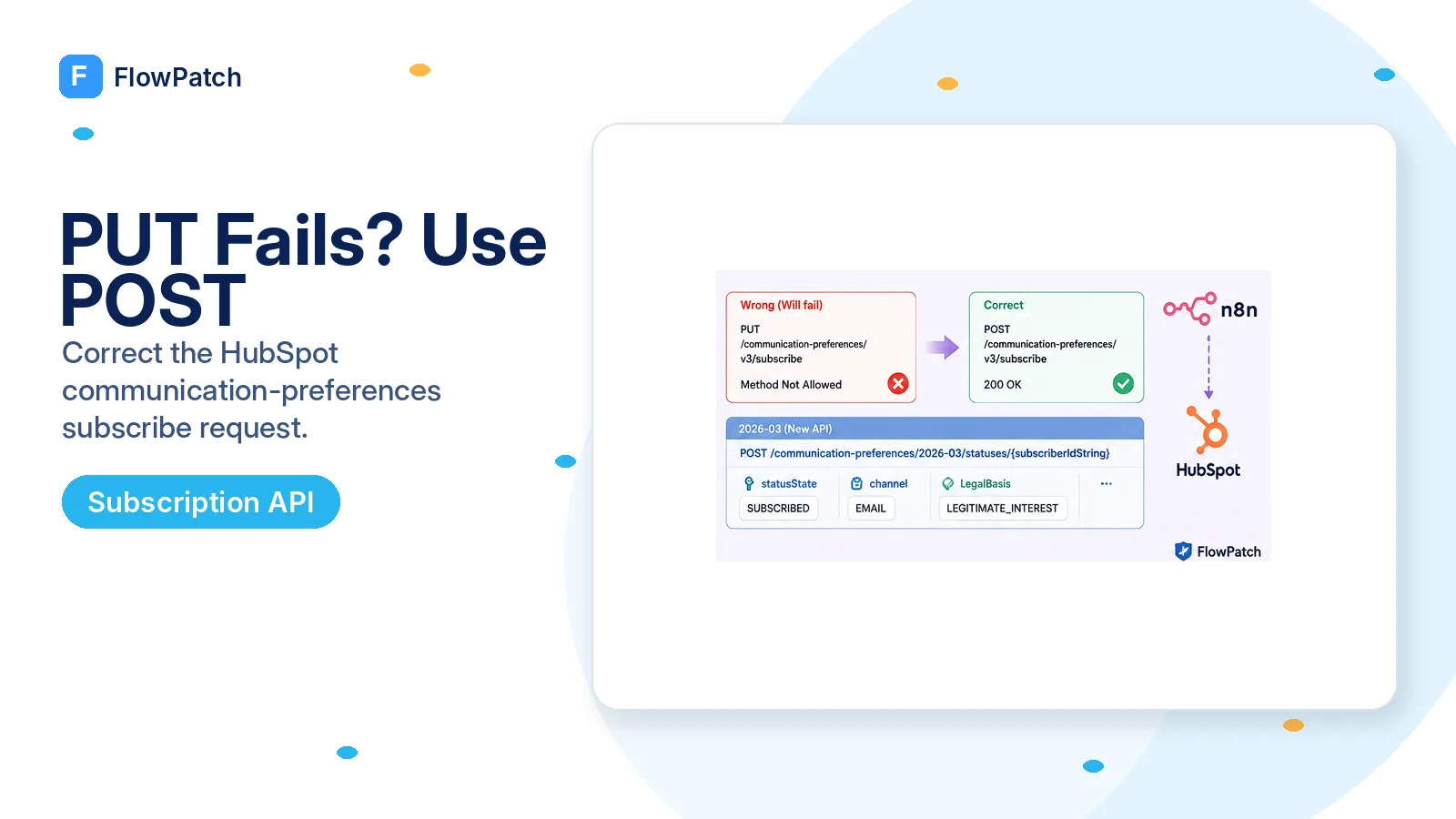
Before debugging scopes or JSON, verify the HTTP method
This is the kind of integration failure where a one-word configuration error can hide inside an otherwise convincing request. In an n8n Community thread, a user was given a sample call to /communication-preferences/v3/subscribe using PUT. Their follow-up was simple: after changing PUT to POST, it worked. HubSpot’s current legacy v3 reference agrees — Subscribe a contact is a POST endpoint.
That makes method verification the first diagnostic step. In the n8n HTTP Request node, inspect Method and URL together rather than staring only at the body. A request can carry the right Bearer token, content type, email address, subscription ID, and legal-basis fields but still fail because it is sent with a verb the route does not implement.
Do not infer the method from the word update. REST APIs often use POST for action-style endpoints such as subscribe/unsubscribe, and HubSpot’s newer preferences API also uses POST for status updates. The endpoint reference is authoritative; naming intuition is not.
Legacy v3 subscribe: POST /communication-preferences/v3/subscribe. If your n8n node says PUT, correct that before changing anything else.
Build a minimal v3 request and prove one subscription type
HubSpot’s v3 Subscribe a contact reference accepts an email address and subscription ID and includes fields for lawful-basis context. Start with one known test contact and one subscription type whose internal ID you have verified. Avoid iterating over hundreds of contacts until the single-item request is deterministic.
Use a reusable n8n credential or a Bearer header stored in credentials, not a literal token in the JSON body. The v3 guide lists communication_preferences read/write scope variants. If POST reaches the endpoint but returns a 403, check the granted communication-preferences permission rather than expanding unrelated CRM contact scopes.
Keep the subscription ID as an ID, not the human-readable name shown in the HubSpot settings UI. Names can be edited and localized; the API contract operates on the internal subscription identifier. Fetch subscription definitions/statuses first when you are unsure which ID belongs to the email type you intend to change.
POST https://api.hubapi.com/communication-preferences/v3/subscribe
Authorization: Bearer {{ $credentials.hubspotToken }}
Content-Type: application/json

{
  "emailAddress": "{{ $json.email }}",
  "subscriptionId": "{{ $json.subscriptionId }}",
  "legalBasis": "CONSENT_WITH_NOTICE",
  "legalBasisExplanation": "Explicit consent captured by the named form/process"
}
Do not replace the preferences API with a made-up contact property
When a dedicated consent endpoint is frustrating, it is tempting to search the contact property list for something that looks like an opt-in field and PATCH it through the normal Contacts API. That shortcut is risky. Subscription preferences represent communication eligibility and lawful-basis state, not merely a free-form CRM attribute owned by your integration.
Use the Communication Preferences API for subscription status. If your workflow also needs a business-level audit field such as source_form_name or consent_capture_timestamp, store that in a clearly named custom property that you own, but do not confuse that audit metadata with HubSpot’s actual subscription status.
This separation helps with debugging as well. A contact can have a custom “newsletter consent source” value while still being unsubscribed in Communication Preferences. Reading only the custom property would give the automation an incorrect picture of whether HubSpot will send the email.
For new work, compare the 2026-03 API instead of freezing the workflow on legacy v3
HubSpot introduced date-versioned APIs in 2026 and its current Communication Preferences guide documents a 2026-03 status endpoint. To update one contact, send POST /communication-preferences/2026-03/statuses/{subscriberIdString}, where subscriberIdString is the email address. The request body uses subscriptionId, statusState, legalBasis, legalBasisExplanation, and channel.
This is not a drop-in path replacement for v3. The body vocabulary changes: the newer API expresses state explicitly as SUBSCRIBED, UNSUBSCRIBED, or NOT_SPECIFIED and includes channel, currently EMAIL. It also uses the date-versioned subscriptions-status scopes rather than the legacy communication_preferences scope names. Treat migration as a small API change with its own test, not a string find-and-replace.
For a brand-new FlowPatch-style integration, the date-versioned endpoint is generally the cleaner place to start because HubSpot says new integrations should use the latest date version where available. If you already have a stable v3 workflow, record that it is legacy and schedule a deliberate migration rather than changing production consent logic casually.
POST https://api.hubapi.com/communication-preferences/2026-03/statuses/{{ encodeURIComponent($json.email) }}
Authorization: Bearer {{ $credentials.hubspotToken }}
Content-Type: application/json

{
  "subscriptionId": {{ $json.subscriptionId }},
  "statusState": "SUBSCRIBED",
  "legalBasis": "CONSENT_WITH_NOTICE",
  "legalBasisExplanation": "Explicit consent captured by the named form/process",
  "channel": "EMAIL"
}
Treat legal-basis fields as real business data, not filler required to make the API green
HubSpot’s current documentation notes that legalBasis and legalBasisExplanation can be required when data privacy settings are enabled. Do not hard-code a generic explanation such as “added by n8n” across every contact. The value should describe the real process that supplied the lawful basis, and your organization should decide which legal basis is appropriate for that process.
The automation’s job is to faithfully transmit an already determined consent outcome, not to invent consent. Make the source event explicit: a form checkbox, preference-center action, customer request, contract process, or other approved source. If the upstream event does not actually demonstrate an opt-in, route it for review rather than automatically setting SUBSCRIBED.
This is also why retries need care. A network retry of the same idempotent status request is different from subscribing a contact again based on an old event that should no longer be valid. Preserve source event IDs/timestamps when your workflow handles consent so you can audit why a status changed.
Verify the resulting preference, not merely the 200 status
After the update, read the contact’s subscription preferences through the corresponding API and confirm the target subscription ID reports the expected state. This catches subtle mistakes such as using the wrong subscription type, wrong email address, wrong brand/business unit, or a body field that was accepted but did not produce the status you expected.
For the 2026-03 API, HubSpot documents GET /communication-preferences/2026-03/statuses/{subscriberIdString}?channel=EMAIL. A response can contain multiple subscription types, so filter by subscriptionId instead of taking the first result. Store the returned status and timestamp in execution evidence for a test run.
Then run the negative case. Unsubscribe the test contact through an approved path and prove your workflow can represent UNSUBSCRIBED without a later branch immediately resubscribing them. A consent automation is not correct until both directions and precedence rules are tested.
- HTTP method matches the documented endpoint.
- Subscription ID belongs to the intended email type.
- Granted scope matches the API generation being used.
- Legal basis/explanation come from a real approved process.
- Read-after-write confirms the exact subscription state.
Keep API generation in one place so migration is reversible
If several workflows subscribe contacts, do not copy raw v3 and 2026-03 requests everywhere. Put the preference update behind one sub-workflow with a small input contract: email, subscriptionId, desired state, legal basis, explanation, and optional brand context. That gives you one location to migrate scopes and endpoint versions.
Return a normalized result such as subscriber, subscriptionId, requestedState, observedState, and API version. Callers should not depend on the raw shape of one HubSpot generation. This is ordinary integration hygiene, but it is especially valuable for compliance-adjacent APIs where inconsistent behavior across copied nodes is costly.
When you migrate, run the old and new read endpoints on test contacts first, compare interpretation, then switch the write path. Do not dual-write subscription status to two APIs in production without understanding whether they address the same underlying preference record.
Where these facts come from
The POST-versus-PUT correction comes from a January 2026 n8n Community report and is confirmed by HubSpot’s current v3 endpoint reference. The migration section uses HubSpot’s current 2026-03 Communication Preferences guide.
Frequently asked questions
Should the HubSpot v3 subscribe request use PUT or POST?
POST. HubSpot’s current reference defines /communication-preferences/v3/subscribe as a POST endpoint. A January 2026 n8n user reported that switching a suggested PUT to POST fixed the update.
Should I store email consent in a normal contact property instead?
No. Subscription preferences represent communication eligibility and lawful-basis state. Use the Communication Preferences API for status; keep any audit metadata in a clearly named custom property you own.
Is the 2026-03 endpoint a drop-in replacement for v3?
No. The date-versioned endpoint POST /communication-preferences/2026-03/statuses/{subscriberIdString} uses a different body with statusState, channel, legalBasis, and its own scopes. Treat migration as a small API change with its own test.