Capture the exact identifier before the HubSpot node
Insert an Edit Fields or Code node immediately before the failing HubSpot node and create a temporary debug field that contains the lookup value as n8n actually sees it. For an email-based upsert, record the raw value, a trimmed value, and a lower-cased comparison value. The goal is not to permanently mutate every email; it is to make invisible input differences visible in the execution data.
Blank values deserve special treatment. If one branch of your workflow can reach the upsert with email equal to an empty string, null, or an expression that resolves to undefined, you no longer have a stable contact identity. Filter those items out or route them to an exception path instead of letting the HubSpot node guess.
Also verify that you are not accidentally mapping a display name, form field label, or a previous node’s item index into the identity field. n8n expressions can look correct in the editor while resolving differently for later items in a multi-item execution. Pin one failing item and inspect the evaluated value, not only the expression text.
// Code node: expose what the next node will use
return items.map(item => {
  const raw = item.json.email;
  return {
    json: {
      ...item.json,
      _debug_email_raw: raw ?? null,
      _debug_email_trimmed: typeof raw === 'string' ? raw.trim() : null,
      _debug_email_normalized: typeof raw === 'string' ? raw.trim().toLowerCase() : null
    }
  };
});
Prove that HubSpot can find the same contact by the same identifier
Before changing the upsert node, perform a read-only test. HubSpot documents a direct contact lookup by email at the contact object endpoint with idProperty=email. Use the same credential and the same incoming email. If that GET returns the expected record, you have proven the identity is valid and the portal contains exactly the contact you intend to update.
If the lookup returns nothing while the HubSpot UI appears to show the contact, check additional email addresses, merged contacts, the connected HubSpot account, and whether the value in your workflow is actually the primary email. HubSpot documents additional emails as unique identifiers too, but connector behavior can differ from the raw API. Do not assume a visual match in the CRM means the node is looking up by the same field.
If you use a custom business identifier instead of email, confirm the property is genuinely configured as unique in HubSpot and use that exact internal property name. A normal text property is not automatically a safe upsert key simply because your own source system happens to keep its values unique.
GET https://api.hubapi.com/crm/objects/2026-03/contacts/person@example.com?idProperty=email
Authorization: Bearer <token>
When the native upsert should work, simplify it before rebuilding the workflow
Duplicate the failing HubSpot node and strip the copy down to the identity plus one harmless property such as firstname. Feed it one pinned item. If the minimal node updates the existing contact, reintroduce the remaining mapped properties in small groups. That tells you the upsert path itself is viable and the original failure was caused by configuration or input state rather than the mere existence of the contact.
If the minimal node still returns CONTACT_EXISTS, compare the node version and the selected lookup behavior with a freshly added HubSpot node. Connector definitions change over time, and stale saved parameters can survive upgrades. Rebuilding one node is a useful test; rebuilding the entire credential set is not.
Do not turn on Continue On Fail as the final solution. That only converts a real data-loss condition into a green-looking execution. If an existing CRM contact was supposed to be updated and was not, the workflow has not succeeded just because the next node ran.
Deterministic fallback: search first, then choose Update or Create
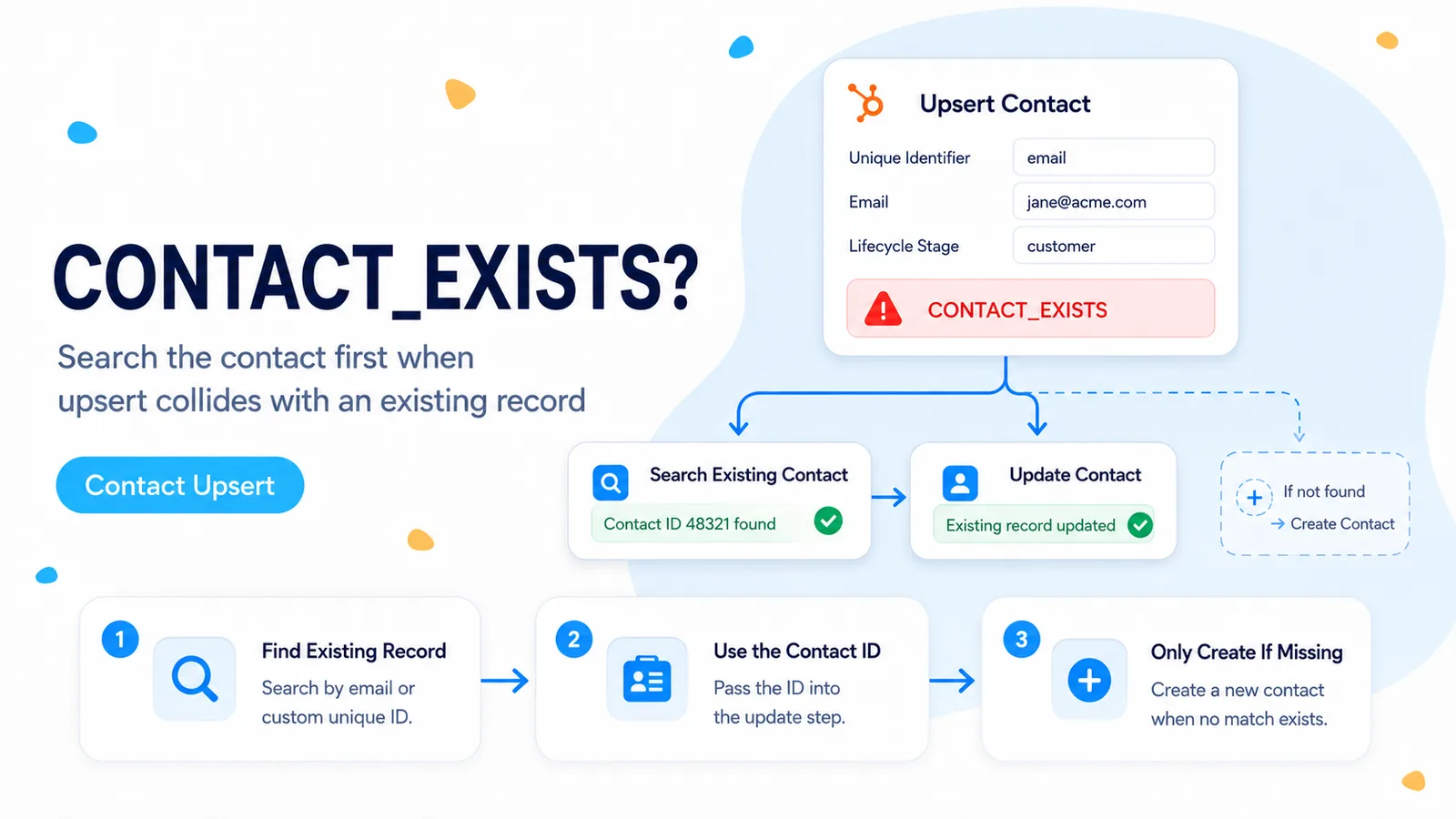
For a production workflow where duplicate prevention matters more than connector convenience, split identity resolution from the write. Search or retrieve the contact first. If a record ID is returned, update that exact ID. If no record is returned, create the contact. This costs an extra read for new records but makes the decision visible in execution history and gives you a place to handle ambiguous matches.
The important detail is to carry the HubSpot Record ID forward after the search. Once you have the Record ID, stop matching by email for the rest of that execution. Record ID is the clearest key for subsequent updates and associations because it identifies the object you already resolved.
Add a third branch for invalid input rather than treating invalid input as “not found.” An empty email is not evidence that a contact is new. A malformed identifier should fail validation before the create branch so the workflow cannot manufacture duplicate records from bad source data.
Incoming contact
  ↓
Validate identity
  ├─ invalid → exception queue
  ↓
Lookup by email / unique ID
  ├─ found → PATCH by HubSpot Record ID
  └─ not found → POST create
Raw API fallback: use HubSpot’s current batch upsert contract explicitly
HubSpot’s current Contacts API exposes a batch upsert endpoint. Each input names idProperty and supplies the identifier value in id. For contacts, email is supported, as is a custom unique identifier property. That endpoint is useful when you want the identity rule written directly in the request instead of implied by a connector control.
There is one current caveat worth preserving in your design: HubSpot says partial upserts are not supported when email is the idProperty. If you need a partial upsert, use a custom unique identifier property rather than assuming every email-based batch request behaves like a PATCH.
Keep batches small enough to inspect and log the result for each source record. HubSpot limits object batch operations to 100 records. For a sync job, attach your own source record key to the n8n item so you can reconcile failures after the response without relying on array position alone.
POST https://api.hubapi.com/crm/objects/2026-03/contacts/batch/upsert

{
  "inputs": [
    {
      "id": "person@example.com",
      "idProperty": "email",
      "properties": {
        "firstname": "Taylor",
        "phone": "+15551234567"
      }
    }
  ]
}
Verify the fix with a three-case test, not one happy-path run
Run three controlled inputs: one existing contact, one genuinely new contact, and one invalid or blank identifier. The existing contact must retain its Record ID and receive the intended property update. The new contact must create exactly one record. The invalid item must be stopped or quarantined without creating anything.
Then rerun the existing-contact input a second time. A correct upsert or search→update design should be idempotent: no duplicate record, no CONTACT_EXISTS failure, and no unexpected side effect caused simply by replaying the same source event.
- Existing contact updates by a stable identifier.
- New contact creates once.
- Blank or malformed identity cannot reach Create.
- Replaying the same existing item does not create a duplicate.
- Execution data records the HubSpot Record ID used for the write.
Where these facts come from
The CONTACT_EXISTS reproduction comes from the n8n Community thread. The identifier, retrieve-by-email, and batch-upsert behavior are checked against HubSpot’s current Contacts API documentation rather than inferred from the connector UI.
Frequently asked questions
Is CONTACT_EXISTS a permission or rate-limit problem?
No. It is an identity-resolution problem. HubSpot recognized a create attempt for an identity that conflicts with an existing contact; the question is why the connector did not resolve that identity before deciding to create.
How do I diagnose it?
Capture the exact identifier the node uses (raw, trimmed, lower-cased), then prove HubSpot can retrieve the existing record by that same identifier, for example a read by email with idProperty=email. Route blank identifiers to an exception path.
What is a reliable fallback when the native upsert keeps creating?
Split identity resolution from the write: search or retrieve first, update the returned Record ID if found, create only if nothing is returned, and add a third branch for invalid input. HubSpot’s batch upsert endpoint is an alternative, but partial upserts are not supported when email is the idProperty.