Two different Salesforce mechanisms, two different fixes
DUPLICATE_VALUE comes from a database-level unique constraint on a specific field — most often an External ID field, a formula field marked Unique, or a standard field like Email on Contact/Lead when your org has "Require Unique Case-Insensitive Email" or similar validation enabled. This is deterministic: the exact field and the exact colliding record ID are named in the error.
DUPLICATES_DETECTED comes from Salesforce's Duplicate Rules and Matching Rules feature (Setup → Duplicate Rules), which runs fuzzy matching — similar company name, similar phone number, similar address — and can be configured per-object to either Block or Allow with a warning. If your org's Duplicate Rule for Leads or Accounts is set to Block, an n8n Create operation that would have otherwise succeeded gets rejected with DUPLICATES_DETECTED and a list of the records it thinks are duplicates, even if none of your individual fields violate a hard uniqueness constraint.
The fix: search before create, then branch
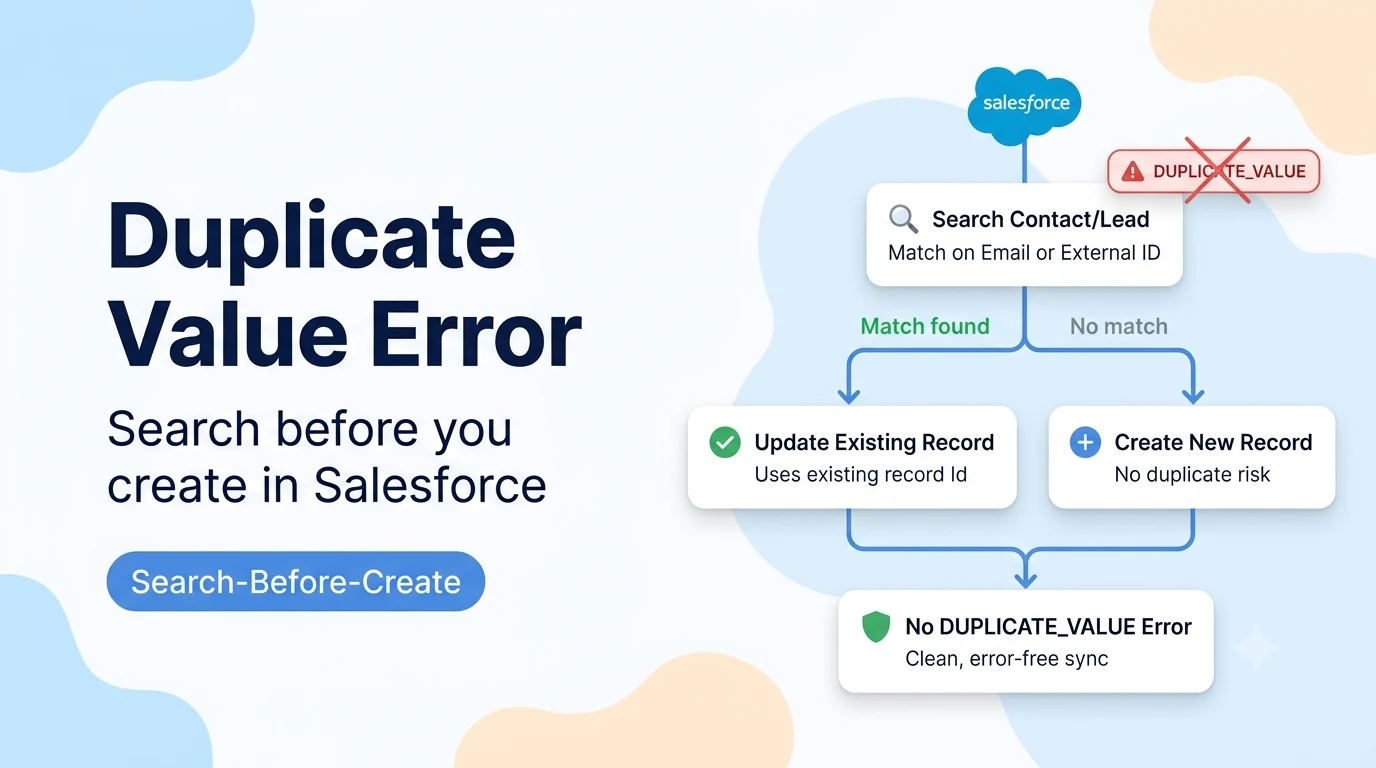
The reliable pattern — the same one used across most CRM integrations, including the equivalent HubSpot "search open deal before create" pattern many n8n workflows already use — is to search Salesforce for a record matching your natural key (email, external ID, or the same fields your Duplicate Rule matches on) immediately before the Create step, then use an IF node to route to Update when a match exists and Create only when it doesn't.
- Salesforce node → Search: query the object using the same field the DUPLICATE_VALUE error named, or the fields your Duplicate Rule matches on (name + phone, or email).
- IF node: check whether the Search step returned any records.
- True branch (match found): Salesforce node → Update, using the existing record's Id.
- False branch (no match): Salesforce node → Create, as originally designed.
-- SOQL used by the Search step (adjust fields to match your object and the specific unique/duplicate-rule fields involved)
SELECT Id, Name, Email
FROM Contact
WHERE Email = '{{ $json.email }}'
LIMIT 1
If it's DUPLICATES_DETECTED: consider Allow-with-warning instead of Block
For DUPLICATES_DETECTED specifically, there's a second option beyond search-before-create: ask whoever administers the Salesforce org to review the relevant Duplicate Rule (Setup → Duplicate Rules) and change its action from Block to Allow (optionally with the Alert checkbox left on, so a human still sees a warning banner in the UI) for API-created records, if your business process is fine with occasional near-duplicates that a human can merge later. This is a policy decision for the Salesforce admin, not something to change from n8n, but it's worth raising if the search-before-create pattern above still produces false-positive matches on fuzzy Duplicate Rules (e.g. two genuinely different companies with similar names).
Batch workflows: search per item, not once for the whole batch
If your n8n workflow processes many items in one execution (e.g. a scheduled sync pulling 200 rows from a spreadsheet), make sure the Search step runs once per item — inside a Split In Batches loop or with the Salesforce node's own per-item execution — rather than a single search that only checks the first item. A single upfront search that passes for item 1 but silently lets items 2–200 hit the same DUPLICATE_VALUE error is a common way this pattern gets implemented incorrectly.
Sources checked for this guide
DUPLICATE_VALUE and DUPLICATES_DETECTED are both standard, documented Salesforce API error codes tied respectively to unique field constraints and the platform's Duplicate Rules/Matching Rules feature. The search-before-create branching pattern mirrors the equivalent duplicate-prevention pattern already documented for n8n's HubSpot integration on this site, applied to Salesforce's Search + IF + Update/Create nodes.