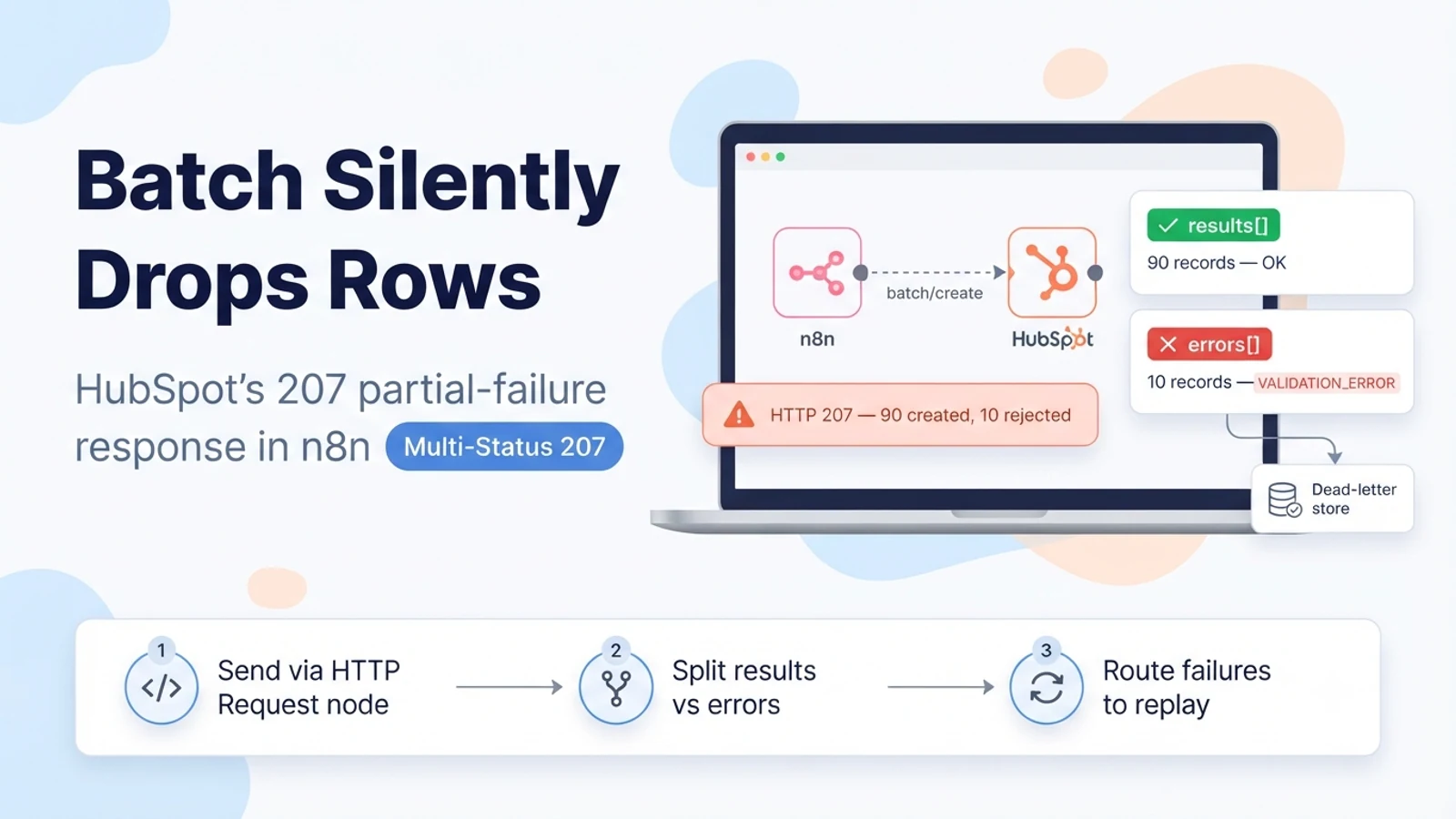
Why 207 is not a normal success or a normal error
HTTP 207 Multi-Status means "the outcome is per sub-item, read the body." HubSpot uses it for batch endpoints when at least one record in the batch was created or updated and at least one was rejected. The top-level HTTP status is not enough information on its own: a 200 tells you every record in the batch succeeded, a 207 tells you the batch was partially applied, and the details of which records failed and why are only in the JSON body.
Two HubSpot quirks make this worse. First, some validation failures do not produce a 207 at all — if one record violates a hard rule (an invalid email format, a value outside a restricted enumeration), HubSpot can reject the entire batch with a 400 and create nothing. Second, the batch upsert endpoint returns a 409 Conflict for the whole request when one input matches an existing record by the id property, instead of upserting the rest and flagging the conflict. So the same logical situation — 'most of my rows are fine, a few are not' — can surface as a 207, a 400, or a 409 depending on which rule was broken.
The practical consequence: you cannot treat batch writes as fire-and-forget. Every batch call needs code that inspects the body and decides what actually happened.
Why the built-in HubSpot node hides the partial failure
n8n's HubSpot node exposes create and update operations, but when it sends work as a batch it represents the batch as a single node output item. It does not iterate the HubSpot response's results array (the records that succeeded) against its errors array (the records that failed). If HubSpot returns a 207, the node generally treats the call as successful because it received a 2xx response, and the rejected records are dropped from the picture.
That is how a sync 'works' in testing with clean data and then quietly loses ten percent of production records once real, messy input arrives. The workflow shows green executions, the record count in HubSpot is lower than expected, and there is no error to search for.
- Execution is green, but the HubSpot record count is lower than the number of input items.
- Re-running the workflow 'fixes' some records but duplicates the ones that had already succeeded.
- No error item appears in n8n even though HubSpot rejected rows.
- The gap is not random — it correlates with a specific bad field (blank email, unknown picklist value, over-long text).
Three responses that make this worse
Retrying the entire batch is the most common mistake. If the last attempt was a 207 that created 90 of 100 records, retrying the same 100-record payload creates duplicates of the 90 that already exist (unless you are using a true upsert keyed by a stable external id). You end up reconciling duplicates instead of fixing ten rows.
Dropping the batch size to one record per call removes the ambiguity but destroys throughput and still gives you no structured record of what failed unless you also add error handling. It trades one problem for a rate-limit problem.
Accepting the loss because 'most of them went through' is not a fix — it is an unbounded, silent data-quality leak that grows every run.
- Do not blindly retry a batch that returned 207 — you will duplicate the successful records.
- Do not 'solve' visibility by setting batch size to 1 without adding error routing.
- Do not treat a lower-than-expected HubSpot count as acceptable rounding.
The fix: send the batch with an HTTP Request node and parse the response
Replace the batch write with an HTTP Request node calling the batch endpoint directly, configured to not throw on non-2xx responses (the 'Continue On Fail' / never-error setting, depending on your n8n version). Then add a Code node that reads the response body and splits it into two lists: records that succeeded and records that were rejected, with HubSpot's own error message and category attached to each rejection.
A 207 body contains a status field, a results array (each entry is a created or updated record with its new id), a numErrors count, and an errors array. Each error entry carries a status of 'error', a category (for example VALIDATION_ERROR), a human-readable message, and a context object that usually identifies which input it refers to. Map each error back to your original input row using whatever key you sent (email, an external id, or the array index), so you know exactly which source record needs attention.
Send downstream steps only the succeeded list. Send the rejected list to a dead-letter path (next section). Do not let a rejected record flow through as if it had an id.
// HTTP Request node: POST https://api.hubapi.com/crm/v3/objects/contacts/batch/create
// Auth: HubSpot private-app token (Bearer). Never error on response.
// Body: { "inputs": [ { "properties": { ... } }, ... ] }

// Code node after it:
const res = $json;                 // the HubSpot response body
const http = $json.statusCode ?? 200;
const succeeded = (res.results || []).map(r => ({ id: r.id, properties: r.properties }));
const failed = (res.errors || []).map(e => ({
  category: e.category,
  message: e.message,
  context: e.context,          // usually { ids: [...] } or the offending input
}));

if (http === 400 || http === 409) {
  // whole batch collapsed — nothing was written. Treat every input as failed.
}
return [{ json: { httpStatus: http, status: res.status, succeeded, failed } }];
Handle the 400 and 409 cases so one bad row cannot sink the batch
Because one invalid record can turn the whole batch into a 400, pre-validate your input before batching. Drop or fix rows with an empty or clearly malformed email, coerce enumeration values to HubSpot's internal names, and truncate fields that exceed HubSpot's length limits. The goal is that everything reaching the batch call is at least structurally valid, so the only failures you see are genuine business conflicts.
For batch upsert keyed by email, deduplicate your input list first. If two rows in the same payload resolve to the same contact, HubSpot can 409 the entire request. Collapse duplicates in n8n (keep the most complete row) before sending. For the conflict-prone slice — records you know may already exist — consider individual upserts with per-item error handling instead of one large batch, so a single 409 only affects one record.
Keep batch sizes at or below HubSpot's documented per-call maximum for the object type. Oversized batches are rejected outright and are not a 207 you can partially recover.
Route rejected records to a dead-letter store, not the console
Write each rejected record to a durable location — a database table, an Airtable base, or a Google Sheet — keyed by your own idempotency key (the source system's record id, not HubSpot's). Store the HubSpot category and message verbatim, the timestamp, and the original payload. This turns 'we lost some records' into a queryable list of specific problems.
Build a small replay workflow that reads the dead-letter store, lets you fix values, and resubmits only those rows. Because the entries are keyed by a stable external id, replaying is safe: an upsert will update the record you meant to create, and a create guarded by a search-before-create will not duplicate.
Alert on the dead-letter store's growth rate, not on individual failures. A steady trickle of VALIDATION_ERROR entries for the same field is a mapping bug upstream; a sudden spike is usually a HubSpot-side change to a property or a restricted picklist.
- Key dead-letter entries by the source record id, so replay is idempotent.
- Store HubSpot's category and message unchanged — they name the exact rule broken.
- Alert on dead-letter growth rate, not per-record noise.
Verification: prove partial failures are now caught
Build a test batch of five known-good records plus one deliberately bad record (blank email, or a picklist value that does not exist). Run the workflow once. Confirm the five good records exist in HubSpot exactly once, the bad record appears in the dead-letter store with HubSpot's real message, and no downstream step received the bad record as if it had an id.
Run the same workflow again without changing anything. The five good records must not be duplicated, and the dead-letter store must not gain a second copy of the bad record for the same source id. Then fix the bad record's value and run the replay workflow; confirm it now lands and the dead-letter entry is cleared or marked resolved.
Finally, force a whole-batch 400 by sending two structurally invalid rows, and confirm your Code node recognises that nothing was written and treats every input row as failed rather than assuming a 207-style partial success.
- Good records created exactly once, even across re-runs.
- Bad record captured with HubSpot's own category and message.
- No rejected record flows downstream with a fake id.
- A whole-batch 400 is recognised as 'nothing written', not partial success.
Sources checked for this guide
HubSpot's own batch API guide documents the 207 Multi-Status response and the results/errors structure. HubSpot Community threads document the two collapse cases where one bad record produces a 400 for the whole batch, and where a batch upsert returns 409 for the entire request instead of a per-record 207. n8n's HubSpot documentation describes the node's create and update operations and credential types.