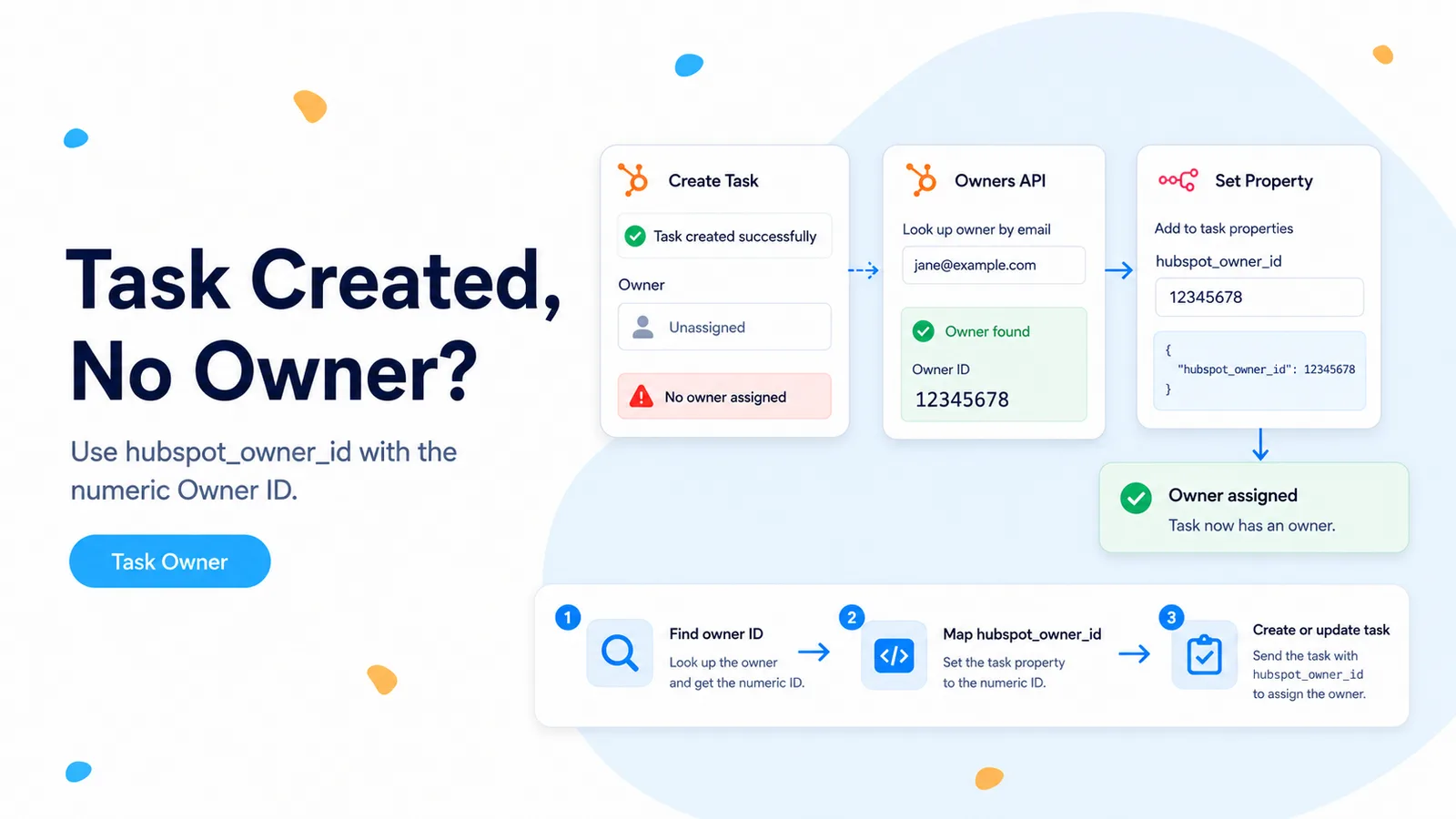
A successful task create does not prove the owner value was valid
A real n8n Community thread describes a task that was created in HubSpot but would not associate with the intended user even when the user identifier was entered as a fixed value or expression. That is a different failure from a 400 response: the API operation can succeed while one optional property is absent or ignored.
HubSpot’s current Tasks API documents `hubspot_owner_id` as the property used to assign the task. The important word is owner. HubSpot exposes several user-related IDs in different APIs, and they are not interchangeable.
The current Users API documentation explicitly distinguishes user record IDs from the Owners API identifier used for record ownership. A value that identifies the same human in another API can therefore be the wrong value for `hubspot_owner_id`.
For ownership fields, retrieve the person from the Owners API and use the owner `id`. Do not guess from a user ID copied from another HubSpot screen or API.
Retrieve the owner by email and save the owner ID
HubSpot’s current Owners API can list owners and can filter by email. In n8n, query the owner using the email address that your workflow already knows, then take the returned `id` field. That value is the one to write to `hubspot_owner_id`.
Do not use `userId` or `userIdIncludingInactive` just because those fields appear next to the owner in the API response. They serve different identity purposes. The owner object’s `id` is the identifier HubSpot documents for assignment properties.
If the lookup returns no active owner, treat that as an assignment failure. Do not silently create an unassigned task unless your business process explicitly allows it.
GET https://api.hubapi.com/crm/owners/2026-03?email=agent@acme.com

Take:
results[0].id  → ownerId

Do not substitute:
results[0].userId
results[0].userIdIncludingInactive
Create the task through the current Tasks API when the native field is unreliable
The current Tasks API creates tasks with `POST /crm/objects/2026-03/tasks`. At minimum, HubSpot requires `hs_timestamp`; the same properties object can include subject, body, status, priority, type, and `hubspot_owner_id`.
An HTTP Request node is a practical fallback when the native connector creates the task but does not assign the owner as expected. Use the existing HubSpot credential, set the body as JSON, and map the owner ID from the owner-lookup node.
If the task must appear on a contact, company, or deal timeline, create the association in the same request or add it afterward. Owner assignment and CRM-record association are separate concepts: the owner is a property on the task, while the contact/deal relationship is an association.
POST https://api.hubapi.com/crm/objects/2026-03/tasks

{
  "properties": {
    "hs_timestamp": "2026-08-27T15:00:00.000Z",
    "hs_task_subject": "Follow up on renewal",
    "hs_task_status": "NOT_STARTED",
    "hs_task_type": "TODO",
    "hubspot_owner_id": "{{$json.ownerId}}"
  }
}
Set the due date independently from the owner
The original community request also asked about changing task dates. HubSpot’s Tasks API uses `hs_timestamp` for the due date and accepts a UTC timestamp or Unix milliseconds. Owner and due date are independent properties, so debug them independently.
Calculate the due date before the HubSpot call. For a task due two days after an event, produce one ISO 8601 UTC value in a Date & Time or Code node and inspect it before sending. This prevents timezone mistakes from being confused with owner-assignment problems.
If you also need reminders, HubSpot exposes `hs_task_reminders`, which uses a Unix timestamp in milliseconds. Do not reuse a seconds-based Unix value there.
Patch an existing task instead of creating a duplicate
If the task was already created successfully and only the owner is missing, do not create another task just to test the assignment. Patch the existing task by task ID and send only the owner property.
A narrow PATCH is easier to audit and avoids duplicate activities on the CRM timeline. After the patch, GET the task requesting `hubspot_owner_id` and verify the returned value.
If the PATCH accepts the value but HubSpot still displays a different owner, confirm the owner is active and that you are reading the same portal and task ID.
PATCH https://api.hubapi.com/crm/objects/2026-03/tasks/<taskId>

{
  "properties": {
    "hubspot_owner_id": "41629779"
  }
}
Three identity mistakes that look like an owner bug
The first is using the user-object `id`. HubSpot documents that this ID represents the user object in the selected account and is different from the owner identifier. The second is using a provisioning or internal user ID. The third is using an owner from another HubSpot account.
These values can all be numeric, which makes the mistake hard to spot by eye. Solve it by deriving the owner ID at runtime from the same HubSpot account and, where possible, from the owner’s email.
Store the resolved owner ID alongside the execution data, but avoid logging unnecessary personal details. The ID plus task ID is enough to diagnose most assignment failures.
Verify ownership by reading the task back
Run one test task assigned to a known active owner. After creation, read the task through the API and request `hubspot_owner_id`. Compare that value to the owner lookup result.
Then open the task in HubSpot and confirm the displayed assignee matches. A green HTTP node is not sufficient because the specific property is what matters.
Finally test an invalid owner input and confirm the workflow routes to an exception branch rather than creating an unassigned production task.
Documentation and community threads cited
The n8n symptom and HTTP fallback are based on a Community thread about task assignment. Owner identification, task properties, dates, and current endpoints are verified against HubSpot’s current Owners, Tasks, Users, and Properties documentation.
Frequently asked questions
Why does n8n create the HubSpot task but leave it unassigned?
The owner field needs the owner record’s id, not a user email, a user-object ID, or another HubSpot user identifier. Passing the wrong identifier silently leaves the task unassigned.
Where do I get the correct owner ID?
Retrieve the person from HubSpot’s Owners API and use the returned owner id as the hubspot_owner_id property on the task.
What if the native task UI still will not persist the assignment?
Create or patch the task with an HTTP Request node, setting hubspot_owner_id explicitly along with the due date. Verify by reading the task back and confirming the owner.