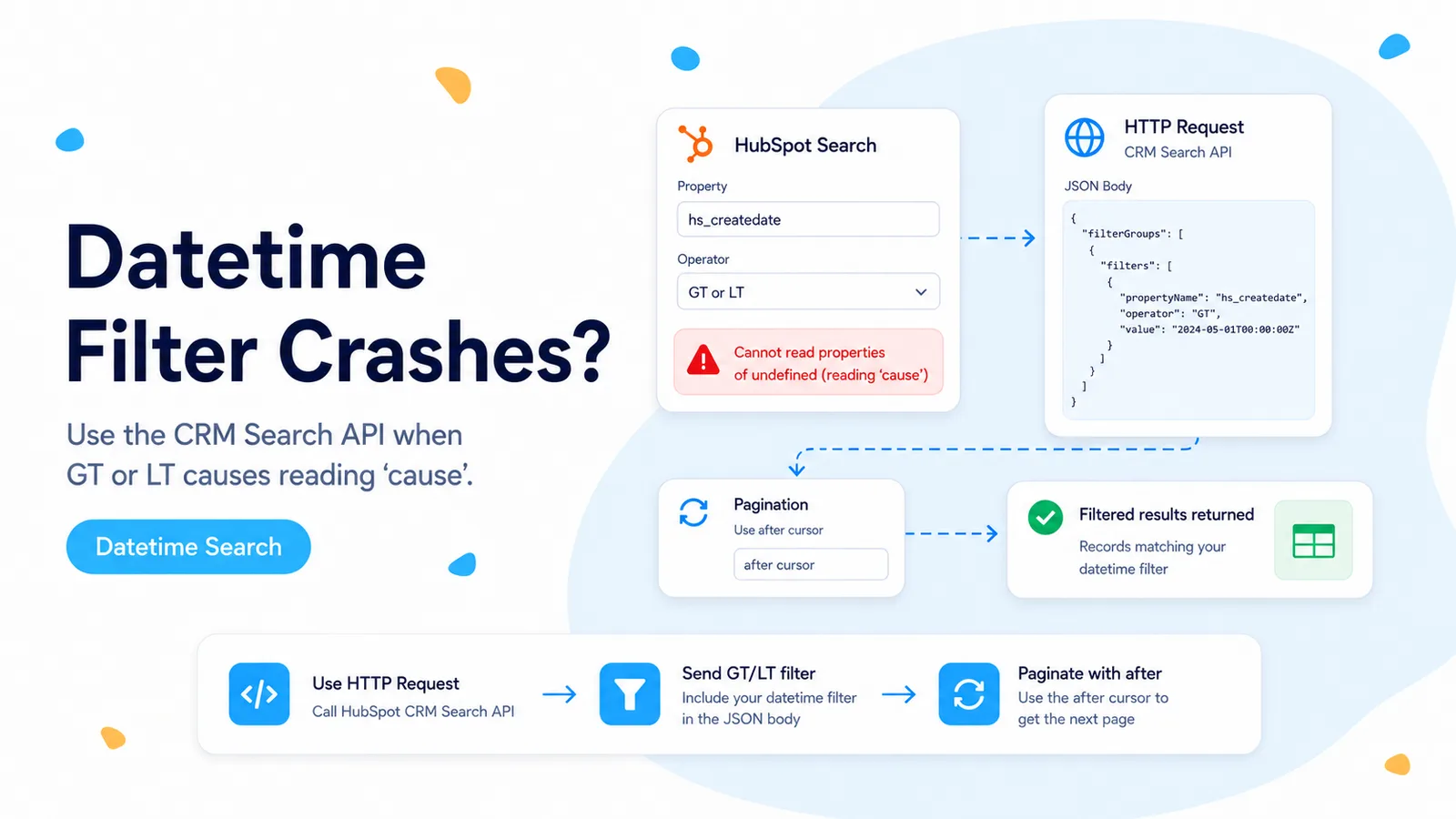
The API supports the operator even when the n8n dropdown does not
A n8n Community report shows the HubSpot Customer Search node missing GT/LT/GTE/LTE choices for datetime fields such as Last Modified Date. The same workflow hit `Cannot read properties of undefined (reading 'cause')` inside the HubSpot V2 node. This is not evidence that HubSpot forbids date comparisons.
HubSpot’s current CRM Search documentation lists LT, LTE, GT, GTE, and BETWEEN as supported filter operators. That makes this a connector-surface problem: the native node does not expose the comparison you need cleanly, while the underlying API does.
The most controlled workaround is to bypass only the search operation. Keep the rest of the workflow in normal n8n nodes and use one HTTP Request node for the query.
Do not convert the datetime into text and use EQ just to stay inside the native node. Use the comparison operator that matches the actual query.
Build the datetime filter directly in the CRM Search request
Use a POST request to the object search endpoint and place the filter in JSON. For incremental contact sync, `hs_lastmodifieddate` or the documented last-modified property can be compared with GT or GTE. The value should use the format expected by the target property and API.
Request only the properties you need and sort on the same field used by your cursor. That keeps each response small and makes replay behavior understandable.
For a bounded window, use BETWEEN with `value` and `highValue` instead of sending two separate queries.
POST https://api.hubapi.com/crm/objects/2026-03/contacts/search

{
  "filterGroups": [{
    "filters": [{
      "propertyName": "lastmodifieddate",
      "operator": "GT",
      "value": "{{$json.cursorIso}}"
    }]
  }],
  "sorts": [{
    "propertyName": "lastmodifieddate",
    "direction": "ASCENDING"
  }],
  "properties": ["email", "firstname", "lastname"],
  "limit": 200
}
HubSpot search pagination uses an `after` value in the request body
The same community thread surfaced a second trap: the search route returns paging metadata, but the next cursor belongs in the body of the next POST request. This is different from GET endpoints where pagination often lives in the query string.
HubSpot’s current search documentation says to take `paging.next.after` from the previous response and send it back as the `after` parameter. In n8n, configure HTTP Request pagination so the body changes on each request, or build a loop that stores and resubmits the cursor.
Stop when `paging.next.after` is absent. Do not fabricate an offset by adding 200; the server-provided cursor is the contract.
First request body:
{
  "limit": 200,
  "after": 0,
  ...filters
}

Next request body:
{
  "limit": 200,
  "after": "{{$response.body.paging.next.after}}",
  ...filters
}
Do not confuse the API paging cursor with your business sync cursor
There are two cursors in a reliable incremental workflow. The HubSpot `after` cursor walks through pages of one search query. Your business cursor records the last successfully processed modification time so the next scheduled execution knows where to begin.
Only advance the business cursor after all pages and downstream actions finish. If you save it after page one and page three fails, the next run can skip records from the unfinished pages.
Use a small overlap on the business time cursor and deduplicate by record ID plus modification time. That protects against boundary timing and search-index delay.
Design around HubSpot Search limits instead of discovering them in production
HubSpot currently limits search to 200 results per page and documents a maximum of 10,000 total results for one query. It also rate-limits search endpoints separately. A daily backfill over a large portal therefore needs partitioning rather than one enormous query.
For large ranges, split the time window into smaller periods and process each window separately. Keep the sort order deterministic, and record the window boundaries in execution data.
Newly created or updated records can take a short time to appear in search. This is another reason an overlap window is safer than an exact timestamp boundary.
Test one boundary case before moving the workflow to schedule mode
Create or identify records modified just before, exactly at, and just after a known timestamp. Run GT and GTE queries and confirm the boundary behaves as intended. This catches accidental operator changes and timezone mistakes.
Then lower the page limit to a tiny number, such as two, so pagination is forced during testing. Confirm the workflow requests every page exactly once and stops when the next cursor disappears.
Finally, simulate a downstream failure on a later page and confirm your business cursor does not advance. That is the reliability test that matters more than the first successful query.
Sources and further reading
The missing operator UI and `reading 'cause'` stack trace are taken from a real n8n Community report. Operator support, current date-versioned endpoints, pagination behavior, result limits, and search constraints are verified against HubSpot’s current CRM Search documentation.
Frequently asked questions
Does the "reading 'cause'" stack trace mean HubSpot forbids date comparisons?
No. HubSpot’s CRM Search documentation lists LT, LTE, GT, GTE, and BETWEEN as supported. The native n8n node just does not expose those operators cleanly for datetime fields, and the connector then throws.
How do I run a datetime GT/LT search reliably?
Use an HTTP Request node against /crm/objects/2026-03/{object}/search, put the comparison operator in the request body, request only the properties you need, and sort on the field your cursor uses.
How does pagination work for the search endpoint?
Take paging.next.after from the previous response and send it back as after in the body of the next POST. Stop when paging.next.after is absent; do not fabricate an offset.