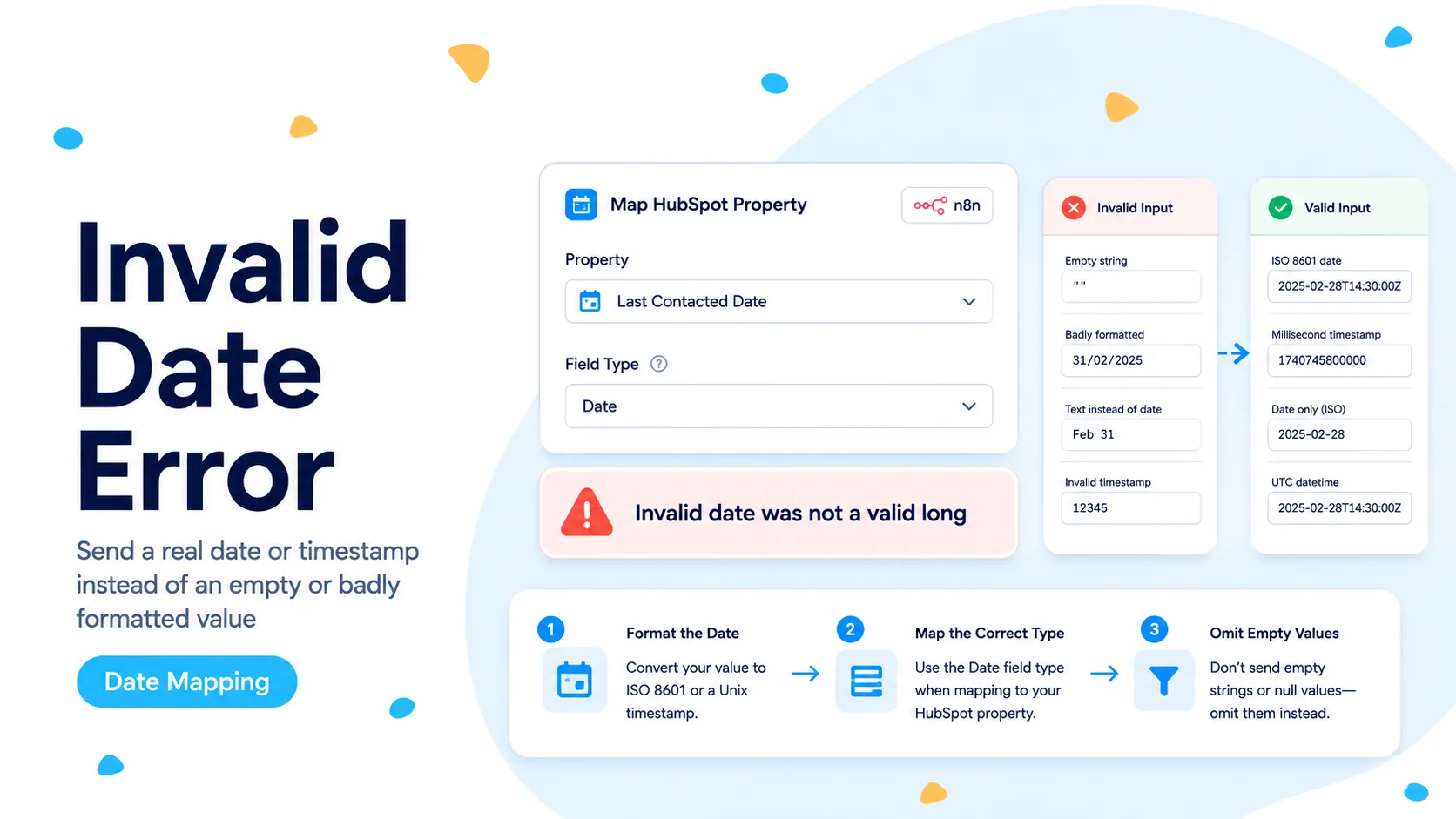
Why a date error mentions a “long” integer
A real n8n Community case shows a date transform receiving empty source values and producing the text “Invalid date.” The downstream HubSpot node then returns a validation result with INVALID_LONG. The error looks strange until you remember that HubSpot date fields historically accept timestamp-style numeric values as well as date strings.
HubSpot’s current Properties documentation makes the contract clearer: date and datetime values can be sent as ISO 8601 strings or UNIX timestamps in milliseconds. Date-only properties have an extra constraint when numeric timestamps are used: the timestamp must represent midnight UTC for that calendar date.
The important diagnosis is therefore not “HubSpot dislikes this date.” It is “the value reaching HubSpot is not a valid representation for the target property type.”
Do not debug the HubSpot node until you inspect the exact post-transform value. The bad value is often created one or two nodes earlier.
First determine whether the HubSpot field is date or datetime
Open the HubSpot property definition or retrieve it through the Properties API. A date property stores a calendar date without time-of-day semantics; a datetime property stores a moment in time. Those are different contracts even if both appear as date pickers in the HubSpot UI.
For date properties, HubSpot recommends the ISO date form YYYY-MM-DD. This avoids timezone arithmetic and the midnight-UTC requirement that comes with numeric timestamps. For datetime properties, send a full UTC ISO timestamp such as 2026-08-26T14:30:00.000Z or a valid millisecond timestamp.
Do not infer the property type from the field label. A custom field called “Renewal Date” may be date or datetime depending on how it was created. Read the schema.
GET https://api.hubapi.com/crm/properties/2026-03/contacts/<propertyName>

Check:
- type
- fieldType
- name
- label
Treat an absent source date as absent data, not as a conversion target
The most important fix is upstream: do not run a date formatter on a value until you know the value exists. In n8n, normalize empty strings, null, undefined, and known sentinel text before the date conversion step.
If the business meaning of a blank source date is “leave the HubSpot property unchanged,” omit the property from the update payload. If the meaning is “clear the HubSpot property,” use the clearing behavior supported by the object API or native node for that property. Those are not the same operation.
Never substitute today’s date merely to make validation pass. That converts a technical failure into silently corrupted CRM data.
Conceptual guard

raw = $json.expires_on
if raw is null / undefined / '' / 'Invalid date':
    do not format it
else:
    convert using the target HubSpot property type
For date-only properties, prefer YYYY-MM-DD
HubSpot currently documents complete ISO date strings such as 2015-05-01 as a valid representation for date properties. This is usually the safest format for CRM fields that mean birthday, renewal date, certification date, or contract start date without a meaningful time of day.
The alternative is an epoch timestamp in milliseconds at midnight UTC. A timestamp representing local midnight in New York or another timezone can cross a UTC date boundary and be rejected or displayed unexpectedly. Using YYYY-MM-DD avoids that unnecessary conversion surface.
If your source already gives YYYY-MM-DD, you may not need a Date & Time node at all. Validate the string and pass it through. Every transform is another chance to introduce timezone or empty-value bugs.
For datetime properties, keep the timezone explicit
A datetime property represents an instant. HubSpot accepts a full ISO 8601 UTC value or a millisecond timestamp. If your source time is local, convert it to a real timezone-aware timestamp before sending it; do not append Z to a local clock value and call it UTC.
When n8n receives timestamps from forms or databases, inspect whether the source includes an offset. 2026-08-26T09:00:00-04:00 and 2026-08-26T09:00:00Z are four hours apart. A CRM automation that strips the offset can shift meetings, renewal reminders, and SLA timestamps.
Store the original source value in execution data while debugging. That lets you compare source, normalized value, and HubSpot value after the write.
Decide explicitly whether blank input means “skip” or “clear”
Many sync bugs happen because a generic mapping sends every source field on every run. If the source leaves a date blank, the workflow may overwrite a valid HubSpot date or send an invalid placeholder. Instead, define field-level semantics.
For partial updates, build the properties object dynamically and include the date field only when the source has an intentional value or an intentional clear instruction. This pattern is more work than a one-to-one mapping table, but it prevents missing source data from destroying valid CRM history.
If a source system uses a sentinel such as 0000-00-00, N/A, or 01/01/1900, treat it as a business data-cleaning decision rather than a date parsing problem. Do not let the parser choose for you.
Reproduce with a one-property PATCH
To isolate the date field from the rest of a contact update, call HubSpot with only the problematic property on a disposable record. First send a known-valid ISO value. Then send the exact normalized value produced by n8n. The contrast tells you whether the issue is formatting or something else in the larger payload.
Keep the target record ID fixed during this test and verify the property definition in the same portal. Cross-portal custom properties can share labels but have different internal names and types.
Once the minimal request works, move the same normalization back into the native HubSpot node or keep the HTTP Request if you need more control over conditional property inclusion.
PATCH https://api.hubapi.com/crm/objects/2026-03/contacts/<contactId>

{
  "properties": {
    "renewal_date": "2026-08-26"
  }
}
Test missing, valid, and timezone-edge values before production
A useful test set contains at least five cases: a normal date, an empty string, null, a date at the start or end of a month, and a datetime with a non-UTC offset. Run them through the exact production normalization path.
For date-only fields, verify the stored HubSpot date remains the same calendar day for users in different portal timezones. For datetime fields, verify the displayed time changes appropriately with user timezone while the underlying instant remains correct.
Do not declare the fix complete after one happy-path record. INVALID_LONG errors are often intermittent because only some source rows are blank or malformed.
Verification checklist
The repair is complete when every outgoing date value matches the property schema, blank source values follow a documented skip-or-clear rule, and a round-trip read returns the expected logical date or datetime.
If HubSpot still reports INVALID_LONG, log the exact serialized value immediately before the request. The raw outgoing string or number is the evidence that matters, not the pre-transform source field.
- Target property type is confirmed from HubSpot schema.
- Date-only fields use YYYY-MM-DD or midnight-UTC milliseconds.
- Datetime fields use explicit UTC ISO or valid millisecond timestamps.
- Missing values are skipped or cleared intentionally, never replaced with fake dates.
- Batch test includes blank and timezone-edge cases.
Sources checked for this guide
The exact INVALID_LONG failure comes from an n8n Community case. Accepted date and datetime formats are checked against HubSpot’s current Properties API documentation.
Frequently asked questions
What does "Invalid date was not a valid long" mean in HubSpot?
The target property is a date or datetime and n8n is sending a value that does not match the accepted format. HubSpot expects ISO 8601 or a millisecond timestamp, and for a date-only property the timestamp must represent midnight UTC.
Should I replace a missing date with today’s date or zero?
No. Do not substitute "Invalid date", 0, or the current date. Preserve missing values as missing, and either omit the property or clear it deliberately depending on your intent.
How do I isolate which date value is wrong?
Send a minimal patch with only the one date property, test a single record, then widen. Inspect the HubSpot property type first so you send the format that property actually accepts.