What the limit actually is
The HubSpot CRM Search API (the POST .../search endpoints for contacts, companies, deals, tickets, and custom objects) will return no more than 10,000 results for any given set of filters. Pagination is cursor-based: each response includes paging.next.after, and you pass that value back as the after property on the next request. There is no offset parameter that would let you jump ahead.
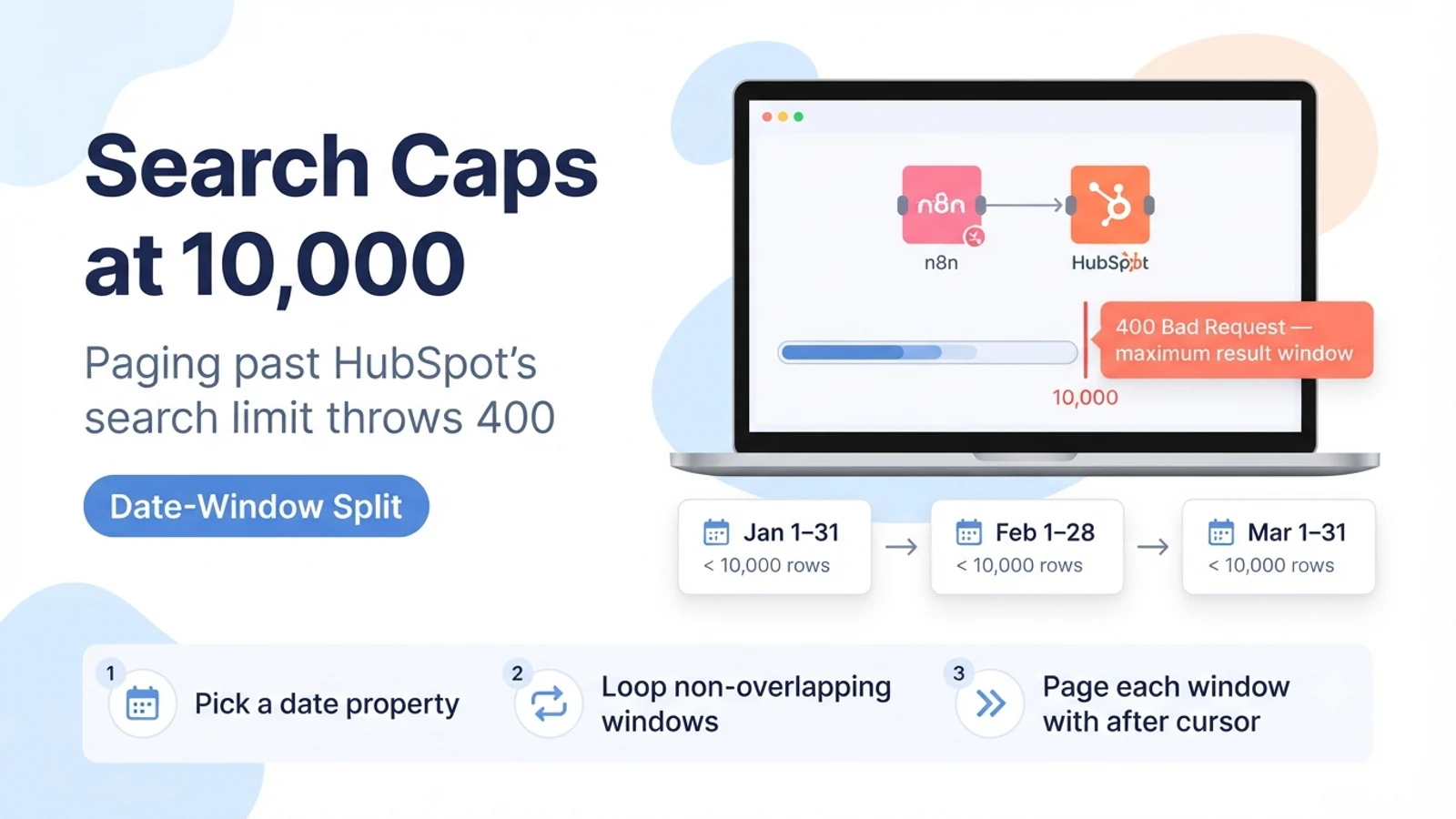
When your paging loop has already walked through roughly 10,000 records and requests the next page, HubSpot rejects it with a 400 Bad Request rather than simply returning an empty page. So a workflow that looks correct — read after, request next page, repeat until there is no next.after — works perfectly on small portals and then fails abruptly on a large one.
This is separate from the API rate limit (the 429 'too many requests' situation) and separate from the daily call cap. It is a ceiling on how deep a single search result set can be paged, regardless of how slowly you page it.
Confirm this is the failure you are hitting
Check where in the run the failure happens. If the first few pages succeed and the failure lands right around the point where you have collected about 10,000 items, this is the search depth cap. If page one fails immediately, look instead at your filter syntax or credential.
Check the error body. The search depth failure is a 400 with a message about the result window or maximum results, not a 401/403 (auth) or a 429 (rate limit). If you see 429, that is the separate rate-limit problem and has a different fix.
Check whether you are using search at all. The Get All / list operations on some objects do not go through the search endpoint and are not subject to the 10,000 search cap in the same way — they have their own pagination. The cap specifically bites POST .../search.
- Failure occurs near the 10,000th collected record, not on page one.
- Error is a 400 about the maximum result window, not a 401, 403, or 429.
- The node or HTTP call is hitting a POST .../search endpoint.
Fixes that do not work here
Adding a longer wait between pages does nothing — the limit is on depth, not speed. Increasing the per-page limit from 100 to 200 only changes how many requests it takes to reach 10,000; it does not raise the ceiling.
Sorting differently (ascending vs descending on a date) does not give you more than 10,000 from one query — it just changes which 10,000 you can reach. Retrying the failed page with the same after cursor returns the same 400 every time.
Switching credential type (private-app token vs OAuth) has no effect. The cap is a property of the search endpoint, not of the authentication method.
- Do not add delays — the cap is on result depth, not request rate.
- Do not raise the page size hoping to slip past 10,000.
- Do not retry the failing page — it will 400 identically.
The fix: split one broad query into date-range windows
Pick a timestamp property that every record has and that spreads the records out — usually createdate for a one-time backfill, or lastmodifieddate for an ongoing sync. Then run the same search once per time window, with each window narrow enough that it returns fewer than 10,000 records. Common window sizes are one month, one week, or one day depending on how many records your portal creates.
Drive the windows from a loop in n8n: build a list of window boundaries (start and end timestamps), then for each window run the search with two range filters on the chosen property (greater-than-or-equal to the window start, less-than the window end) plus your real business filters. Page each window normally with the after cursor until its next.after is gone, then move to the next window.
Make the windows non-overlapping and contiguous so no record is fetched twice and none is skipped. If you use lastmodifieddate for an incremental sync, keep a small overlap on the trailing edge and deduplicate downstream by record id, because a record modified exactly on a boundary could otherwise fall between two runs.
// For each [windowStart, windowEnd):
POST https://api.hubapi.com/crm/v3/objects/contacts/search
{
  "filterGroups": [{
    "filters": [
      { "propertyName": "createdate", "operator": "GTE", "value": "{{windowStart}}" },
      { "propertyName": "createdate", "operator": "LT",  "value": "{{windowEnd}}" }
      // ...plus your real business filters
    ]
  }],
  "sorts": [{ "propertyName": "createdate", "direction": "ASCENDING" }],
  "limit": 100,
  "after": "{{cursorForThisWindow}}"
}
// Page with paging.next.after until it is absent, then next window.
// Each window must return < 10,000 rows.
When you need the entire object set, not a filtered slice
If the real requirement is 'every contact in the portal', search is the wrong tool even with windows. Two better options exist. The first is a static or active list: create the list once with your criteria, then read its membership through the list API, which is designed to page through large memberships. The second is the Export API, which produces the full dataset as a file for a one-time or scheduled bulk pull.
For an ongoing sync of everything, the durable pattern is: one initial backfill using date windows or an export, then an incremental job that only searches lastmodifieddate greater than the last successful run. The incremental query stays tiny and never approaches 10,000, so the depth cap stops being relevant after the backfill.
Keep a persisted cursor (the last successful lastmodifieddate you processed) so a failed incremental run resumes from the right point instead of re-scanning history.
Verification
Count first. Run a single unwindowed search with your filters and a small page size, page until it fails or completes, and record how many records you retrieved. If it completes under 10,000, you do not need windowing yet. If it fails at ~10,000, windowing is required.
After adding windows, sum the record counts across all windows and compare to an independent count — the object total in the HubSpot UI for the same filters, or an export. The numbers should match within your intentional overlap. A shortfall means a window is still over 10,000 (narrow it) or the windows have a gap (fix the boundaries).
Run the windowed job twice and confirm downstream side effects happen once per record. If you are deduplicating by record id, a second run should process nothing new.
- Unwindowed search fails near 10,000 — confirms the cap is the cause.
- Sum of windowed counts matches an independent total.
- No window individually exceeds 10,000.
- Re-running the job does not double-process records.
Sources checked for this guide
HubSpot's CRM Search API reference documents the 10,000-result ceiling and cursor-only pagination. HubSpot Community threads document the 400 Bad Request that appears when paging past 10,000 and the date-window and Export API workarounds that HubSpot support recommends.