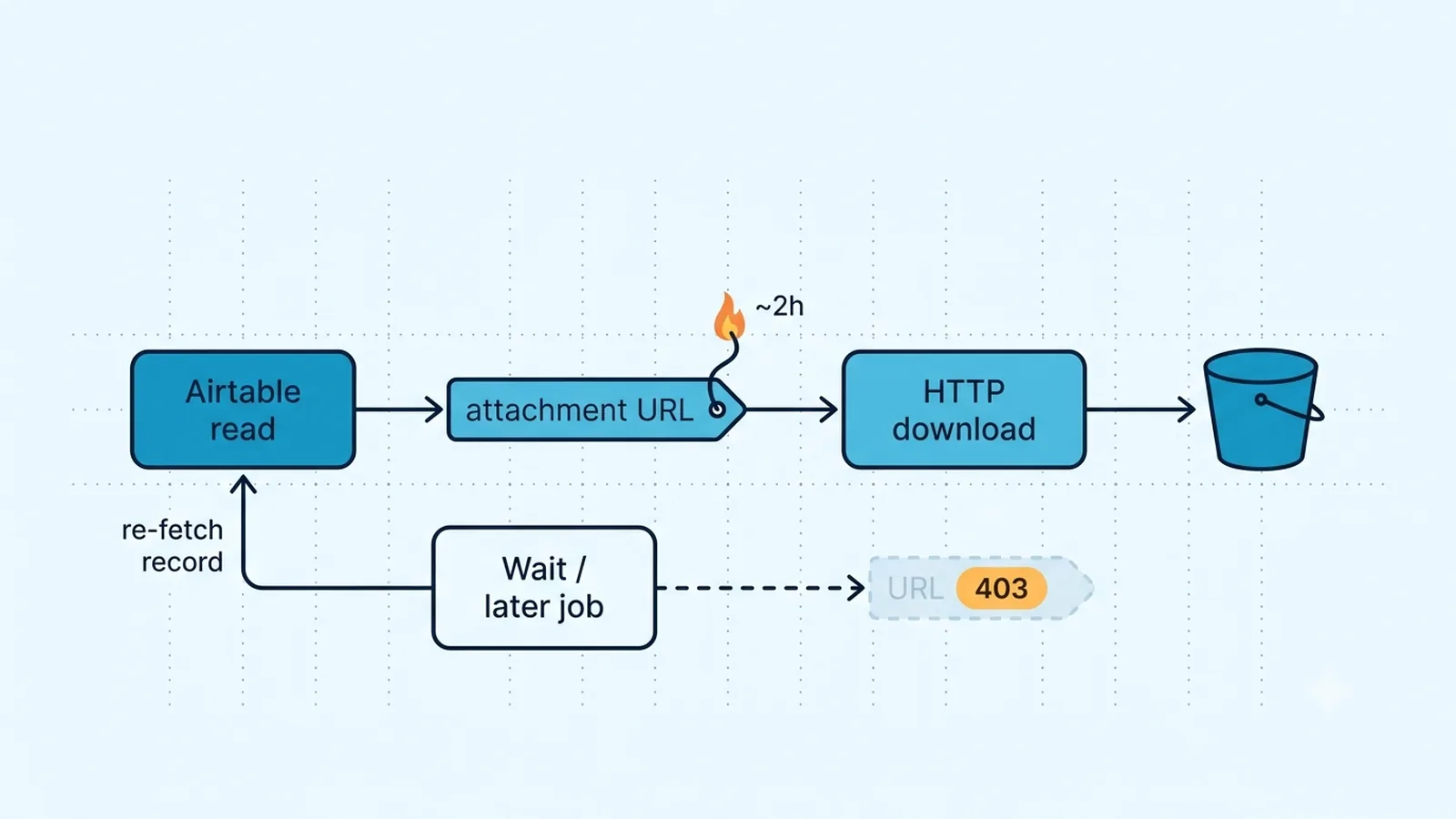
Prove that the attachment URL is stale before changing credentials
Take the failed attachment URL from the n8n execution and compare its age with a freshly fetched record. Airtable's attachment URL support documentation says API-provided download URLs are temporary, remain active for at least two hours, and are generally short-lived around that scale. If a fresh read produces a new download URL and that URL succeeds while the stored one returns 403 or Access Denied, you have an expiration problem. Reauthorizing the Airtable credential will not make the old signed URL durable.
Also distinguish Airtable's attachment viewer URL from the expiring download URL. The viewer URL is intended for authenticated Airtable access and requires the viewer to be signed in with appropriate base access. The download URL is the one integrations typically use to fetch file bytes without turning Airtable into a permanent public file host. Do not persist either form as if it were a stable CDN address. Persist the record ID, field identity, attachment ID/metadata where useful, and fetch a fresh record when you need a new temporary download URL.
Store a durable copy before any delayed or asynchronous step
If the file must be used hours or days later, download it first and write the bytes to storage you control: S3-compatible object storage, Google Drive, another document store, or your own application storage. Save the durable object's key or URL in your workflow state. The important change is architectural: the delayed step references your stable storage object, not the transient Airtable download URL.
For a job that cannot download immediately, save the Airtable base/table/record identity instead of saving the signed URL. When the later job starts, fetch the record again to obtain a fresh attachment URL and then download promptly. This adds one Airtable read but removes the false assumption that yesterday's URL should still work. If the attachment can be replaced between those two steps, also compare attachment metadata so the workflow knows whether it is fetching the same logical file.
Choose between URL-based attachment writes and direct upload
Writing attachments back to Airtable has two distinct paths. The traditional record create/update pattern can attach a file by giving Airtable a URL it can fetch. That URL must be reachable by Airtable; private localhost addresses, URLs behind an interactive login, and already-expired signed links are poor inputs. When the source system generates temporary presigned URLs, make sure the URL remains valid long enough for Airtable to retrieve it.
Airtable also provides a direct attachment-upload API for an attachment field on an existing record. Current Airtable support says this path sends the file as Base64-encoded content and supports files up to 5 MB per upload, which is a much tighter limit than ordinary in-app attachment storage. If n8n already has the file as binary data, encode it for the upload endpoint rather than publishing the file somewhere solely to give Airtable a public URL. For files above that API limit, use the public-URL attachment pattern or another supported storage path instead of assuming the direct upload endpoint accepts arbitrary binary size.
Attachment patterns and their durability
| Pattern | Good for | Main failure mode |
|---|
| Store Airtable API download URL | Immediate same-execution download | URL expires after a short window |
| Re-fetch record, then download | Delayed job with Airtable as source of truth | Attachment may have changed; requires a new API read |
| Download then save to own storage | Long-lived downstream use | You must manage storage permissions/lifecycle |
| Write attachment by public URL | Airtable fetches an externally hosted file | Source URL inaccessible or expires too soon |
| Direct attachment upload API | n8n already holds file bytes | Must follow the upload endpoint's current payload rules |
Make retry logic obtain a fresh URL instead of replaying a dead one
A generic Retry On Fail around the download node can replay exactly the same expired URL several times. That cannot recover. When a download fails with the pattern you have identified as expiry, route the execution back to a fresh Airtable record read, extract the new attachment URL, and retry the file request once with the refreshed address. Keep a retry cap so a deleted attachment or permission change does not become an infinite loop.
Differentiate an expired URL from other 403 causes. A newly fetched URL that also returns 403 points toward access controls, an invalid request, proxy/WAF behavior, or a different attachment problem. Likewise, a 404 after the record or attachment was removed is not solved by refreshing a URL. Store enough context in execution data to tell whether you retried with the same URL or a newly issued one; otherwise the log only shows repeated HTTP failures without proving what changed.
Verification checklist
- A freshly fetched Airtable attachment URL downloads successfully while the previously stored URL reproduces the expiry failure.
- n8n downloads the attachment in the same execution immediately after reading the record when no delay is required.
- Delayed workflows store file bytes in durable storage or re-fetch the Airtable record for a new temporary URL instead of reusing the old one.
- The HTTP Request download keeps the original filename and the binary property expected by the next node.
- Upload workflows intentionally use either a reachable public URL or Airtable's current direct attachment-upload endpoint.
- Retry logic refreshes the Airtable record before retrying an expired URL and stops if a fresh URL fails for a different reason.
Documentation and community threads cited
These fixes follow current Airtable API documentation, n8n node docs, and community threads. Primary sources:
Frequently asked questions
How long does an Airtable API attachment URL stay valid?
Airtable currently guarantees at least two hours after the URL is received, while warning that the exact window can change. Treat the URL as temporary and download promptly.
Should I store Airtable attachment URLs in my database for later downloads?
Store record and attachment metadata, not the temporary download URL as a permanent asset address. For later use, either save the downloaded bytes in durable storage or fetch the Airtable record again for a fresh URL.
Can n8n upload attachment bytes directly to Airtable?
Airtable now has a direct attachment-upload API for an existing record/attachment field. That is distinct from the traditional record update pattern where Airtable fetches a file from a reachable URL.