Measure all traffic hitting the base, not one node in isolation
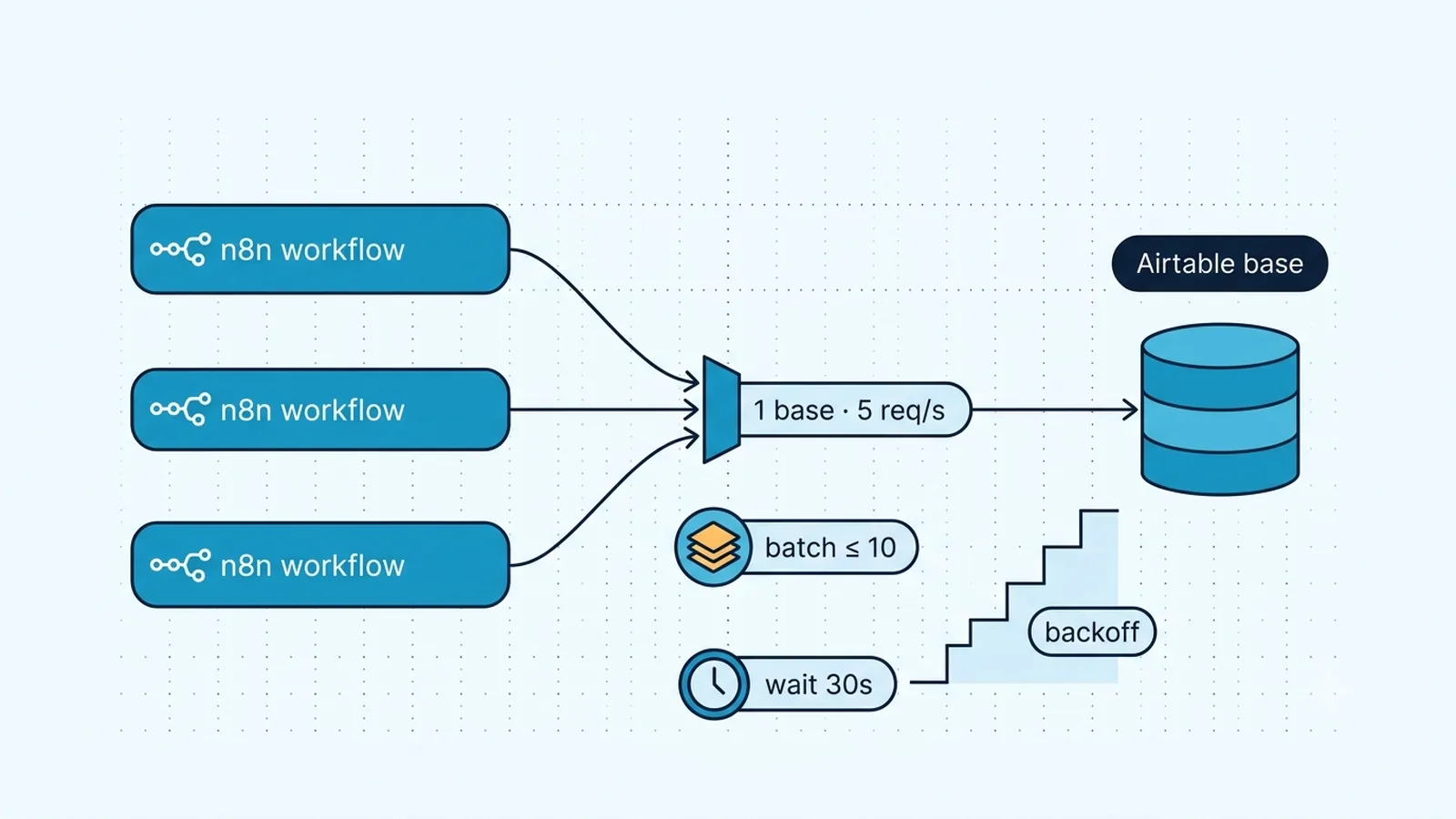
The first diagnosis is to count requests at the Airtable base boundary. Airtable's current Web API documentation and support guidance set the rate at 5 requests per second per base across pricing tiers. That limit is not 5 per table and not 5 per workflow. Two scheduled n8n workflows, a production webhook flow, a backfill, and a manual editor test can all consume the same base-level allowance at the same time. A single workflow that appears to send only three requests per second can still receive 429s if another workflow contributes three more.
Airtable also documents an aggregate limit of 50 requests per second for all traffic using personal access tokens associated with a given user or service account. For most small n8n setups the 5-per-base limit is reached first, but a service account spanning many active bases can hit the higher aggregate ceiling. When debugging, log base ID, workflow name, execution ID, and request timestamp. Without that shared view, teams often keep slowing one flow while a second scheduled job remains the real source of bursts.
Current Airtable Web API limits relevant to n8n
| Scope | Current limit | Operational implication |
|---|
| Per base | 5 requests/second | Traffic from all workflows to that base contributes |
| Per PAT user/service account | 50 requests/second | Many bases can aggregate against the credential owner |
| Monthly workspace API calls | Free 1,000; Team 100,000; Business/Enterprise unlimited | A low-rate 429 can be monthly quota, not burst throttling |
| Create/update/delete batch | Up to 10 records/request | Batching can reduce request count by roughly 10x |
| After rate-limit response | Wait 30 seconds | Immediate retries continue failing instead of recovering |
Batch records before adding arbitrary delays
If you are creating, updating, deleting, or upserting many Airtable records, first reduce the number of HTTP requests. Airtable supports batching up to 10 records in a single record-write request. Ten individual requests consume ten units of the rate budget; one ten-record batch consumes one. This is the highest-leverage change for imports and synchronization jobs because it improves throughput while reducing the chance of 429s.
The native n8n Airtable node may abstract the API calls, so verify whether your operation and node version already batch items or whether each input item becomes a request. For a deterministic bulk path, an HTTP Request node can send a `records` array of at most 10 entries to the relevant endpoint. Do not make batches larger and hope Airtable truncates them; respect the endpoint's record limit. Also keep item-level error attribution by storing your source ID inside each record or alongside the batch.
// Code node: produce arrays of at most 10 input records.
const size = 10;
const out = [];
for (let i = 0; i < items.length; i += size) {
  out.push({ json: { records: items.slice(i, i + size).map(x => x.json) } });
}
return out;
Pace Loop Over Items and Airtable operations as one rate-controlled lane
A Loop Over Items node can serialize work without automatically making the external call rate-safe. If every loop iteration reaches Airtable immediately, five or more calls can still land inside the same one-second window. Add a Wait node or use the relevant batching/delay options where they exist, and size the delay from the total traffic budget rather than from this workflow alone. A theoretical 200 ms spacing equals five starts per second, but running exactly at the ceiling leaves no room for timing jitter or other workflows. Production pacing should leave margin.
If several workflows must write the same base continuously, independent Wait nodes are not a complete global limiter. Their schedules can align and burst together. Prefer a queue, a shared rate-limiting mechanism, or architecture that funnels Airtable writes through one controlled workflow when sustained load matters. For low-volume sites, simply staggering schedules and using conservative waits may be enough. The key is to design against the shared base rate, not to assume each workflow owns five requests per second.
Treat a 429 as a 30-second recovery event
Airtable's support guidance says that after exceeding the rate limit, subsequent requests will not succeed for 30 seconds. That makes a one-second retry loop counterproductive. Once n8n receives 429, stop the lane, wait at least the documented recovery interval, then resume conservatively. If you use Retry On Fail, make sure its wait policy actually spans the rate-limit window; a few rapid retries simply convert one throttled request into several more failed requests.
For a generic retry wrapper, use exponential backoff plus jitter so multiple executions do not all retry on the same boundary. The 30-second Airtable recovery window is the floor after a rate-limit event; exponential backoff helps if traffic remains high after that point. Do not depend on a `Retry-After` header being present for Airtable 429 responses unless you have observed and validated it in your environment. Airtable's troubleshooting documentation explicitly mentions that header for some 503 responses, but current rate-limit guidance is the stronger contract for 429 behavior.
Do not classify every Airtable failure as rate limiting
Not every Airtable 429 means you exceeded 5 requests per second. Current Airtable guidance says Free workspaces have 1,000 Web API calls per month and Team workspaces have 100,000; Business and Enterprise have unlimited monthly calls. If traffic is low but 429s persist beyond the 30-second burst-recovery window, check Workspace settings → Usage for the workspace that actually contains the base. A monthly-quota 429 will not recover just because n8n waited 30 seconds.
A 429 also has a different remediation path from 401, 403, 422, and 503. Authentication failures need credential work; field-validation 422s need payload correction; 503 can be transient service unavailability. A workflow that sends all of these through one blind retry policy can waste its entire execution window on errors that will never recover. Branch on the HTTP status or error type before deciding whether to wait, repair data, or stop.
If you use an HTTP Request node for low-level control, return or preserve the status code and response body so the workflow can distinguish these paths. If you use the Airtable node, inspect the error object captured by n8n and keep the rate-limit path explicit. Mark the execution with the base ID and the next allowed retry time in your own state if the job spans multiple workers; otherwise a second worker may resume the same base during the cooldown.
Reduce needless reads and writes before scaling retry logic
Rate limiting often exposes redundant workflow behavior. Do not update a record when the fields you own are already equal to the desired values. Avoid a read-before-write call if an upsert or deterministic record ID lets you perform the operation safely without it. Cache stable schema metadata rather than fetching it repeatedly inside a record loop. These changes reduce Airtable requests and make the remaining traffic easier to pace.
For large transfers, review Airtable's documented alternatives as well as the ordinary record endpoints. Airtable's rate-limit support article describes batching and the Sync API as strategies for higher-volume data movement. Choose those only when their semantics fit your job; a bulk synchronization endpoint is not automatically a replacement for transactional updates. For normal n8n automation, ten-record write batches plus a controlled request lane usually provide a much simpler fix.
Verification checklist
- Total traffic to the affected Airtable base stays below the 5 requests-per-second base limit with margin for concurrent workflows.
- Bulk create, update, delete, or upsert operations use supported batches of no more than 10 records per request where practical.
- Loop Over Items or equivalent n8n logic includes deliberate pacing rather than firing each Airtable request immediately.
- A 429 pauses the affected base for at least the documented 30-second recovery period before retrying.
- Retry logic distinguishes 429 from validation, authentication, permission, and service-unavailable errors.
- Scheduled jobs and parallel workflows have been checked together so their combined request rate, not just one execution, is controlled.
Documentation and community threads cited
These fixes follow current Airtable API documentation, n8n node docs, and community threads. Primary sources:
Frequently asked questions
Is Airtable's 5 requests per second limit per table or per base?
Per base. Requests to different tables in the same base share that 5 req/s budget, so concurrent n8n workflows can throttle one another even when each individual flow looks slow.
How long should n8n wait after Airtable returns 429?
Airtable's current support guidance says subsequent requests will not succeed for 30 seconds after the rate limit is exceeded. Pause at least that long, then resume with controlled pacing and backoff.
How many Airtable records can I write in one batch request?
The standard create/update/delete batch endpoints support up to 10 records per request. Batching reduces request count substantially and should be done before adding large arbitrary delays.