Identify whether the workflow is using a name, an ID, or stale schema
Open the failed execution and inspect the exact request representation that reached Airtable. A visible label such as `Customer Status` and an Airtable field ID such as `fld...` are different identifiers for the same current field, and integrations can cache either. The crucial question is not whether the field appears in the UI; it is whether the identifier in the request still points to the current field instance in the table you are calling.
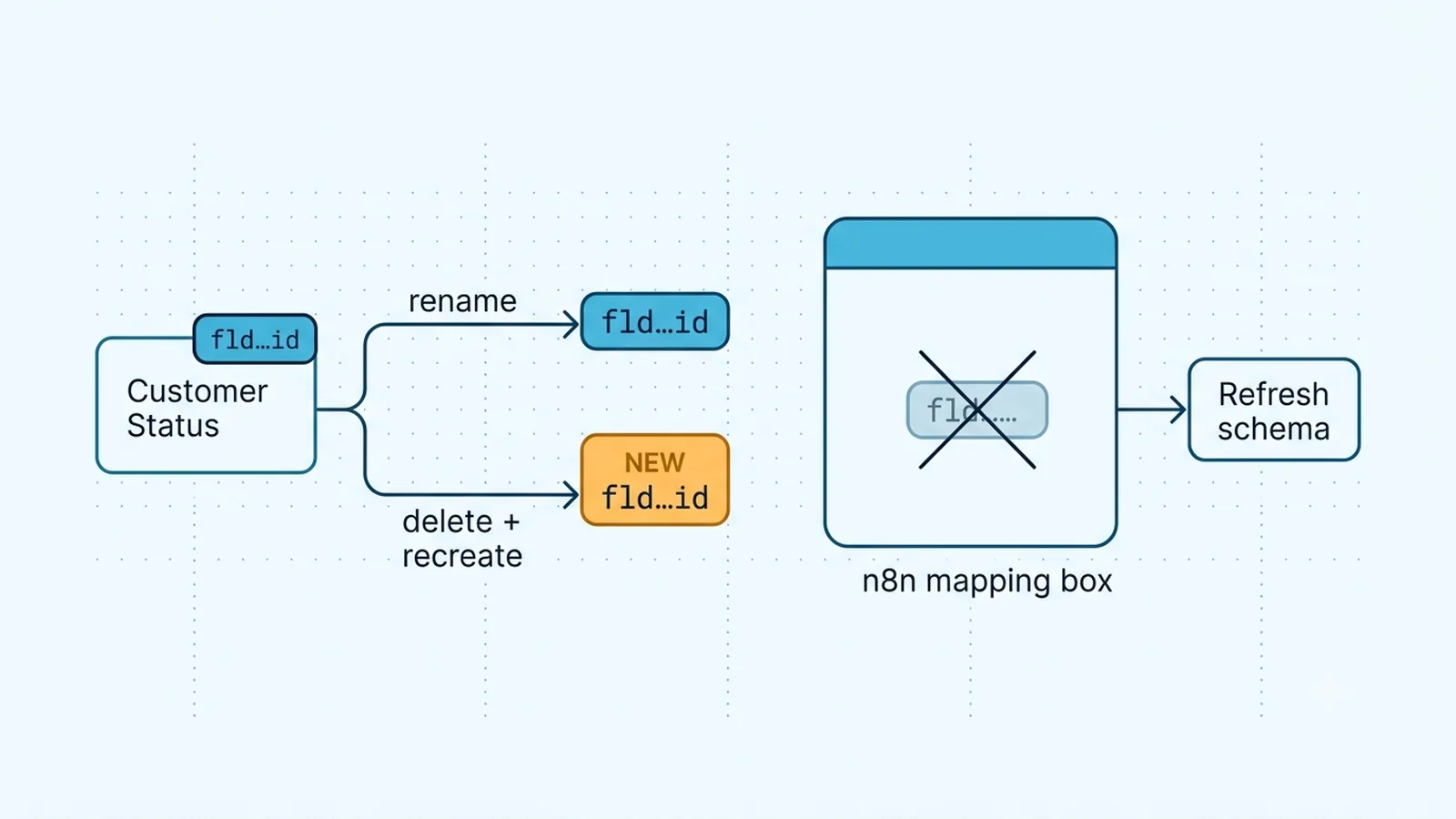
Airtable's current API troubleshooting documentation calls out a particularly deceptive case: a field can be deleted and then recreated with the same name, type, and position, yet the new field receives a new ID. An integration holding the old `fld...` value receives `422 UNKNOWN_FIELD_NAME` even though a human sees what looks like the same column. Refresh the table schema or reselect the field in n8n after this kind of change. Do not repair it by repeatedly renaming the replacement field; the stale ID, not the visible text, is the broken reference.
Choose field names or field IDs intentionally
Field IDs are useful when people rename columns because the ID belongs to the field instance rather than its display label. Field names are readable and convenient when a workflow is maintained manually. Either can work when the endpoint and integration option support them, but a workflow that mixes the two without tracking the output mode becomes fragile. Record which form each node produces and expects.
If the Airtable read request uses `returnFieldsByFieldId=true`, returned field keys can be `fld...` IDs rather than human-readable names. A downstream expression such as `$json.fields.Status` then fails even though the read itself succeeded. This is an n8n mapping failure, not necessarily an Airtable 422. Conversely, a write node configured or constructed around current field IDs should receive the current IDs, not a renamed label pasted into a field-ID slot. Inspect the actual JSON keys at the boundary rather than inferring mode from the canvas label.
When you do use field names, copy the name from the current schema rather than retyping it. Spaces, punctuation, emoji, and leading or trailing whitespace are part of the display string; a visually similar key can still be a different request key. Field IDs avoid that display-text ambiguity, but only while the referenced field instance still exists.
// If a previous API read returned field IDs as keys:
const fields = $json.fields ?? {};
return [{ json: {
  status: fields["fldXXXXXXXXXXXXXX"],
  recordId: $json.id
} }];
Handle renames differently from delete-and-recreate changes
A simple rename is exactly where field IDs help: the field instance remains the same while its visible name changes. Workflows mapped by the old text name may need to be refreshed, while mappings based on the current field ID can keep working. A delete-and-recreate operation is the opposite. The new column can look identical but has a new field ID, so cached IDs must be replaced.
Treat schema edits as deployment changes. After a field is renamed, deleted, recreated, or has its type changed, run one read and one write through the production credential before bulk jobs resume. If multiple n8n workflows share the base, search for the old field name and the old `fld...` identifier across all of them. One refreshed workflow does not protect a second scheduled workflow that still carries the stale mapping.
Do not treat a hidden view column as a missing table field
Airtable views control presentation and filtering; hiding a field in a view does not delete that field from the underlying table schema. Therefore, a column being hidden in the selected view is not by itself a valid explanation for `UNKNOWN_FIELD_NAME`. If a request fails only when a particular view is used, inspect the endpoint parameters, filters, and selected table, but keep schema identity separate from view visibility.
Also verify the base and table at the top of the request. Airtable IDs have prefixes that help distinguish object types: base IDs start with `app`, table IDs with `tbl`, record IDs with `rec`, and field IDs with `fld`. Accidentally placing a record ID or a field ID where a table identifier belongs usually produces a path or lookup failure rather than a legitimate field match. In n8n credentials reused across environments, a copied field ID from staging can be perfectly valid syntax and still be nonexistent in the production table.
Identifier checks that narrow the failure quickly
| Value | Typical prefix or form | What to verify |
|---|
| Base | app... | The credential can access the intended base |
| Table | tbl... or supported table name | The request path targets the intended table |
| Record | rec... | The update/delete targets the intended row |
| Field | fld... or supported field name | The identifier belongs to the current field instance |
Remove computed fields from write payloads
Formula, lookup, rollup, count, created-time, and other computed values are derived by Airtable. They are useful to read, but they should not be treated as ordinary mutable inputs. If your n8n flow reads an Airtable record and later sends a broad copy of its `fields` object back into an update, computed keys can ride along unintentionally. Depending on the endpoint and field, the resulting error can look like a field or permission problem rather than the business update you were trying to perform.
Build an explicit write allowlist. Map only the fields the workflow owns, and let Airtable recompute derived columns. This protects the flow from a second class of schema drift: an admin can convert a formerly writable field into a formula or lookup while retaining a similar name. A narrow payload makes the first failing field obvious and reduces the chance that a harmless schema addition breaks every update.
Refresh mappings and preserve downstream contracts
After reselecting a field in the Airtable node or refreshing IDs from the schema, inspect downstream nodes before publishing. If a read switched from field names to field IDs, rename the data into a stable internal contract immediately after the Airtable node. Downstream business logic should not need to know whether Airtable currently calls a field `Customer Status` or `Lifecycle Stage`.
For production systems, keep the Airtable-specific mapping at the edge of the workflow: translate Airtable names/IDs into internal keys after reads, and translate internal keys into an explicit Airtable write object before updates. Then a field rename requires one mapping change rather than edits across IF, Merge, Code, and HTTP nodes. Re-run a record that exercises every mapped field, because a successful write to one column does not prove that all stale IDs were removed.
Verification checklist
- The failing request has been checked to determine whether it sends a visible field name or a `fld...` field ID.
- Any field that was deleted and recreated has had its cached ID refreshed in n8n, even when the replacement has the same visible name.
- The request targets the intended `app...` base and `tbl...` table for the current environment.
- Hidden fields are not being misdiagnosed as deleted fields merely because a view does not display them.
- Formula, lookup, rollup, and other computed fields have been removed from create/update payloads.
- Downstream expressions have been checked if `returnFieldsByFieldId=true` changes response keys to `fld...` values.
Documentation and community threads cited
These fixes follow current Airtable API documentation, n8n node docs, and community threads. Primary sources:
Frequently asked questions
Why does UNKNOWN_FIELD_NAME persist after I recreate a column with the same name?
A recreated Airtable field is a new field instance and gets a new `fld...` ID. Refresh the schema or reselect the field in n8n so the workflow stops sending the deleted field's old ID.
Does hiding an Airtable field in a view make the API field unknown?
No. Hiding a field changes the view, not the table schema. Check the current field identifier, base/table target, and request parameters instead of treating view visibility as field deletion.
Can `returnFieldsByFieldId=true` break my n8n mappings?
It can change returned field keys from names to `fld...` IDs. The API read may still be correct while downstream expressions expecting names fail, so normalize those keys before later nodes.