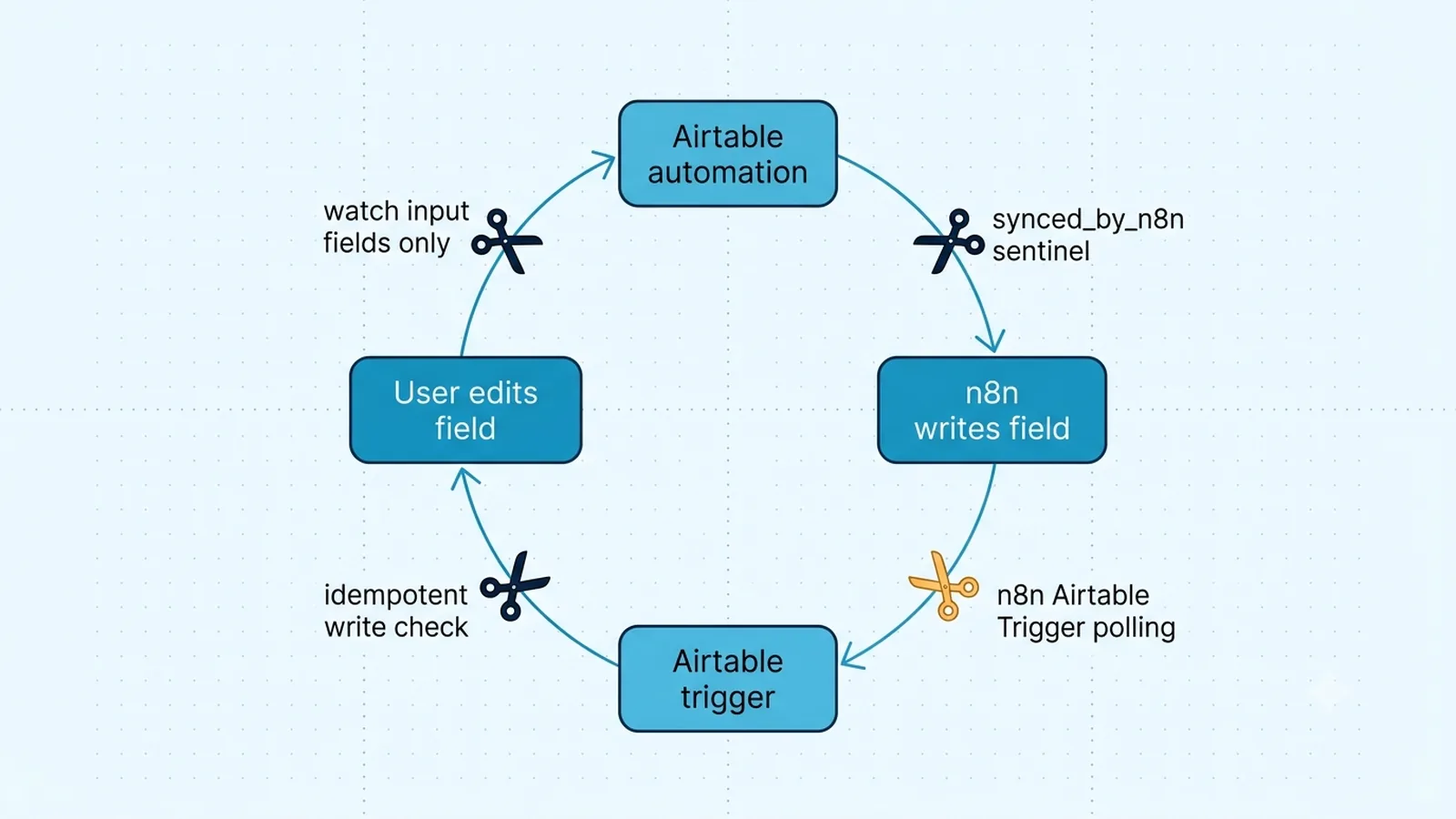
Identify the exact write that causes the next trigger
Open two or three consecutive executions and line them up with Airtable's record activity. The loop is usually deterministic: a user or source system changes field A; an Airtable automation calls n8n; n8n writes field B; Airtable's `When record updated` trigger is watching B or the entire record; the automation calls n8n again. On the second run, n8n may rewrite B with the same or a derived value, or create another downstream row, and the cycle continues.
Airtable's current automation documentation lets `When record updated` monitor the entire record or selected fields. That selection is your first control surface. If the workflow only needs to react to `Order Status`, do not configure the trigger around every mutable field in the record. Fields that n8n owns—sync timestamps, enrichment values, external IDs, status mirrors—should normally be excluded from the trigger set. This removes the feedback edge instead of trying to detect it after a second execution has already consumed quota.
Where to break an n8n ↔ Airtable feedback loop
| Breakpoint | Use when | Trade-off |
|---|
| Watch only input fields | n8n writes different fields than humans/source systems | Simplest and lowest run consumption |
| Sync sentinel field | The same record must carry workflow state | Requires careful set/clear semantics |
| Last-modified identity/time filter | You can trust and inspect modifier metadata | Credential identity and field selection must be verified |
| n8n Airtable Trigger polling | You want filtering/dedup in n8n | Polling latency and trigger-field design |
| Idempotent write check | Repeated events are unavoidable | Usually needs a read/state comparison |
Watch fields that represent input, not workflow output
The highest-quality loop fix is structural. Configure the Airtable automation to watch only fields whose changes should begin the integration, and make sure n8n does not write those same fields as part of normal processing. If a user edits `Approval`, the automation can watch `Approval`; n8n can then update `Synced At`, `External ID`, or `Result` without re-firing that trigger. This approach does not require a race-prone flag reset and remains understandable to someone inspecting the base months later.
Be careful with formula, lookup, and rollup-driven conditions. Airtable's automation behavior differs by trigger type, and a computed change can satisfy a condition even though no person edited that displayed value directly. Test the exact trigger you choose with the fields your n8n flow mutates. The success criterion is observable: one intended source change produces one automation invocation, and the fields written by n8n do not produce a second invocation.
Use a sync sentinel when the workflow must touch watched data
When n8n must update a field that is also part of the trigger condition, add an explicit Boolean or status field such as `synced_by_n8n`. Before the business write, set the sentinel to a state the Airtable automation excludes; after processing, decide how and when it should be cleared without immediately requalifying the record. A common mistake is to set the flag true, write the record, then clear it inside the same trigger-sensitive design—both writes can become new trigger events.
Design the sentinel as a state machine rather than a momentary toggle. For example, the source change sets a record to `Needs Sync`; n8n processes it and moves it to `Synced`; only a future human/source edit moves it back to `Needs Sync`. If you truly need a Boolean, make the automation's start condition exclude the n8n-owned state and have an independent source action reset it. This makes the loop impossible by condition, rather than merely unlikely by timing.
// IF / Code-node guard concept
if ($json.synced_by_n8n === true) {
  return []; // Do not enter the write branch again
}
return [{ json: $json }];
Use n8n's Airtable Trigger when polling gives you cleaner control
n8n's Airtable Trigger node polls Airtable using a trigger field such as a created-time or last-modified field. For workflows where Airtable automation callbacks are causing opaque feedback, moving the trigger boundary into n8n can centralize polling, IF conditions, deduplication, and downstream writes. It is not automatically better: polling introduces interval-based latency and still needs a field whose semantics fit the change you care about.
Choose a last-modified field that tracks the source fields, not every field n8n writes, when Airtable's field configuration allows that model. Then store or compare the record ID plus modification timestamp before executing side effects. In n8n production mode, test the polling behavior with real changes rather than relying only on manual editor runs. The objective is the same as with Airtable automations: workflow-owned writes must not look like new source events.
Make writes and creates safe even when a duplicate event arrives
Even a well-designed trigger can deliver repeated or closely spaced events because users edit twice, upstream systems retry, or two automations observe the same record. Protect the expensive side effect separately from the trigger. Before creating a destination row, use a stable source key such as Airtable record ID plus an event/version marker and verify that you have not already processed it. Before updating Airtable, compare the desired values with the current ones and skip the request when nothing would change.
Idempotency also reduces automation-run consumption because fewer n8n writes mean fewer opportunities for Airtable triggers to fire. Do not use `{{$now}}` in every update unless a new timestamp is truly meaningful; a constantly changing sync timestamp guarantees that every run produces a different row state. If you need an audit timestamp, update it only when the business payload changes or after a dedupe check has decided the event is genuinely new.
Airtable automation runs and n8n executions provide an early warning signal. A single source edit producing dozens of runs within seconds is enough evidence to disable the automation or workflow while you inspect the trigger edge. Do not leave the loop running while testing individual IF expressions; it can consume automation quotas, generate duplicate downstream records, and overwhelm rate limits before the new condition is published.
After applying the structural fix, test three cases: a human/source edit that should trigger, an n8n-owned write that should not trigger, and a repeated delivery of the same source state that should not duplicate side effects. Keep the corresponding Airtable activity and n8n execution IDs. Those three tests prove much more than seeing one green execution because they cover the initial event, the feedback edge, and the duplicate-event path.
Verification checklist
- One intended source-field change produces one Airtable automation or n8n trigger event rather than a chain of repeated executions.
- Fields written by n8n are excluded from the Airtable trigger set or are blocked by an explicit sentinel/condition.
- If Last modified by is used, production tests confirm the dedicated n8n credential appears under the identity the condition expects.
- A repeated delivery of the same record state does not create a second downstream record or perform an unnecessary Airtable update.
- Any sync flag has defined set and reset semantics that cannot themselves requalify the same event indefinitely.
- Airtable automation run counts and n8n executions remain stable after both human edits and workflow-owned writes.
Documentation and community threads cited
These fixes follow current Airtable API documentation, n8n node docs, and community threads. Primary sources:
Frequently asked questions
Why does an Airtable automation fire again after n8n updates the same record?
`When record updated` reacts to changes in the fields it watches, regardless of your intended direction of sync. If n8n writes one of those watched fields, that write can become the next trigger event.
Is a synced_by_n8n checkbox enough to stop every loop?
Only if its lifecycle is designed carefully. Setting and immediately clearing a watched flag can itself create more updates. Prefer a state/condition that n8n-owned writes cannot immediately requalify.
Should I use Airtable automation or the n8n Airtable Trigger?
Use whichever gives you the cleanest event boundary. Airtable automation can be near-immediate and field-specific; n8n polling can centralize filtering and deduplication. Either still needs idempotent downstream effects.