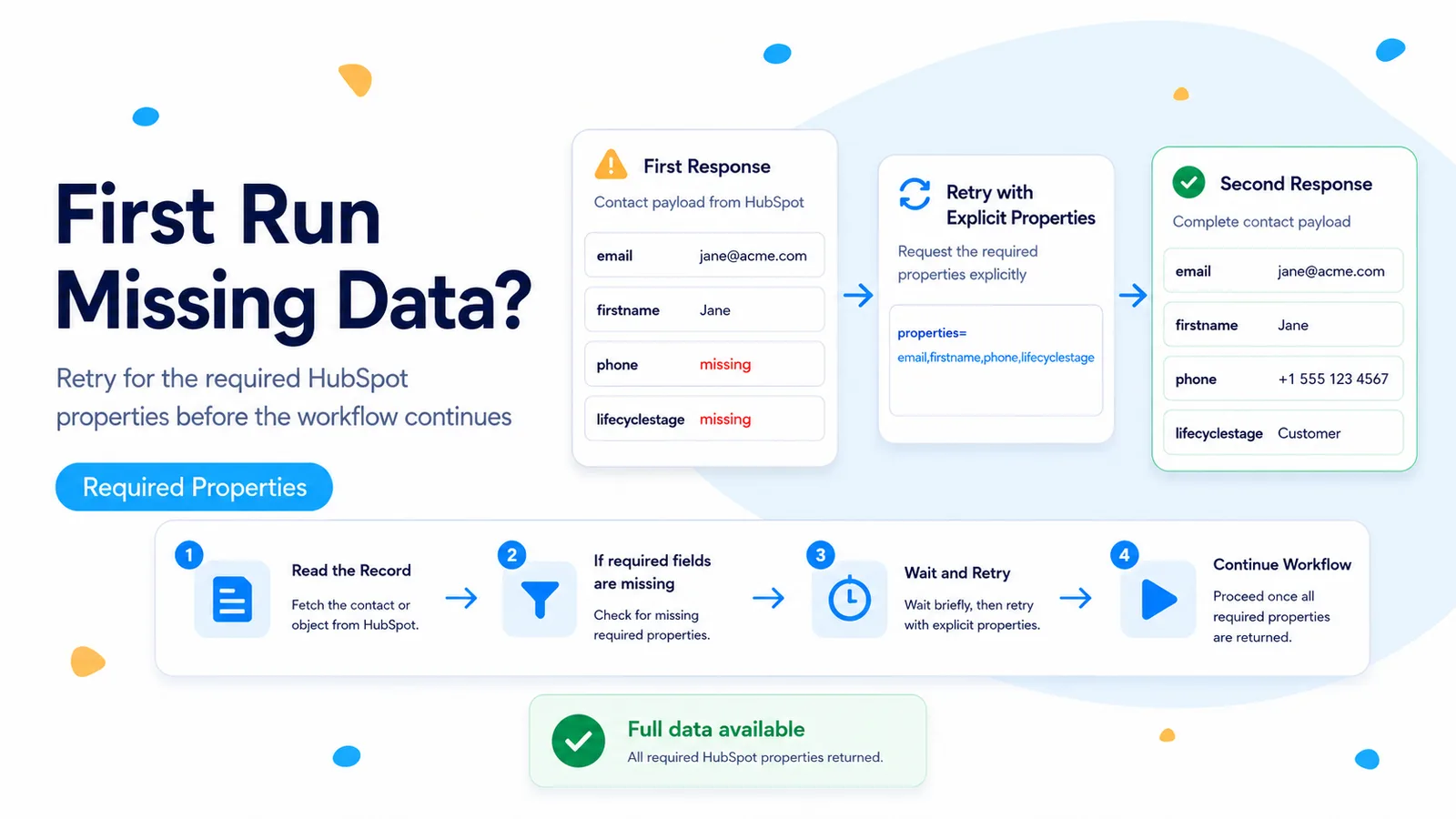
The useful symptom is “same record, different result a few seconds later”
A 2026 n8n Community report describes a workflow that looks up a HubSpot contact by a transaction ID. On the automatic run, some needed properties are empty or absent. Manually re-running the lookup a few seconds later returns the full set. A community reply attributes the pattern to timing and propagation inside HubSpot. HubSpot’s public object documentation does not promise a fixed propagation window, so it is better to treat that explanation as a plausible timing diagnosis to verify rather than a guaranteed platform rule.
The first question is whether the property was truly missing from the HubSpot API response or merely not requested. HubSpot’s current object API says that requested properties without values do not appear in the response. Its endpoints also return only selected/default properties unless you ask for others. Those behaviors can look like “incomplete data” even when there is no timing issue.
Capture the first automatic response before adding any wait. You need a baseline showing which properties are absent, which are present, and what the record’s updatedAt/hs_lastmodifieddate values look like.
First eliminate the simpler cause: request the fields explicitly
In the HubSpot node or HTTP Request, specify the exact properties your next node requires. Avoid fetching a giant contact object “just in case.” A small required set is easier to validate and makes your retry condition precise.
For example, if routing depends on email, lifecyclestage, and a custom transaction property, request those three fields and no more during the readiness check. Once the record is ready, a later enrichment step can retrieve optional context if needed.
Remember that HubSpot may omit a requested property when that record has no value. Your code therefore needs to distinguish absent, empty string, and a valid falsy value such as 0 or false. A blanket truthiness test can misclassify legitimate data as “not ready.”
GET /crm/objects/2026-03/contacts/{{ $json.contactId }}
?properties=email,lifecyclestage,external_transaction_id
Use a bounded readiness loop instead of one blind Wait
A fixed five-second Wait always costs five seconds and still fails when the data takes longer. A bounded readiness loop is more disciplined: read the record, check only the required fields, wait briefly only when the condition is not met, and stop after a small number of attempts.
Keep the retry count low enough that a genuinely missing field does not hold an execution open for minutes. Three or four reads separated by one to three seconds is a reasonable starting experiment, not a universal HubSpot guarantee. Measure your own workflow before setting the production values.
When the retry ceiling is reached, route the item to an exception path with the contact ID and missing field names. Do not silently continue with partial data. Silent continuation is how a temporary timing symptom becomes a wrong CRM update or misrouted lead.
Read contact
  ↓
Required fields present?
  ├─ yes → continue workflow
  └─ no → attempts < 4 ?
            ├─ yes → Wait 2s → Read contact again
            └─ no  → exception / retry queue
Make the readiness check field-aware
Write the condition around what the downstream step actually needs. If email is mandatory but company is optional, do not block on company. If a custom score is legitimately allowed to be zero, test for null/undefined rather than Boolean(score). If a property is an empty string until another HubSpot workflow fills it, document that business rule so the retry is understandable.
For object properties, use the internal property names returned by HubSpot. The readiness check should operate on API values, not labels from the HubSpot UI. That prevents a later label rename from changing the automation’s logic.
Log the missing fields on each attempt. A sequence such as [lead_score] → [lead_score] → [] proves the retry actually observed a transition. A sequence that never changes suggests the field is not being populated at all and more waiting will not help.
const required = ['email', 'external_transaction_id', 'lead_score'];
const props = $json.properties ?? {};
const missing = required.filter((name) =>
  props[name] === undefined || props[name] === null || props[name] === ''
);
return [{ json: { ...$json, _missingRequired: missing, _ready: missing.length === 0 } }];
Resolve identity once, then retry by HubSpot Record ID
If the initial workflow finds the contact through a transaction ID, email, or search query, capture the resulting HubSpot Record ID and use that Record ID for subsequent retry reads. Repeating a search introduces a second moving part: the search index and filter behavior can change independently of the record’s properties.
HubSpot’s current object API supports direct reads by Record ID. A direct read gives you a cleaner readiness test because every retry targets the same object. It also avoids accidentally selecting a different contact when an external identifier is duplicated or corrected while the workflow is waiting.
Do not poll every second indefinitely. The objective is to bridge a short timing gap, not create a permanent synchronizer. Long-running synchronization belongs in a scheduled reconciliation workflow with its own cursor and error handling.
Signals that this is not a timing problem
If a property is missing after repeated direct reads minutes apart, verify whether HubSpot ever received a value for it. Open the contact’s property history or inspect the upstream system that should write it. A retry cannot invent data that no process has produced.
If the property appears in the HubSpot UI but not in your API response, check that you requested its internal name and that the token has access to the property/object. If the first read comes from a search endpoint and the second from an object endpoint, standardize the test before drawing conclusions because those endpoints have different default returned properties.
If only one n8n environment shows the issue, compare node versions, workflow data, credentials, and execution mode. Do not label it “HubSpot eventual consistency” solely because a delay appears to help. Preserve a reproducible before/after request pair first.
- Same Record ID is used for every retry.
- Required properties are explicitly requested.
- Missing fields are logged per attempt.
- Retry count is bounded.
- Persistent missing fields go to an exception path, not an infinite wait.
Verify under automatic execution, not only in the editor
Trigger the workflow through the same production path that originally produced the incomplete data. Record the timestamp of the upstream event and each HubSpot read. Confirm the first incomplete read, if it still happens, is followed by a successful bounded retry without manual intervention.
Then test a contact where one required field is intentionally never populated. The workflow should stop at the retry ceiling and produce a useful exception. That negative test proves the readiness loop is protecting data quality rather than merely postponing every execution.
Documentation and community threads cited
The first-run/manual-retry symptom comes from n8n Community. The article deliberately treats the proposed propagation explanation as a community diagnosis, while the behavior of requested and omitted properties is grounded in HubSpot’s current object API documentation.
Frequently asked questions
Why does the first automatic HubSpot read return partial data that is complete moments later?
A community diagnosis attributes it to timing and propagation inside HubSpot, but HubSpot does not promise a fixed window. First rule out the simpler cause: HubSpot omits requested properties that have no value and returns only selected or default properties unless you ask for others.
Is a fixed Wait node the right fix?
No. A blind five-second Wait always costs five seconds and still fails when data takes longer. Use a bounded readiness loop that requests the exact properties you need, checks only those fields, waits briefly, and stops after a few attempts.
What should happen if a field never arrives?
Route the item to an exception path with the contact ID and missing field names. Silent continuation with partial data is how a timing symptom becomes a wrong CRM update.