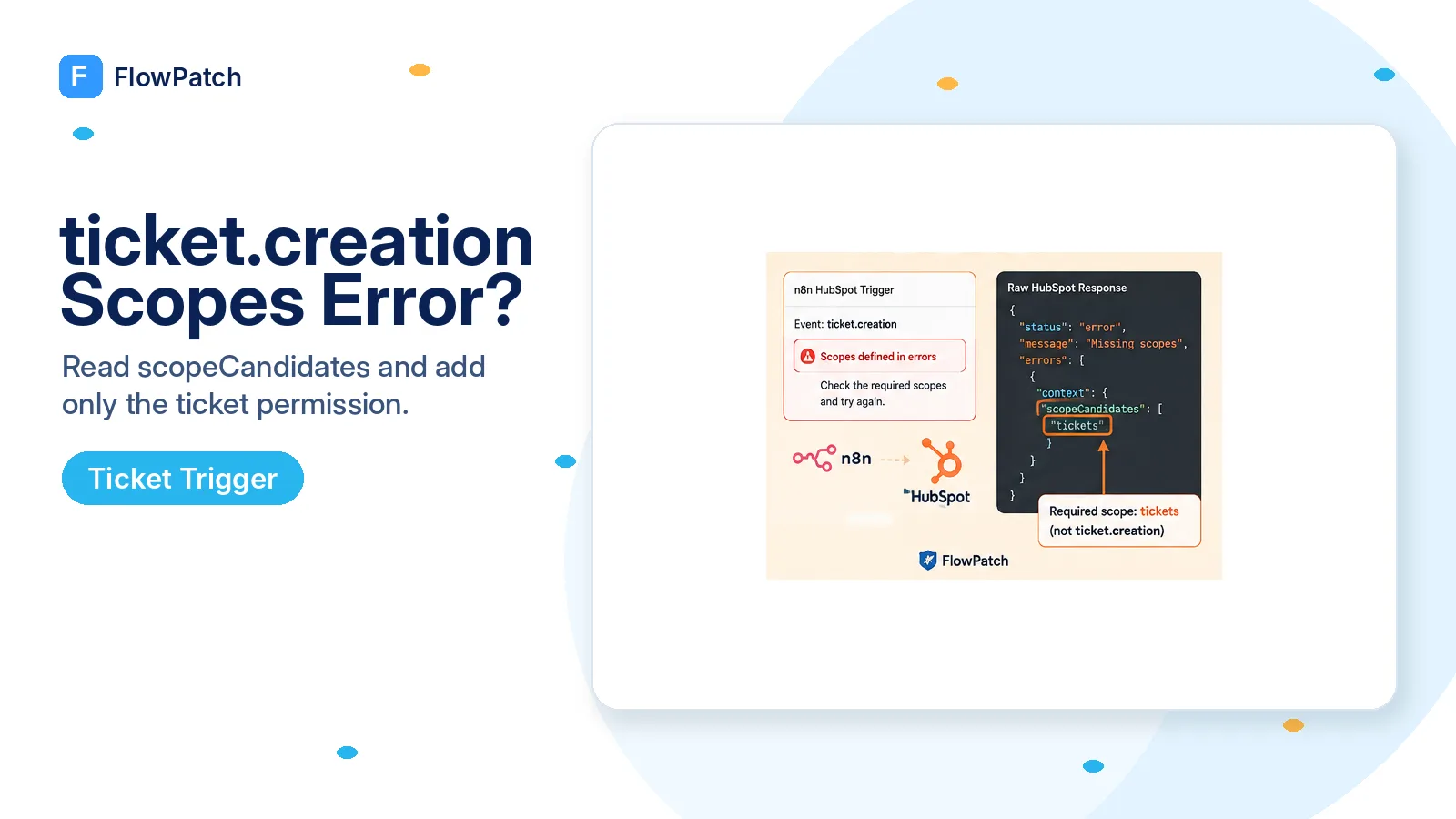
The most important correction: “errors” is a JSON field, not a permission name
This failure wastes time because the n8n message reads as though the HubSpot app must require a scope literally called errors. There is no useful permission to search for under that name. A community user reproduced the underlying HubSpot API call and captured the full response. Inside the top-level errors array, HubSpot included a SubscriptionErrors.REQUIRED_SCOPE_SUBSCRIPTION_DETAIL entry with context for ticket.creation and a list of scopeCandidates.
That raw payload changes the diagnosis completely. The authentication can be good enough to create other webhook subscriptions while ticket.creation fails because the app definition lacks ticket access. The problem is therefore event-specific authorization at subscription creation, not a generic OAuth outage.
Keep the exact subscription type visible while debugging. If contact.creation works and ticket.creation fails under the same n8n credential, do not rebuild the entire credential first. Compare what HubSpot requires for the failing object type.
Do not add a fictional “errors” scope. The useful data is supposed to be inside HubSpot’s errors array.
HubSpot’s v3 webhook guide still maps ticket.creation to ticket access
HubSpot’s current legacy Webhooks v3 guide lists subscription types and their corresponding scopes. Contact, company, and deal events use granular CRM read scopes, while ticket.creation, ticket.deletion, ticket.propertyChange, ticket.associationChange, ticket.restore, and ticket.merge are listed with the tickets scope. That asymmetry explains why a credential that handles contacts and deals can fail as soon as you add a ticket event.
The raw validation response captured in the n8n Community goes further: its scopeCandidates included tickets, crm.objects.tickets.read, crm.schemas.tickets.read, and sensitive-ticket variants. Treat that payload as evidence of what HubSpot’s validation service offered for that specific request, not as a reason to request every candidate. Use the least privileged scope that fits your app model and the current HubSpot app UI.
If your app configuration surface shows a ticket permission under a different granular label, verify it against the authorization screen and the raw subscription response. HubSpot has been moving APIs toward granular and date-versioned permissions, while the n8n Trigger path still interacts with the legacy webhook model. That is exactly why copying one old scope list blindly is fragile.
Make the app’s required scopes and the OAuth grant tell the same story
There are two scope sets people often blur together: the scopes configured as required/optional on the HubSpot app, and the scopes actually requested and granted during the OAuth connection used by n8n. Editing only the app definition does not retroactively rewrite an already issued authorization grant. After you change required permissions, reconnect the n8n HubSpot credential through the intended portal so the new grant contains what the trigger needs.
At the same time, avoid the opposite mistake of turning on every HubSpot permission. Community reports around this trigger show that overly broad or mismatched app scope configuration can make the credential authorization flow fail. Work from the exact event list your workflow uses. If the only new event is ticket.creation, add the minimum ticket access needed for that event, reauthorize, and test before touching conversations, marketing, CMS, or unrelated write scopes.
Document which events share this credential. A single developer app serving ten workflows can become hard to reason about because each new trigger adds another permission requirement. For a small integration, one deliberately scoped app/credential for the webhook workflows can be easier to audit than a catch-all app used by every HubSpot node.
- App configuration contains the ticket permission needed by ticket.creation.
- n8n OAuth authorization is re-granted after the app scope change.
- The correct HubSpot portal is selected during authorization.
- Unrelated scopes are not added as a shotgun fix.
- Existing contact/deal triggers are retested after changing the credential.
If n8n still hides the detail, reproduce subscription creation outside the Trigger node
The community report is valuable because the user could not see the useful errors array in normal n8n logs, even with debug logging. They eventually prodded the HubSpot API manually and saw the scopeCandidates context. If your UI still reduces the response to the generic “defined in errors” line, use a controlled API reproduction rather than guessing.
For the v3 webhook model, HubSpot documents POST /webhooks/v3/{appId}/subscriptions with eventType, propertyName when relevant, and active. The management request uses the app/developer authentication required by that API, which is distinct from simply calling a CRM object endpoint with a private-app token. Reproduce only if you understand the credential model; do not paste secrets into a public request inspector.
The goal of the reproduction is not to build a parallel webhook system. It is to obtain the full validation JSON so you can read errors[].context.scopeCandidates for the failing subscription. Once the app permission is corrected, return to the native n8n Trigger and keep the production design simple.
Desired subscription
{
  "eventType": "ticket.creation",
  "active": true
}

Read the FULL HubSpot error response:
errors[].subCategory
errors[].context.subscriptionType
errors[].context.scopeCandidates
Do not confuse ticket.creation with the propertyName error from ticket.propertyChange
FlowPatch already treats the ticket.propertyChange failure separately because that event has an extra requirement: the internal property name being monitored. HubSpot’s webhook guide says propertyName is needed for property-change subscription types. ticket.creation has no propertyName requirement; its common failure here is authorization for the ticket object.
This distinction is useful when a workflow contains multiple events. If the API returns both a required-scope detail and a missing-property detail, split the event list temporarily and activate one subscription type at a time. Fixing two validation problems in one edit makes it difficult to know which change mattered.
Likewise, do not use a working deal.propertyChange trigger as proof that ticket.creation should work. They have different object permissions. A webhook credential is not simply “valid” or “invalid”; it can be valid for some subscriptions and under-scoped for another.
Verify the subscription itself before waiting for a real support ticket
After reauthorizing, activate the n8n workflow and confirm activation succeeds without the validation message. Then inspect the HubSpot app’s webhook subscription configuration if that surface is available to your app type. The ticket.creation subscription should be active before you test business events.
Create one unmistakable test ticket in the connected portal and record its ID. Confirm n8n receives the event once, captures the correct objectId, and can read the ticket details with the downstream credential. HubSpot notes that webhook notifications can be batched, retried, and in rare cases duplicated, so downstream processing should be idempotent by event/object identity rather than assuming exactly-once delivery.
Finally create a contact or deal event that uses the same credential. That regression test catches the case where adding ticket access fixed one trigger but a scope reauthorization accidentally dropped permissions used by another workflow.
When this is probably an n8n compatibility problem rather than your app configuration
If HubSpot’s raw response says the configured app already satisfies one of the candidate ticket scopes, the OAuth grant includes it, and the native Trigger still constructs a subscription that HubSpot rejects, preserve that evidence and check the current n8n issue tracker. There has already been public discussion about the HubSpot Trigger relying on older API behavior and scope lists.
Do not keep expanding permissions after you have proven the minimum required scope is present. A reproducible request, app-scope screenshot, redacted granted-scope list, n8n version, and full HubSpot correlationId are the artifacts maintainers need. They are far more useful than “I enabled everything and it still fails.”
For a production workflow that cannot wait on a connector fix, a scheduled Tickets API poll can be a temporary fallback. Keep that fallback bounded to records created after a stored cursor and deduplicate by ticket ID; do not replace one trigger problem with an unbounded full-portal scan.
Sources checked for this guide
The exact n8n message and hidden scopeCandidates behavior are documented in n8n Community reports. HubSpot’s current Webhooks v3 guide is used for the ticket.creation scope mapping and webhook delivery behavior. The article does not treat community suggestions to add unrelated webhooks/conversations scopes as authoritative.
Frequently asked questions
Is "errors" a HubSpot scope I need to add?
No. "errors" refers to an errors array in HubSpot’s validation response that n8n may not surface. It is not a permission.
What scope does ticket.creation actually need?
For the legacy v3 webhook model used by the n8n HubSpot Trigger, HubSpot’s current guide lists ticket.creation with the tickets scope. Fix the app’s required ticket permission and re-grant the credential.
Should I add conversations or generic webhook scopes to be safe?
No. Adding unrelated scopes because the UI message hides the candidate list does not help. Capture the raw error to see the acceptable scopeCandidates, then match the app’s required list to the authorization request.