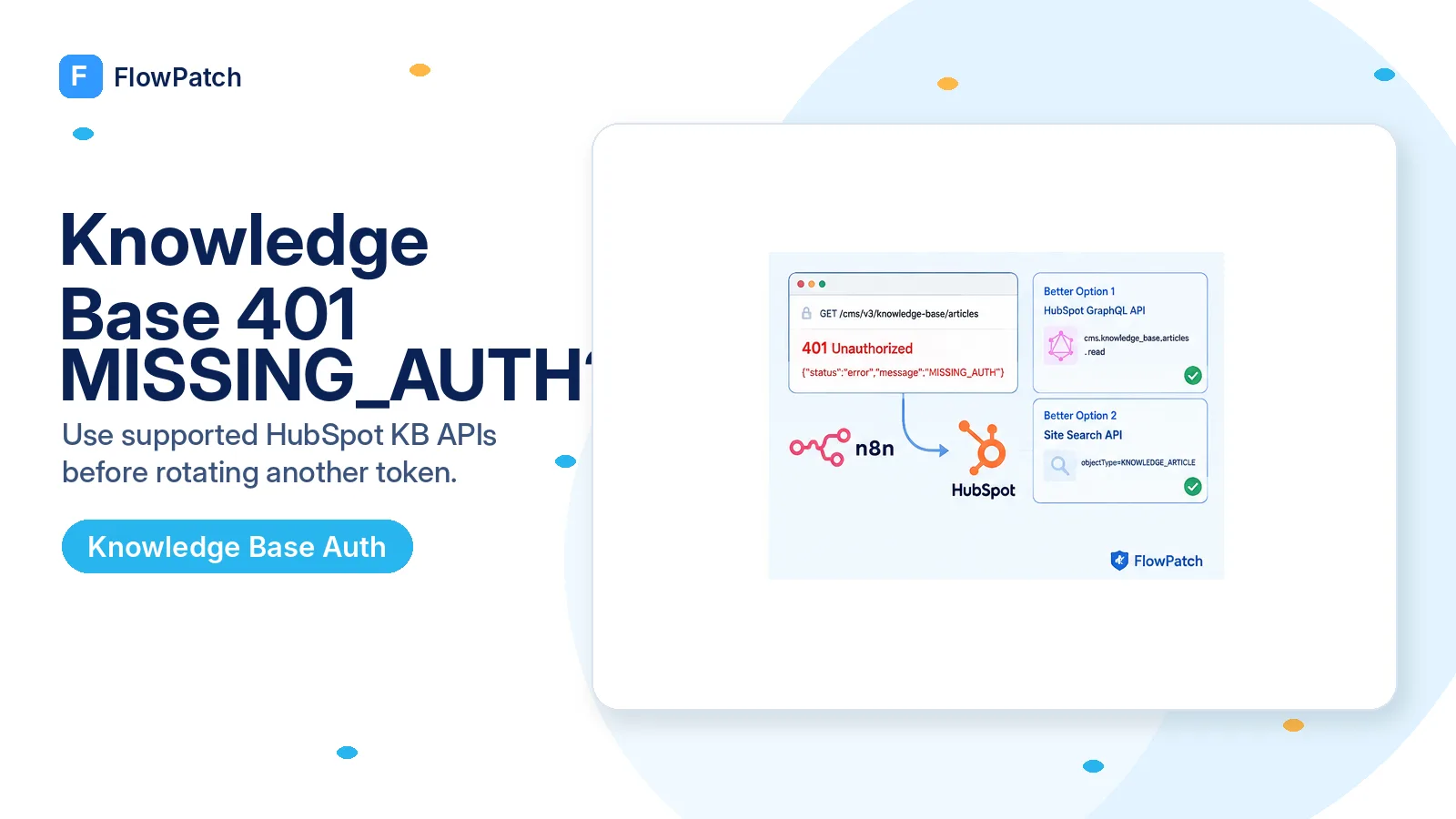
Start with the contradiction: the token works, but only this URL says auth is missing
A useful 401 diagnosis begins with a control request. In the reported n8n case, a HubSpot private-app token could read CRM records such as tickets and contacts, but requests under /cms/v3/knowledge-base/ returned MISSING_AUTH. The user even sent the Bearer header manually through an HTTP Request node and rotated the token. That combination matters because it weakens the simple explanation that n8n forgot the credential or that the token was globally invalid.
When one credential succeeds against one HubSpot API family and fails against another, compare the target route with the current API reference before changing authentication again. A URL copied from an old gist, generated by an AI assistant, inferred from another CMS endpoint, or taken from an internal network call can look plausible while never having been a supported public route. A gateway can answer such a route with an authentication-looking response, which makes the integration engineer spend hours on the wrong layer.
Preserve one successful CRM request and one failing Knowledge Base request from the same execution. Keep the method, host, path, status code, response body, and a redacted indication that an Authorization header was present. That pair is much stronger evidence than saying “the credential tests green” because it isolates the variable that changed: the API path.
Do not rotate a production token merely because an undocumented-looking URL says MISSING_AUTH. First prove that the URL exists in HubSpot’s current public API contract.
The first fix is route verification, not a different token prefix
The community thread around this error contains several speculative fixes: adding write scopes, manually typing the Authorization header, and switching token types. One participant eventually asked the more important question: where did /cms/v3/knowledge-base/articles come from? That route was not present in the public documentation they could find. This is exactly the point where troubleshooting should branch away from credential rotation.
HubSpot’s current scope catalog describes cms.knowledge_base.articles.read as permission to view knowledge-article details using the GraphQL API. Its current GraphQL documentation exposes a KB root with knowledge_article and knowledge_article_collection fields. For search-oriented use cases, HubSpot’s current Site Search API supports the KNOWLEDGE_ARTICLE content type. Those are documented surfaces with explicit behavior you can test.
That does not prove every undocumented CMS URL is permanently impossible, and it does not prove the original 401 can never have another cause. It does give you a safer diagnostic order: use an endpoint HubSpot currently documents, ask only for the scopes that endpoint requires, and then interpret any 401/403 from that supported request.
- CRM call succeeds with the same token: keep it as your authentication control.
- Target URL is absent from current HubSpot reference: treat the route itself as suspect.
- Need article content/details: test the documented GraphQL KB schema.
- Need keyword search across published KB content: test Site Search with type=KNOWLEDGE_ARTICLE.
- Only after a documented request fails should you widen the scope/auth investigation.
For article data, move the n8n request to HubSpot GraphQL
HubSpot’s GraphQL guide says KB is a root query field for the latest Knowledge Base tool. A collection query can return fields such as hs_name, hs_body, and hs_path, while a single-article query can address an article by hs_id. The public API call itself is sent as POST /collector/graphql with an operationName, a query string, and optional variables.
Do not paste an enormous query into the first test. Start with a tiny collection query that returns a title and path. If it succeeds, add the body, path, category data, filters, and pagination needed by the workflow. A minimal query makes it much easier to tell a scope error from a schema-field error.
HubSpot documents two GraphQL execution scopes for API requests — collector.graphql_schema.read and collector.graphql_query.execute — plus scopes that correspond to the data source being queried. The current scope catalog specifically associates cms.knowledge_base.articles.read with Knowledge Base article details. Verify the exact scopes available to your app/account instead of copying a scope set from an unrelated CRM tutorial.
POST https://api.hubapi.com/collector/graphql
Authorization: Bearer {{ $credentials.token }}
Content-Type: application/json

{
  "operationName": "kbTitles",
  "query": "query kbTitles { KB { knowledge_article_collection(limit: 5) { items { hs_name hs_path } } } }",
  "variables": {}
}
If you only need discovery, Site Search may be the simpler API
Many n8n workflows do not actually need the full Knowledge Base authoring model. An AI support flow may need to find published articles relevant to a phrase, retrieve their URLs and titles, and pass those references downstream. For that job, HubSpot’s date-versioned Site Search API is often a cleaner match than guessing a Knowledge Base CRUD route.
The current Site Search guide lists KNOWLEDGE_ARTICLE as a supported content type and returns fields including id, title, description, URL, language, category, and subcategory. Build the search request in a normal HTTP Request node, use the exact current path from the reference, and set type=KNOWLEDGE_ARTICLE so ordinary site pages and blog posts do not pollute the result set.
Be explicit about the limitation: search results are an index-oriented view, not a substitute for every article field available through GraphQL. If the downstream step needs full body content or structured KB relationships, switch to GraphQL rather than trying to stretch Site Search beyond its purpose.
GET https://api.hubapi.com/cms/site-search/2026-03/search
  ?q={{ encodeURIComponent($json.query) }}
  &type=KNOWLEDGE_ARTICLE
  &limit=10
Authorization: Bearer {{ $credentials.token }}
Only debug authentication after the supported request is reproducible
If POST /collector/graphql or the current Site Search route now returns 401/403, you finally have an authentication problem attached to a documented endpoint. Check the token against a lightweight control API, confirm the app actually has the required CMS/GraphQL scopes, and verify that the connected HubSpot account has the product tier required for Knowledge Base access. HubSpot’s scope documentation lists cms.knowledge_base.articles.read for Service Hub Professional or Enterprise.
In n8n, avoid testing two credential mechanisms at the same time. Either select a credential in the HTTP Request node or set a manual Authorization header for a controlled test; do not do both and then wonder which header won. Never print the full Bearer token into execution logs, sticky notes, screenshots, or AI prompts. Redact it to a short prefix/suffix if you need evidence that a value was populated.
If the request works with a manual Bearer header but fails with a reusable n8n credential, then inspect the n8n credential configuration. If both fail identically while a CRM control call still succeeds, return to scope/tier/API-contract analysis. The point is to change one layer at a time.
Verification checklist for the 401 fix
A successful fix is not “the node turned green once.” Run a control CRM request and the replacement KB request with the same credential. Confirm the supported KB request returns a real article from your portal, then run it through the exact production execution mode used by the AI Agent or workflow. Save the endpoint version and required scopes in a workflow note so a future maintainer does not reintroduce the guessed route.
Finally, search the workflow export for /cms/v3/knowledge-base/articles. If the stale path still exists in an inactive branch, old HTTP node, fallback tool, or copied sub-workflow, it can resurrect the same problem later. Remove or clearly disable it rather than leaving a trap in the canvas.
Sources and further reading
The exact MISSING_AUTH symptom and disputed /cms/v3/knowledge-base/articles path come from a January–February 2026 n8n Community thread. The replacement approaches use HubSpot’s current scope catalog, GraphQL Knowledge Base documentation, and date-versioned Site Search documentation. Community claims that changing token type alone fixes the route are not treated as official behavior here.
Frequently asked questions
The same token works for Contacts but the knowledge base route returns MISSING_AUTH — is n8n dropping the header?
Probably not. In a 2026 community case that /cms/v3/knowledge-base/articles route could not be found in HubSpot’s public reference. Reproduce the request against a documented endpoint before you debug the token.
Which endpoints actually read knowledge base content?
Current HubSpot documentation exposes Knowledge Base reads through the KB GraphQL root, and searchable published articles through the Site Search API. Use one of those supported paths first.
When is it actually a token problem?
Only if a documented, supported endpoint itself returns 401 or 403 with the same credential. At that point check scopes and the account, not the header.