Why “I already checked that scope” can still be true and still fail
Two n8n Community reports in 2026 describe the same frustrating symptom: the HubSpot developer app visibly contains the requested scopes, but the n8n connection still returns a missing-scopes error. The trap is assuming the app settings page is the only source of truth.
HubSpot’s current OAuth documentation defines a contract between the app configuration and the authorization URL. Scopes marked required in the app must be included in the OAuth request. If the request asks for a required permission that is absent from the app configuration, or the app requires a scope that the request omits, authorization can fail before n8n ever receives a usable token.
There is a second layer: the HubSpot account chosen on the consent screen must actually have access to the product or feature behind the requested scope. A scope can be syntactically valid and correctly configured, yet still fail installation when the selected account is not entitled to it.
App settings, OAuth request, selected HubSpot account, and issued token must all agree. Checking a box solves only one of those four layers.
Capture the exact scopes n8n is asking HubSpot to authorize
Start with the error details rather than the app settings. Record every scope named in the error or visible in the OAuth authorization URL. If you can inspect the URL before the consent screen, copy the scope parameter and URL-decode it so the individual permissions are readable.
Do not compare by eye against a long screenshot. Put the requested scopes in one list and the HubSpot app’s required scopes in another. Normalize whitespace and compare exact names. Small differences such as singular versus plural object names, schema scopes versus object scopes, or a legacy permission name can be easy to miss in a crowded UI.
If n8n is requesting a scope that no longer exists or does not match the current HubSpot platform, changing the HubSpot app cannot make that invalid scope valid. In that case record the n8n version and credential type because the connector itself may be requesting a legacy set.
Diagnostic scope table
REQUESTED BY N8N        CONFIGURED IN HUBSPOT       ACCOUNT HAS FEATURE?
crm.objects.contacts.read   yes                      yes
crm.objects.deals.read      yes                      yes
tickets                     ?                        ?
<unexpected legacy scope>   no                       n/a
Separate required scopes from optional product-dependent scopes
HubSpot supports required, conditionally required, and optional scopes. Required scopes must be granted for installation to succeed. Optional scopes can be dropped when an account does not have access to the corresponding product. This distinction matters when you connect n8n to portals on different HubSpot tiers.
If the workflow can function without a product-specific permission, making that permission optional can produce a more resilient app installation. If the workflow absolutely depends on that feature, keep it required but test authorization with a HubSpot account that has the necessary entitlement.
Do not mark a required operational scope optional just to get a green connection. You can end up with a credential that authorizes successfully but later fails at runtime when the workflow reaches the protected endpoint. The goal is an accurate grant, not merely a successful consent screen.
After changing scopes, create a new authorization grant
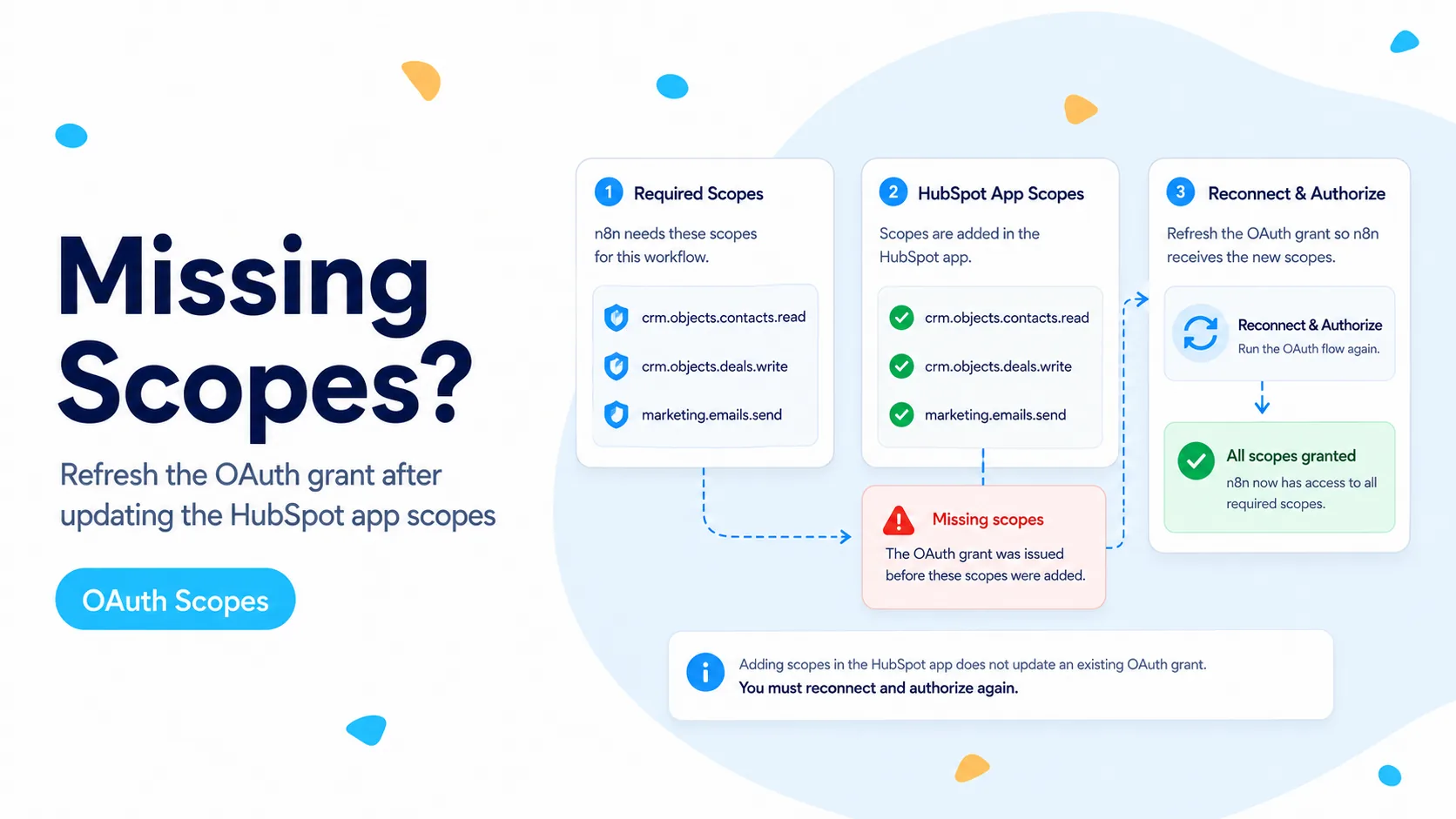
Editing the app configuration changes what future authorization requests may ask for. It does not retroactively add permissions to an existing access or refresh token. After changing required scopes, run the OAuth flow again so HubSpot can present the updated consent and issue a token set for the new grant.
For diagnosis, create a fresh n8n credential rather than repeatedly reconnecting the same object. A clean credential avoids confusion about cached state and makes it obvious which grant you are testing. Use a private browser window if you need to prevent HubSpot from silently selecting the wrong account during the flow.
Once the fresh credential works, replace the old one deliberately in the workflow. If it fails at the same point, compare the new authorization URL with the scope table again. Do not keep deleting and recreating the HubSpot app unless the app configuration itself is demonstrably wrong.
- Save the app configuration first.
- Start a fresh OAuth authorization after scope changes.
- Confirm the intended HubSpot portal on the consent screen.
- Test one endpoint that specifically requires the newly added scope.
- Retire the old n8n credential only after the new grant is verified.
Trigger workflows need event-specific scopes, not just generic CRM access
Webhook subscriptions make scope debugging more specific. HubSpot’s current webhook documentation maps subscription types to required scopes. For example, deal.creation requires crm.objects.deals.read, while ticket.creation and ticket.propertyChange use the tickets scope. A credential that can read contacts does not automatically have permission to create a ticket webhook subscription.
If the HubSpot Trigger fails only for one event type while other events work, compare the required scope for that event rather than rebuilding the entire credential. This is especially important for ticket events because users often add contact, deal, and company scopes but miss the ticket-specific permission.
Also remember that Service Keys do not support webhooks. If the workflow is a Trigger workflow, a Service Key that works perfectly for REST calls is not evidence that the webhook subscription can be created.
Check whether the selected account can grant every requested scope
HubSpot explicitly notes that users can get an installation error when they try to authorize a scope for a product the selected account cannot access. This can look like a configuration mismatch even when the text of the scope is correct.
Test with the actual production portal, not only a developer test account or free portal. If a required scope belongs to a paid HubSpot product, verify that the portal and the authorizing user have the needed access. User permissions and account subscription are separate from the app’s declared scopes.
For multi-account apps, move tier-dependent permissions into optional scopes where the workflow can degrade gracefully. Then make the workflow inspect what was actually granted before executing a feature that may not be available.
What to collect if n8n itself appears to request the wrong scope set
If the app configuration exactly matches the documented required scopes but n8n still sends an unexpected or obsolete scope, capture evidence before changing anything else. Record the n8n version, HubSpot node or Trigger typeVersion, credential type, full missing-scope message, and the authorization URL with secrets removed.
That evidence distinguishes a connector problem from a user configuration problem. It also prevents support threads from collapsing into generic advice to add more scopes. A reproducible scope mismatch is actionable; a screenshot of a red banner is not.
Use an HTTP Request node with a known-good OAuth or Bearer token as a temporary diagnostic path if the business process is blocked. That does not repair the Trigger, but it can prove the HubSpot endpoint and permission work independently of the native node.
Verification checklist
A successful connection is not enough. Execute an operation that requires the scope you just fixed. If the issue involved deals, read or write one test deal. If it involved ticket webhooks, activate the Trigger and create one disposable ticket. This proves the grant covers the real operation rather than only the generic credential test.
Keep the final scope table with the workflow documentation. The next time HubSpot or n8n changes the integration, you can compare the new request against a known-good baseline instead of starting from memory.
- Requested scope list matches HubSpot app required scopes exactly.
- Selected portal is entitled to all required product scopes.
- OAuth flow was run again after configuration changes.
- A scope-specific read/write or webhook test succeeds.
- Unexpected legacy scopes are documented with n8n version and node typeVersion.
Documentation and community threads cited
The failure pattern is based on 2026 n8n Community reports. Scope behavior, required-versus-optional rules, and webhook scope mapping are checked against HubSpot’s current OAuth, scopes, and Webhooks documentation.
Frequently asked questions
I added the scopes in HubSpot — why does n8n still say scopes are missing?
Checkboxes in the app are not the whole story. The scopes marked required by the app must also appear in the OAuth authorization request, and a token already issued does not gain permissions because you edited the app afterward.
What actually fixes a missing-scopes error?
Compare the exact scope set n8n requests with the app configuration, confirm the selected HubSpot account is entitled to those scopes, then perform a clean reauthorization so the new grant contains the updated set.
Do ticket and webhook features need their own scopes?
Yes. Ticket and webhook events require their specific scopes in both the app’s required list and the authorization request. Adding unrelated scopes will not compensate for a missing ticket or webhook permission.