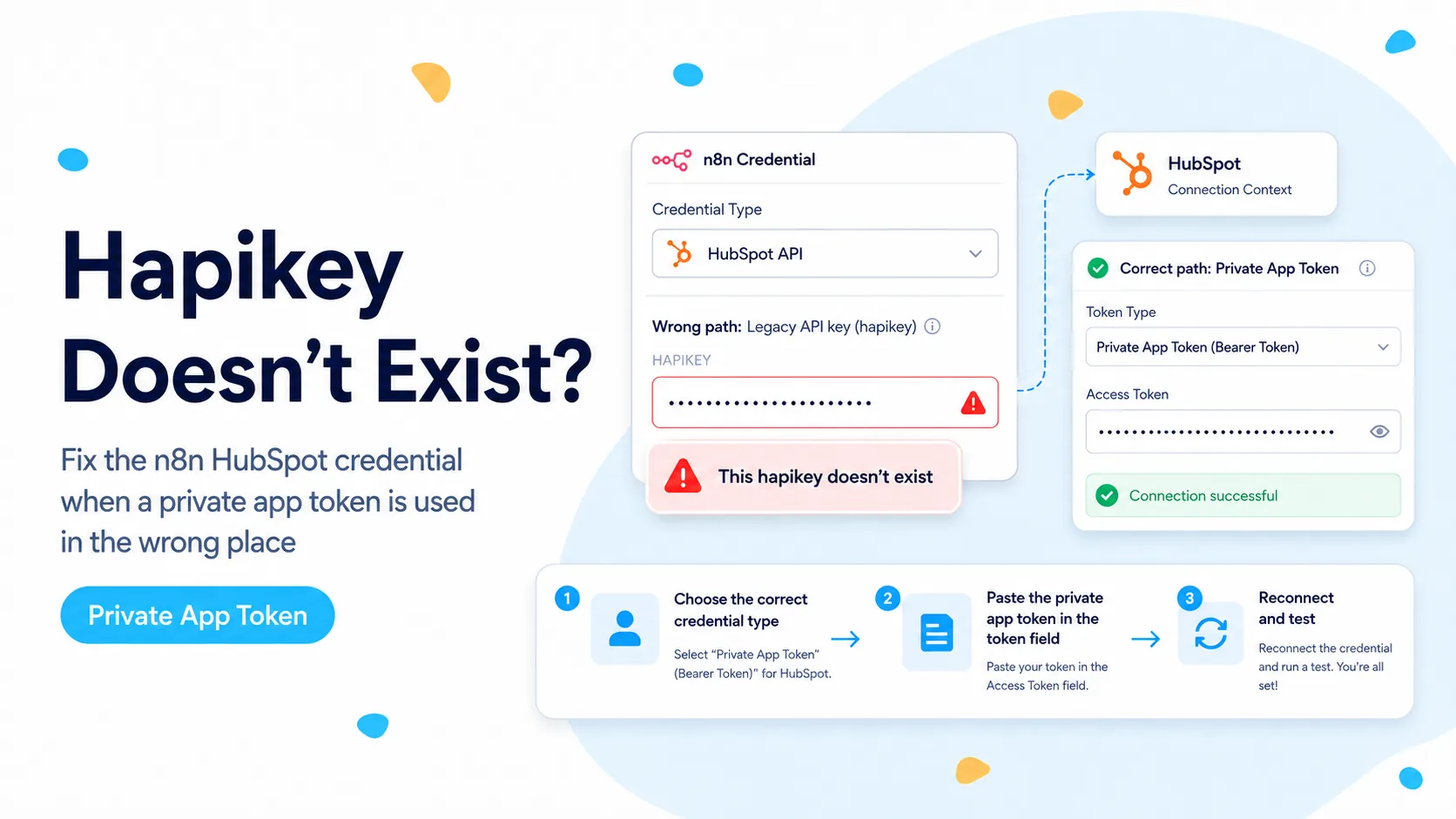
The clue is the word “hapikey,” not the red credential banner
A March 2026 n8n Community case is unusually useful because the user had already created a HubSpot private app, granted crm.objects.contacts.read, and copied the private app access token. The request still failed with “This hapikey doesn’t exist.” That combination points away from a missing contact scope and toward the way the credential is being transmitted.
HubSpot’s current authentication documentation shows OAuth tokens and private access tokens being sent in the Authorization header as Bearer credentials. Its newer Service Keys use the same Bearer pattern for REST API calls. By contrast, “hapikey” refers to HubSpot’s old API-key mechanism. If HubSpot is telling you a hapikey does not exist while you believe you supplied a modern access token, the first question is whether n8n is still using an old credential type.
Do not start by creating three more private apps. A new token pasted into the same legacy credential field can reproduce the same failure because the transport method is still wrong. First identify the credential object attached to the failing node and the authentication method that object actually uses.
A modern HubSpot token can be perfectly valid and still fail if an old n8n credential sends it as a hapikey instead of as Authorization: Bearer <token>.
Confirm the node is not holding an old credential reference
Open the failing HubSpot node and note the exact credential name and type. Older workflows can survive upgrades with a credential object created years earlier, even after you rotate the secret inside it. The node does not automatically reinterpret an old API-key credential as a newer app-token credential just because the text you pasted looks like a modern token.
If the same workflow contains another HubSpot node that works, compare the credential type, not just the credential label. Two credentials can both be named “HubSpot Production” while one is legacy API key and the other is an app token. This is especially easy to miss after duplicating nodes from an old workflow.
Also check HTTP Request nodes that use Predefined Credential Type. A built-in HubSpot node may be fixed while an older HTTP Request node still references a different HubSpot credential. Test each credential path independently rather than assuming one green node proves every call in the workflow uses the same authentication.
- Record the credential type attached to the failing node.
- Compare it with a known-working HubSpot node in the same instance.
- Check copied HTTP Request nodes for stale credential references.
- Do not rotate the token until you know which auth method is actually being sent.
Use a current HubSpot app-token or Service Key credential
For a normal server-to-server workflow that only needs HubSpot REST APIs, HubSpot’s 2026 Service Keys are designed for system-to-system integrations and can be sent as Bearer tokens. HubSpot also continues to document private app access tokens as Bearer credentials for legacy private apps. The important part is that the credential selected in n8n must map to that Bearer behavior.
Create a fresh current HubSpot credential in n8n rather than editing the old API-key credential in place. Give it a temporary diagnostic name such as “HubSpot Bearer Test.” Paste the app token or Service Key into the field intended for that authentication method, then attach only one read-only node to it.
A fresh credential object reduces ambiguity. If it works, you have isolated the problem to credential type or stale credential metadata. You can then migrate the remaining HubSpot nodes one at a time instead of making a large workflow-wide change with no rollback point.
Diagnostic sequence
1. Create new current HubSpot credential
2. Paste private-app token or Service Key
3. Attach to one Contact → Get/Search node
4. Execute one read-only request
5. Only after success, migrate write nodes
Prove the token outside the complex workflow
When the native node gives a generic authorization banner, a minimal REST request is the fastest way to separate token validity from connector state. Use an HTTP Request node with the Authorization header set to Bearer and call a harmless contacts endpoint that the token is scoped to read.
If that request succeeds, the token and scope are good enough for the endpoint. The remaining problem is how the failing node is configured. If the request returns 401, inspect whether the token is active, copied completely, and belongs to the intended HubSpot account. If it returns 403, authentication succeeded but the token lacks the needed permission for that endpoint.
This test is more informative than repeatedly clicking “Reconnect.” It turns one vague failure into three distinct branches: token rejected, token accepted but under-scoped, or token accepted and the native node still misconfigured.
GET https://api.hubapi.com/crm/v3/objects/contacts?limit=1
Authorization: Bearer <your-token>

Interpretation:
200 → token + read scope work
401 → token/authentication problem
403 → authenticated, but missing permission
Choose Service Key versus private app deliberately
HubSpot announced Service Keys in February 2026 as the forward-looking option for system-to-system integrations where OAuth and webhooks are unnecessary. They are useful for scheduled syncs, reporting jobs, internal automation, and direct API access. They do not support webhooks.
That limitation matters for n8n. If the workflow uses the regular HubSpot action node for reads and writes, a Service Key can be a good fit. If the workflow depends on the HubSpot Trigger and webhook subscriptions, do not “fix” the hapikey error by converting everything to a Service Key and then expect the Trigger to work. Keep authentication choices aligned with the capability you need.
For an older workflow that already uses a legacy private app successfully, migration is not mandatory just because Service Keys exist. The priority here is to remove the incorrect hapikey path. Once the workflow is stable, you can decide whether a broader credential migration is worth the operational change.
Do not confuse authentication failure with missing scopes
The community report included crm.objects.contacts.read, which is enough for a simple contact read. Adding dozens of unrelated scopes does not change a request that is being authenticated through the wrong mechanism. Scope debugging should happen after you have proven the Bearer credential is accepted.
When you do need more permissions, grant only the scopes required by the operations in the workflow. A contact sync that reads and updates contacts typically needs contact read and write permissions; a deal operation needs deal scopes; schema lookups can require schema scopes. Keep a small inventory next to the workflow so future changes are deliberate.
A 401-style authentication failure and a 403-style authorization failure are different classes of problem. Treating both as “credentials broken” is how teams end up rotating working secrets and widening permissions without learning what actually failed.
Migrate old workflows one node at a time
After the diagnostic credential succeeds, duplicate the workflow or disable automatic execution while you change references. Start with read-only nodes, then low-risk writes, then production-critical writes. Execute each node with a known record before moving to the next one.
Do not delete the old credential immediately. Keep it named clearly as legacy and remove node references from it. Once no active workflow uses it and the replacement has run successfully for an appropriate observation window, revoke or archive the old credential according to your security process.
For self-hosted n8n, exported workflow JSON can help you find stale credential IDs that are hard to spot visually. Search for the old credential name or ID before declaring the migration finished.
- Create a new credential instead of mutating the old one blindly.
- Test read operations first.
- Move write operations after successful reads.
- Search exports for stale credential references.
- Revoke the legacy credential only after production verification.
Verification checklist
The fix is complete when the same token that previously produced the hapikey message can perform the intended request through a current credential path, and the workflow no longer contains active nodes bound to the obsolete API-key credential.
Run both a direct API read and the native n8n operation. If the direct request works but the native node still fails, capture the node typeVersion, n8n version, credential type, and raw error before escalating. That evidence is far more useful than “HubSpot login does not work.”
- Minimal Bearer request succeeds for an endpoint covered by the token scope.
- Native HubSpot node succeeds with the new credential.
- No active node uses the legacy API-key credential.
- Write scopes are tested only where writes are actually required.
- Old credential is revoked only after the replacement is proven.
How this was verified
The exact error pattern comes from a March 2026 n8n Community thread. The authentication behavior is checked against HubSpot’s current authentication documentation and its 2026 Service Key documentation.
Frequently asked questions
Does "This hapikey doesn’t exist" mean my private-app token is bad?
Usually not. The message normally means the token is being sent through a legacy HubSpot API-key credential path. A private-app access token or 2026 Service Key is a Bearer credential and must go in the App Token / Service Key style credential, not an old API Key field.
How do I confirm the credential type is the problem?
Create or select the current HubSpot Bearer-style credential in n8n and run one read-only request, such as fetching a single contact. If that succeeds, the token is fine and the earlier failure was the credential path.
Should I regenerate the token or widen scopes?
Not first. Prove the credential with a minimal read before touching scopes or secrets. Over-permissioning hides the real cause and increases the risk if a token leaks.