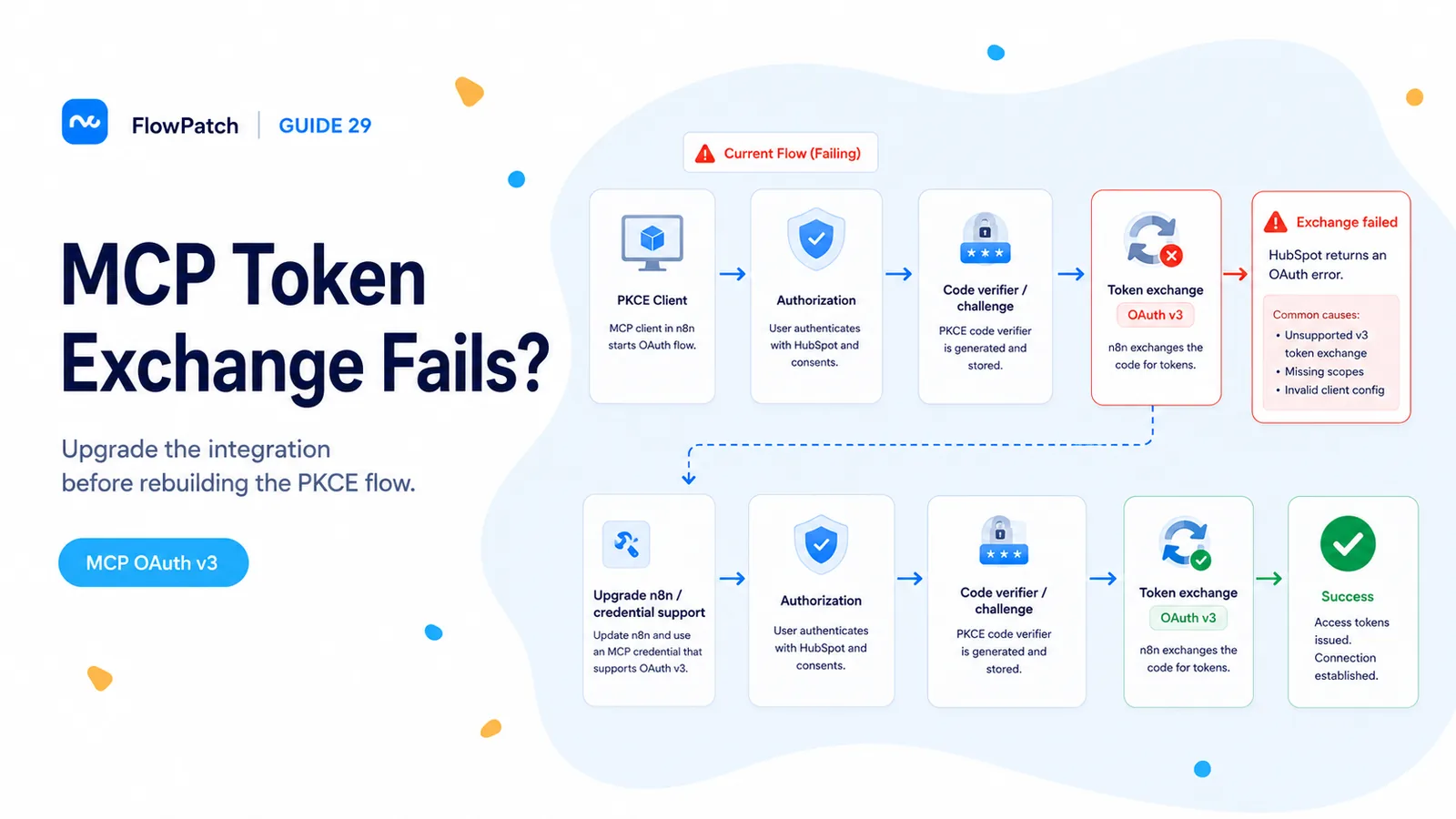
The browser login can succeed while the token exchange still fails
A July 2026 n8n Community report narrowed a HubSpot Remote MCP problem to the token exchange. The browser authenticated with HubSpot and returned to n8n, but the MCP OAuth2 API credential failed when exchanging the authorization code at HubSpot’s MCP OAuth v3 token endpoint.
This is a useful diagnostic boundary. If you see the HubSpot consent screen and the callback reaches n8n, client registration and the first half of the authorization flow are not the same problem as a failed token request. Recreating the HubSpot portal user or adding random CRM scopes may not touch the failing step.
The community thread later reported success after updating to n8n 2.32.5. That makes version verification the cheapest first test before hand-editing OAuth parameters.
When auth returns to n8n and then fails, capture the token-exchange response. Do not treat it as a generic 'bad client ID'.
HubSpot Remote MCP is not the same OAuth flow as the regular CRM API credential
HubSpot’s Remote MCP server is a HubSpot-hosted MCP endpoint at `mcp.hubspot.com`. HubSpot’s 2026 GA announcement says MCP connections require OAuth 2.1 with PKCE. HubSpot also describes single-use refresh-token rotation in its MCP guidance.
That matters because old tutorials often point to the standard HubSpot OAuth token path used by traditional CRM integrations. The MCP connection has its own authorization behavior and should be configured from an MCP Auth App, not from an unrelated private app or a legacy public-app tutorial.
Keep the two systems separate in documentation: a HubSpot Service Key can authenticate ordinary API calls in an HTTP Request node, while Remote MCP is an OAuth-based agent connection with different lifecycle requirements.
Step 1: record the exact n8n version before changing credentials
Open n8n’s About/version screen or check the running container image tag. If you are on a build older than the version that the July reporter used successfully, upgrade in a test environment before rewriting the OAuth flow.
For self-hosted installations, take a database backup and preserve your encryption key before upgrading. Do not jump several major operational changes at once. Upgrade n8n, keep the HubSpot MCP Auth App unchanged, and retest the credential. That isolates software compatibility from app configuration.
If you are already on a newer version and the failure persists, save the full error response from the token exchange. OAuth v3 uses standardized `error` and `error_description` fields, which are far more useful than a generic 'failed to connect' toast.
- Record n8n version.
- Record credential type: MCP OAuth2 API.
- Record authorization URL and token URL.
- Save the callback query and token-exchange error response.
- Change one variable at a time.
Step 2: verify the MCP-specific endpoints and PKCE mode
The community reproduction used `https://mcp.hubspot.com/oauth/authorize` for authorization and `https://mcp.hubspot.com/oauth/v3/token` for token exchange. Use the endpoints specified by HubSpot’s current MCP documentation for your connector; do not substitute `/oauth/v1/token` simply because an older generic HubSpot OAuth example used it.
PKCE must remain enabled. Turning PKCE off can change the error but moves you away from HubSpot’s required security model rather than fixing compatibility.
Likewise, do not paste an ordinary HubSpot app’s client credentials into an MCP flow unless it is actually the MCP Auth App that HubSpot issued for this connector.
Credential type: MCP OAuth2 API
Authorization URL: https://mcp.hubspot.com/oauth/authorize
Token URL:         https://mcp.hubspot.com/oauth/v3/token
Grant / security:  PKCE
Client credentials: from HubSpot MCP Auth App
A connection test is not complete until refresh-token rotation works
HubSpot’s MCP guidance warns that refresh tokens rotate and are single-use. A client that stores the original refresh token and reuses it after a successful refresh can work initially and then fail later.
After connecting, keep the integration alive long enough to observe a refresh cycle or use your client’s diagnostic information to confirm that the new refresh token replaces the old one atomically. If your credential store cannot persist the rotated token, the apparent fix will expire.
Do not log access or refresh tokens while debugging. Capture status codes, response field names, and correlation information, but redact token material.
Reconnect when HubSpot adds permissions or the app status requires reauthorization
HubSpot’s GA announcement notes that existing MCP connections may show `REQUIRES_REAUTHORIZATION` when newly added object capabilities introduce scopes. In that case, disconnect/reconnect or reauthorize so the new permissions are granted.
This is different from a token-exchange bug. A stale grant can connect but lack a newly needed tool or object permission; a token-exchange failure prevents the credential from being established at all.
Check HubSpot Connected Apps/MCP connector status before assuming a scope is missing inside n8n.
When a fallback is appropriate—and when it is not
If your goal is simply to call HubSpot CRM endpoints from n8n, you do not need the Remote MCP server. A Service Key or supported HubSpot credential plus HTTP Request may be simpler and more deterministic.
If your goal is specifically to expose HubSpot as an MCP tool to an AI agent, replacing it with a set of hand-built HTTP calls changes the architecture. That can be a temporary operational fallback, but document that you have removed MCP capabilities rather than 'fixed MCP.'
HubSpot also publishes a local developer MCP server for development work. Do not confuse that developer-oriented server with the hosted Remote MCP server used to access CRM context.
Verification checklist after upgrading
Create a fresh test credential after the upgrade rather than judging only by an old failed credential. Complete authorization, call a harmless read tool such as a user/context lookup, and confirm that the connection remains valid.
Then test one write only in a disposable record if your connector has write permission. Finally, observe a reauthorization or refresh scenario so you know the credential survives beyond the first browser callback.
If the token exchange still fails on a current n8n version, capture a minimal reproduction with the exact n8n version, credential type, HubSpot MCP URLs, and redacted OAuth error response. That is actionable evidence for n8n or HubSpot support.
References used here
The exact token-exchange failure and successful n8n 2.32.5 follow-up come from a July 2026 n8n Community thread. HubSpot’s current MCP documentation and 2026 GA announcement verify OAuth 2.1 with PKCE, MCP Auth Apps, hosted endpoint behavior, and reauthorization expectations.
Frequently asked questions
Should I fall back to HubSpot OAuth v1 when the MCP token exchange fails in n8n?
No. HubSpot Remote MCP requires OAuth 2.1 with PKCE and refresh-token rotation. Downgrading to the legacy v1 endpoint is the wrong direction.
What fixed it for other users?
A July 2026 n8n Community report connected successfully after updating to n8n 2.32.5. Check your n8n version first and use the MCP-specific HubSpot endpoints.
Do I need a custom private-app workaround?
Not before verifying the version and the MCP endpoints. Reauthorize so the grant includes PKCE and refresh rotation, and only consider a fallback if the supported path still fails after the upgrade.