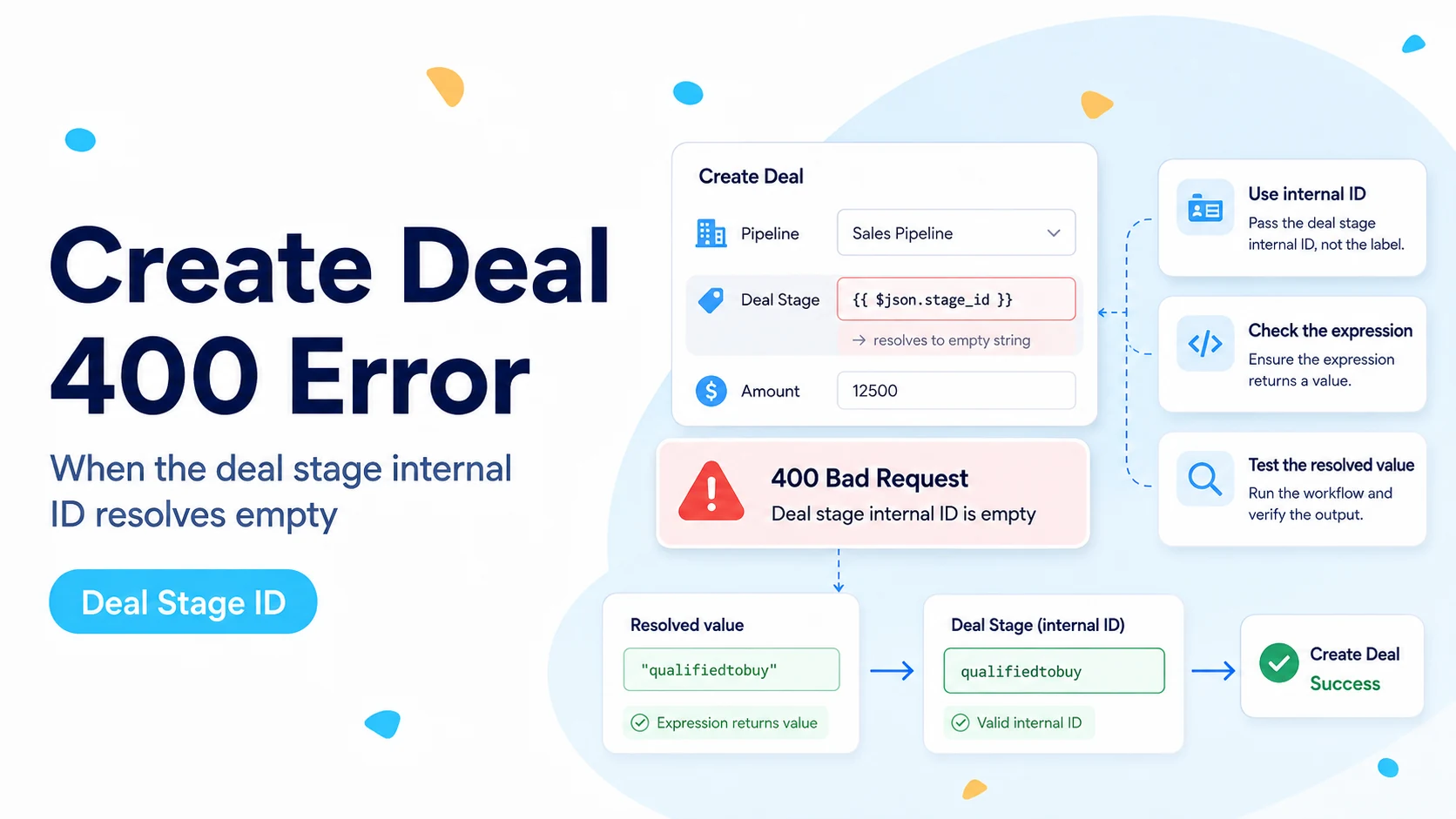
Why a correct HubSpot stage can still produce a 400 in n8n
HubSpot’s current Deals API requires the internal ID of the deal stage and, when you use more than one pipeline, the internal ID of the pipeline. Those IDs are often strings. Examples in HubSpot’s documentation include pipeline set to default and dealstage set to contractsent.
The mistake happens when a user copies an internal stage ID such as qualifiedtobuy into n8n and wraps it in double curly braces. In n8n, {{ ... }} means “evaluate this as an expression.” A bare word inside that expression is treated like a variable reference, not like a literal string. If no variable named qualifiedtobuy exists, the evaluated value can be empty or invalid.
A March 2026 n8n Community case shows this exact failure while creating HubSpot deals. The suggested correction was to type the internal ID directly when it is a fixed value. That aligns with HubSpot’s API requirement: it wants the ID string, not an expression that happens to resemble it.
The HubSpot internal ID can be correct and the request can still be wrong if n8n evaluates the field to an empty string before sending it.
Plain text versus expression: use the mode that matches the data
If every deal created by this node should enter the same stage, keep the field static. Type the stage internal ID as plain text. Do the same for the pipeline internal ID. This is the simplest and most debuggable configuration.
If you need to use expression mode for a fixed literal, return a quoted string. That makes your intent explicit. If the stage is genuinely dynamic, point the expression to a real upstream property such as $json.dealstage and inspect the resolved output in n8n’s expression preview.
Never assume the preview is populated just because the expression is syntactically valid. Run the upstream node with test data first, then confirm the exact string the HubSpot node will receive.
Fixed stage — preferred:
qualifiedtobuy

Fixed stage in Expression mode:
{{ 'qualifiedtobuy' }}

Dynamic stage from previous data:
{{ $json.dealstage }}

Dangerous if no variable exists:
{{ qualifiedtobuy }}
Use HubSpot internal IDs, not the visible stage labels
HubSpot explicitly says deal creation must use the internal ID of the pipeline and stage. A stage label such as Qualified to Buy or Contract Sent is presentation text. The API value can be lowercase, compact, numeric, or otherwise different from what users see in the pipeline board.
You can find the internal IDs in HubSpot pipeline settings or retrieve pipelines through the Pipelines API. This is especially important when you have custom pipelines because the same human concept can exist in more than one pipeline.
Keep the pipeline and stage as a valid pair. A stage belongs to a specific pipeline. Sending the internal ID of a stage from Pipeline B together with the internal ID of Pipeline A is a different error from an empty expression, but it produces the same practical result: the deal cannot be created as requested.
Inspect the evaluated values before the HubSpot node runs
Insert an Edit Fields node immediately before HubSpot and create two temporary debug fields: debug_pipeline and debug_dealstage. Map them from the exact expressions you intend to use. Execute only up to that node and inspect the output.
You want to see concrete strings, not undefined, null, an empty string, or a human label. This tiny step prevents the HubSpot node from hiding an upstream expression problem behind a generic Bad request banner.
If the stage is selected by business logic, also output the reason for the selection. For example, debug_stage_reason = lead_score>=80. That makes it easier to distinguish “the branch chose the wrong stage” from “the correct stage was chosen but the API value was malformed.”
Example debug output before HubSpot:
{
  "debug_pipeline": "default",
  "debug_dealstage": "qualifiedtobuy",
  "debug_stage_reason": "lead_score>=80"
}
When the native Create Deal field list gets in the way
The 2026 community report also notes limitations in how the native HubSpot Create Deal node presents pipelines, stages, and some custom properties. If the dropdown does not expose the value you need, do not force a wrong selection just to make the UI look complete.
Use an HTTP Request node with the HubSpot credential and call the Deals API directly. HubSpot’s current date-based endpoint accepts a properties object with dealname, pipeline, dealstage, and any other writable deal properties. This removes the connector dropdown from the equation and lets you see the exact JSON sent.
Keep the HTTP fallback narrow. You do not need to replace the whole HubSpot integration—only the operation the native node cannot express cleanly.
POST https://api.hubapi.com/crm/objects/2026-03/deals

{
  "properties": {
    "dealname": "Website lead - Acme",
    "pipeline": "default",
    "dealstage": "qualifiedtobuy"
  }
}
Custom deal properties can fail for the same expression reason
The same plain-text-versus-expression rule applies to custom deal properties. If a select option’s internal value is premium and you enter {{ premium }} without a variable named premium, n8n can send an empty value. Fixing dealstage while leaving the same mistake in a custom field can make the next run fail again.
Retrieve the deal property definition from HubSpot’s Properties API when you are unsure of the internal property name or option values. For multi-select checkbox fields, HubSpot documents semicolon-delimited values. For numbers, send numeric content that matches the property contract rather than a formatted currency label.
Debug one rejected property at a time. Remove optional custom fields temporarily, prove the minimum deal can be created, then add fields back in small groups. That turns a generic 400 into a short search.
Prove the minimum deal payload first
Start with dealname, pipeline, and dealstage. If that succeeds through the HTTP Request node, your authentication and stage IDs are valid. Add owner, amount, close date, and custom properties only after the minimum payload works.
This approach is more informative than editing five fields after every failure. A successful minimum request establishes a known-good baseline. The first additional property that reintroduces the 400 is now your actual debugging target.
For a dynamic pipeline workflow, run one test case per route. A stage value can be valid for one branch and invalid for another if the pipeline changes without the stage mapping changing with it.
Verification checklist for a corrected Create Deal mapping
Create a disposable deal and confirm it lands in the intended pipeline and stage, not merely that the API returns 201. Open the deal in HubSpot and inspect the stage. Then inspect the n8n execution output and preserve the created deal ID.
Run a second test where the upstream stage expression intentionally resolves to a different valid stage. That proves the workflow is truly dynamic rather than accidentally hard-coded. Finally, run a case with a missing stage input and make the workflow fail before it reaches HubSpot with a clear validation message.
Failing early is important. A Code or IF node that stops on an empty dealstage gives you a precise workflow error instead of spending an API request on a predictable 400.
- Static internal ID is plain text or an explicitly quoted literal.
- Dynamic expression preview shows a real stage ID.
- Pipeline and stage belong together.
- Minimum deal payload succeeds.
- Missing dynamic stage is rejected before the HubSpot call.
Primary sources and reports
The internal-ID requirement comes from HubSpot’s current Deals API documentation. The n8n expression-specific failure pattern comes from a March 2026 n8n Community case. The HTTP fallback uses HubSpot’s current date-based CRM object endpoint.
Frequently asked questions
Why does a correct HubSpot stage ID still cause a 400 in n8n?
A fixed internal ID such as qualifiedtobuy is data, not an n8n variable. Wrapping a bare word in {{ }} tells n8n to evaluate it as an expression, and with no matching variable it resolves to an empty or invalid value before the request is sent.
How should I enter a fixed deal stage in the HubSpot node?
Type the stage internal ID and the pipeline internal ID as plain text. If you must stay in expression mode for a fixed value, return a quoted literal such as {{ 'qualifiedtobuy' }}. Use a real expression only when the stage comes from upstream JSON.
How do I confirm the value before HubSpot rejects it?
Add an Edit Fields node before HubSpot with debug_pipeline and debug_dealstage mapped from your intended expressions, run only to that node, and confirm you see concrete strings, not undefined, null, an empty string, or a human label.